

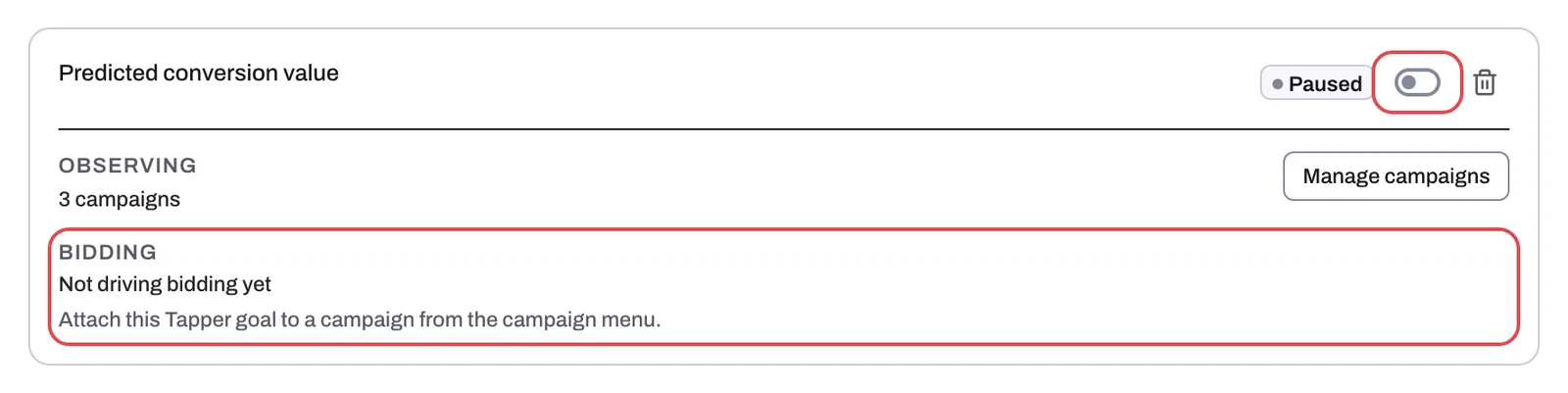
A Tapper goal says Not driving bidding yet
Each card in the Tapper goals section of the Google protection tab has a Bidding row. It reads Not driving bidding yet until the goal is attached to at least one campaign, and Driving with a number of campaigns once it is, for example "Driving 2 campaigns". The campaigns counted under Observing feed the goal, but they do not count as bidding on it.
Why it happens
- No campaign is attached. A campaign bids on a Tapper goal only after you attach the goal from that campaign's menu. The card says so: "Attach this Tapper goal to a campaign from the campaign menu."
- The goal is paused. The card's status reads Paused instead of Active, and you attach a goal once it is Active. Every new goal starts paused until Tapper's short setup review. A goal you paused yourself can be switched back on with the switch beside Paused.
The bid strategy does not change this row. A campaign attached while it bids on a strategy other than Maximize Conversion Value still counts under Bidding, but the warning shown when you attach it applies: "The goal still attaches, but bidding won't use Tapper's values until the campaign switches to value-based bidding."
Fix it
- Open Protected Entities, open the entity, and click Google protection under Ad platforms in the left rail.
- Find the goal's card in the Tapper goals section. If its status reads Paused and the goal is new, write to support@tapper.ai so Tapper can switch it on. If you paused it yourself, turn on the switch beside Paused (its tooltip reads Activate).
- Once the goal is Active, open the Manage campaigns sub-tab, find the campaign, open the ⋮ menu on its row and click Attach Tapper goal. If the item is grayed out, hover over it: the tooltip says why, for example "No active Tapper goals on this account yet. Create one first."
- Pick the goal if the account has more than one and, under Other conversion goals, choose Only this goal (recommended) or Alongside account-default goals (the default). Click Attach.
- If a warning about Maximize Conversion Value appears, change the campaign's bid strategy to Maximize Conversion Value in Google Ads so bidding uses the goal.
- Go back to the goal's card. The Bidding row now reads Driving with the number of campaigns. On a Block + Lift workspace the campaign's row also shows the Tapper goal chip in its Protection column; when the account has more than one Tapper goal, the chip names the goal, for example "Tapper goal: Predicted conversion value".
If it still happens
- Check the Google Ads account's card on the Overview sub-tab of the Google protection tab. If it reads Needs reconnect, reconnect the account first. Until you do, Attach Tapper goal stays grayed out and its tooltip reads "Reconnect this Google Ads account to set conversion goals." See Reconnect an ad account that stopped working.
- Write to support@tapper.ai with your workspace name, the entity name, the Account ID from the account card and the goal's name as it appears on its card.
Related
Was this helpful?
Related articles
Still need help?
Chat with our team and mention this article.