

Check that the website tag is working on your site
Load a landing page with your browser's developer tools open, then look for the signs in Tapper.
Before you start
- Install the script right after the opening
<body>tag or through Google Tag Manager. See The website tag: what it does and where to find it. - Have a landing page address your ads use.
- Use a window without ad blockers or privacy extensions, which can block Tapper's script. A private window with extensions off works.
Check in your browser
Open the developer tools
- Chrome: right-click the page and choose Inspect, or press F12 (Windows) or Command + Option + I (Mac). Or use the three dots at the top right, then More tools, then Developer tools.
- Safari: choose Develop, then Show Web Inspector. No Develop menu? Turn it on in Safari's settings under Advanced.
Load a landing page as an ad visitor
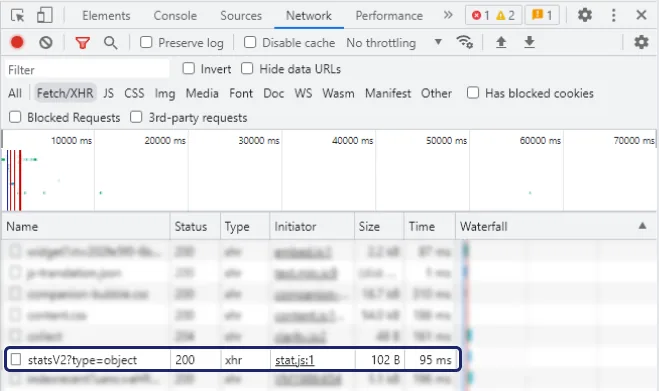
- Open the Network tab.
- Open your landing page with a click ID added, for example
https://yourdomain.com/?gclid=test. Usegclidfor Google Ads,fbclidfor Meta,ttclidfor TikTok andmsclkidfor Microsoft Ads. If the address already has a?, add&gclid=testinstead. - Type
tapperin the filter box. - Look for
bundle.jsfrommonitor.tapper.aiwith status 200, then requests toprotect.tapper.ai. You may also seefingerprint.tapper.ai.
If both appear, the script works on that page. Repeat for each kind of landing page.
Shopify stores
Check connection on the store's Shopify row in Setup > Data sources checks the order connection, not the storefront script, so run the browser check too. See Install Tapper on a Shopify store.
Check in Tapper
- Clicks. Where your workspace has Block, open Traffic under Block and, on the Clicks tab, choose Google Ads, Meta Ads, TikTok Ads or Microsoft Ads. Ad clicks appear once visitors land on pages that run the script. With more than one entity, pick the entity in the switcher at the top of the sidebar.
- Tag status. At the top of Setup > Website > Monitoring, the Tag status card reads Receiving events once visits arrive. When most visitors from your ads never load the script, it warns "The script failed to load for most visitors from your ads."
- Script initialization time (daily). On the Geography tab, under Engagement. Values for recent days mean the script is running.
Dashboard cards fill in on their own schedule, so a new install takes a while to show.
If nothing shows up
- No
bundle.jsrequest. The script is not on this page. Paste it right after the opening<body>tag, or check that your Google Tag Manager tag fires on All Pages and the container is published. bundle.jsis blocked, often with a Console message about Content Security Policy. See Allow Tapper in your Content Security Policy.- Your cookie policy is Consent first. Tapper stores no cookie or identifier on a visitor's device until your site calls
window.tapper.consent("GRANTED");. Make sure your banner passes each visitor's answer withwindow.tapper.consent("GRANTED");orwindow.tapper.consent("DENIED");, then accept your own banner, reload and check again. See Cookie policy, consent snippets and recognizing visitors without cookies. - The domain is not listed. Once your list has a domain, Tapper keeps visits only from the domains under Protected domains, in Setup > Website > Domains. Check the spelling and add every domain your ads land on.
Still nothing? Write to support@tapper.ai with the landing page address and a screenshot of the Network tab.