

Blocking-lift experiments: measure what blocking saves
A blocking-lift experiment measures what Tapper's blocking is worth on one Google Ads campaign. Tapper sets up a Google Ads campaign experiment that splits the campaign in two: your live campaign stays protected, and Google's copy of it runs with Tapper's exclusions removed. You then compare the cost per acquisition (CPA) of the two halves. Experiments are part of Tapper Block.
How it works
- The control is protected. The control (Tapper calls it the base) is your real campaign, with Tapper's exclusions in place throughout.
- The treatment is not. The treatment (the trial) is Google's copy of the campaign with Tapper's exclusions removed. It gets the share of traffic you choose, is exposed to invalid traffic and spends real budget for as long as the experiment runs.
- Audience and IP exclusions are what is measured. Placement exclusions apply to the whole Google Ads account, so they affect both halves the same way and are not part of the comparison. Video and Hotel campaigns get no IP exclusions, so on those the test measures audience exclusions only.
- Blocking has to be on. If the account is in monitoring-only mode, the protected campaign is not blocking anything, and the test cannot show a difference. See Switch blocking on or off.
Before you start
- You are an Owner or Admin of the workspace.
- The entity has a connected Google Ads account. Without one, the tab reads Connect Google Ads to start protection.
- The account has a Search, Display, Video or Hotel campaign. Other campaign types, Performance Max included, cannot be split.
- Your workspace includes Block. Lift only workspaces do not have the Experiments page.
Create an experiment
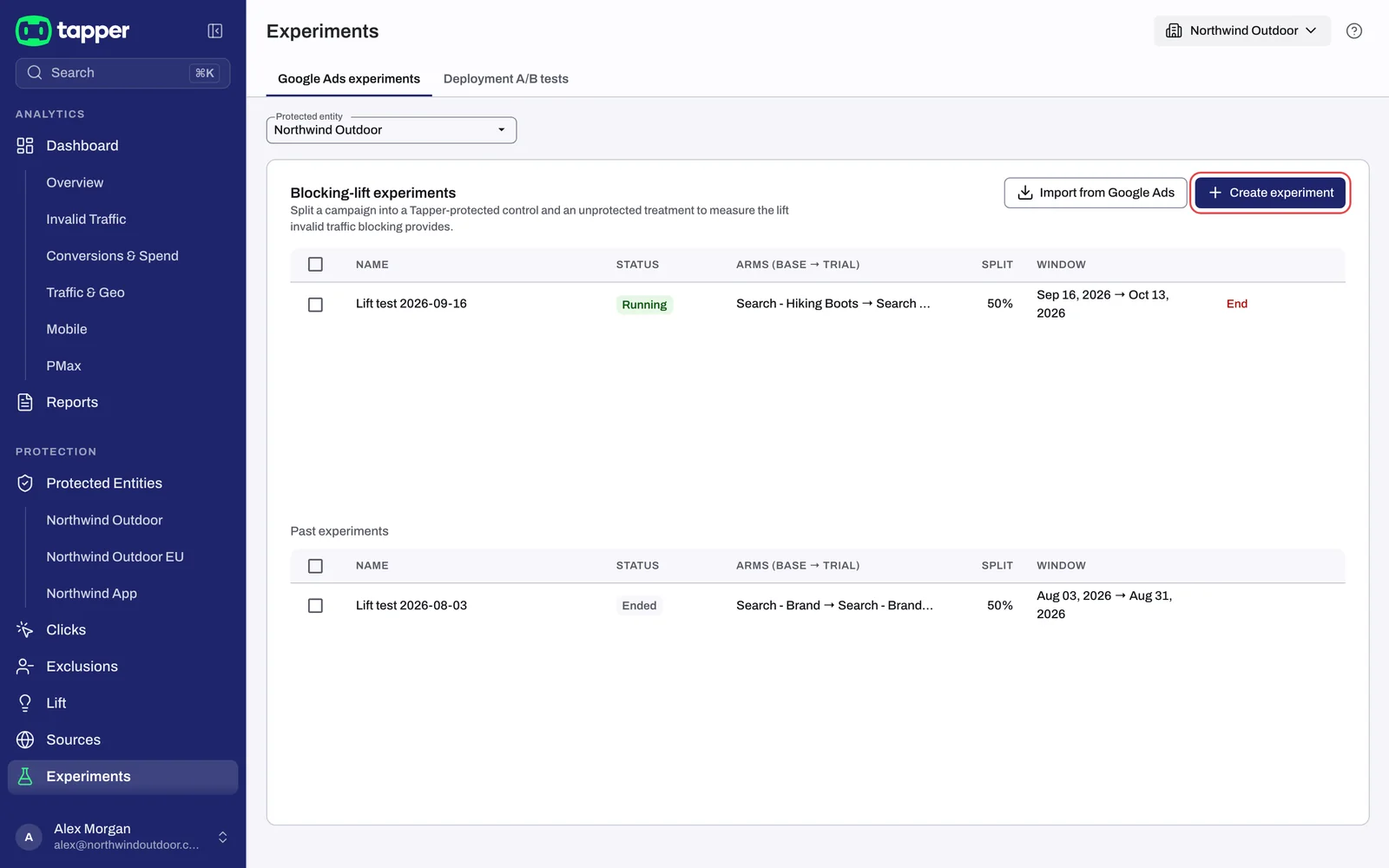
- In the sidebar, under Protection, click Experiments. The page opens on the Google Ads experiments tab.
- If your workspace has two or more protected entities, choose one in the Protected entity dropdown.
- Under Blocking-lift experiments, click Create experiment. The Create blocking-lift experiment dialog opens.
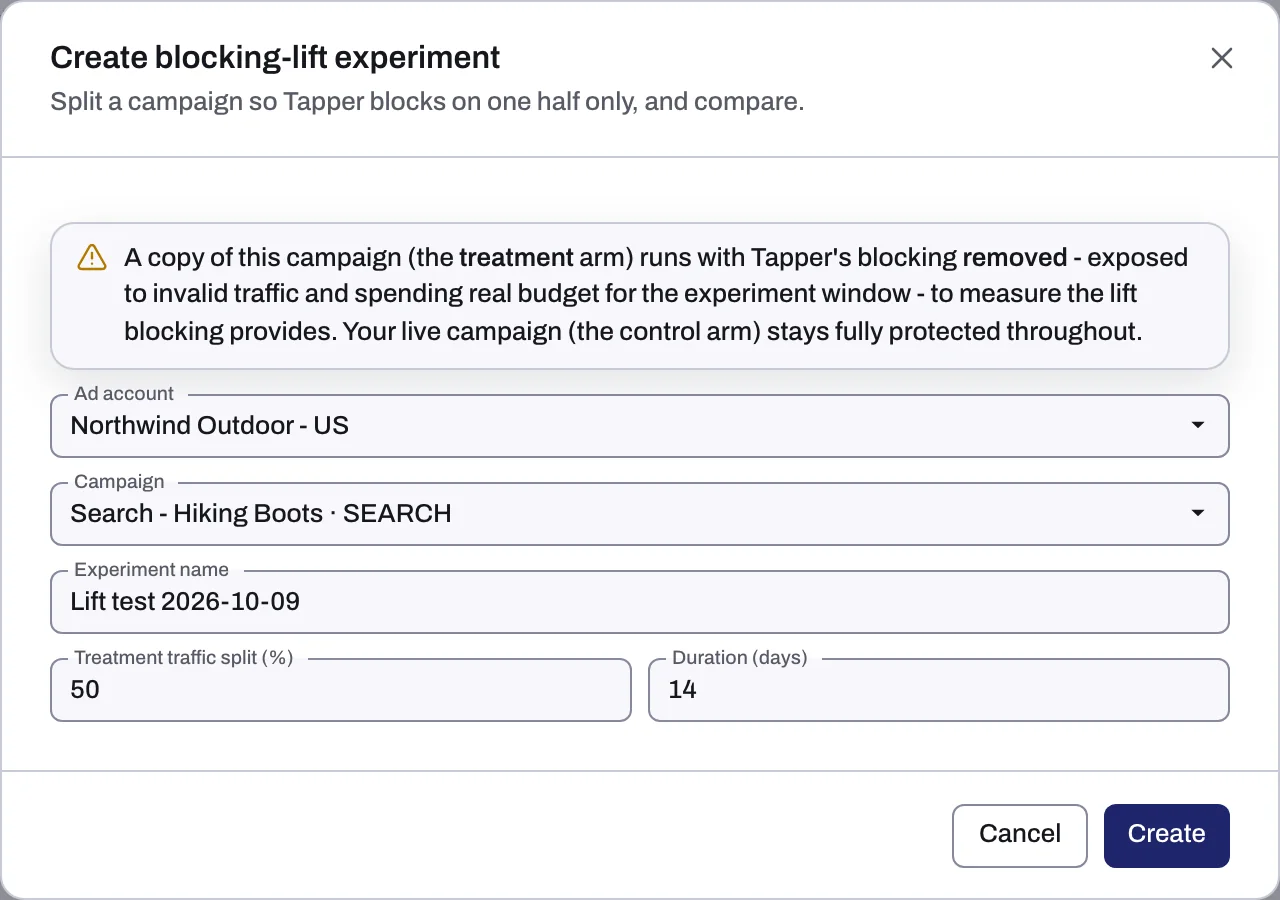
- Read the warning at the top of the dialog: the treatment copy runs with Tapper's blocking removed, so it is exposed to invalid traffic and spends real budget for the experiment window. Your live campaign stays fully protected.
- Fill in the fields:
| Field | Default | What to know |
|---|---|---|
| Ad account | The connected Google Ads account that runs the campaign | |
| Campaign | Only Search, Display, Video and Hotel campaigns are listed | |
| Experiment name | "Lift test" followed by the date | Any name you will recognize in the list |
| Treatment traffic split (%) | 50 | 1 to 99: the share of the campaign's traffic that goes to the unprotected copy |
| Duration (days) | 14 | At least 1 day; the field suggests up to 90 |
- Click Create.
Follow your experiments
The list has the columns Name, Status, Arms (base → trial), Split and Window. An experiment's status is one of Draft, Scheduled, Starting, Running, Ended, Graduated, Cancelled or Failed. Experiments that are Ended, Graduated or Cancelled move down to Past experiments.
- End appears on experiments that are Draft, Scheduled, Starting or Running. The confirmation End experiment? explains that ending clears the control and treatment tags from the campaigns and that the treatment campaign stops serving. Click End experiment to confirm.
- Remove appears on a failed experiment and removes it from the list.
Read the results
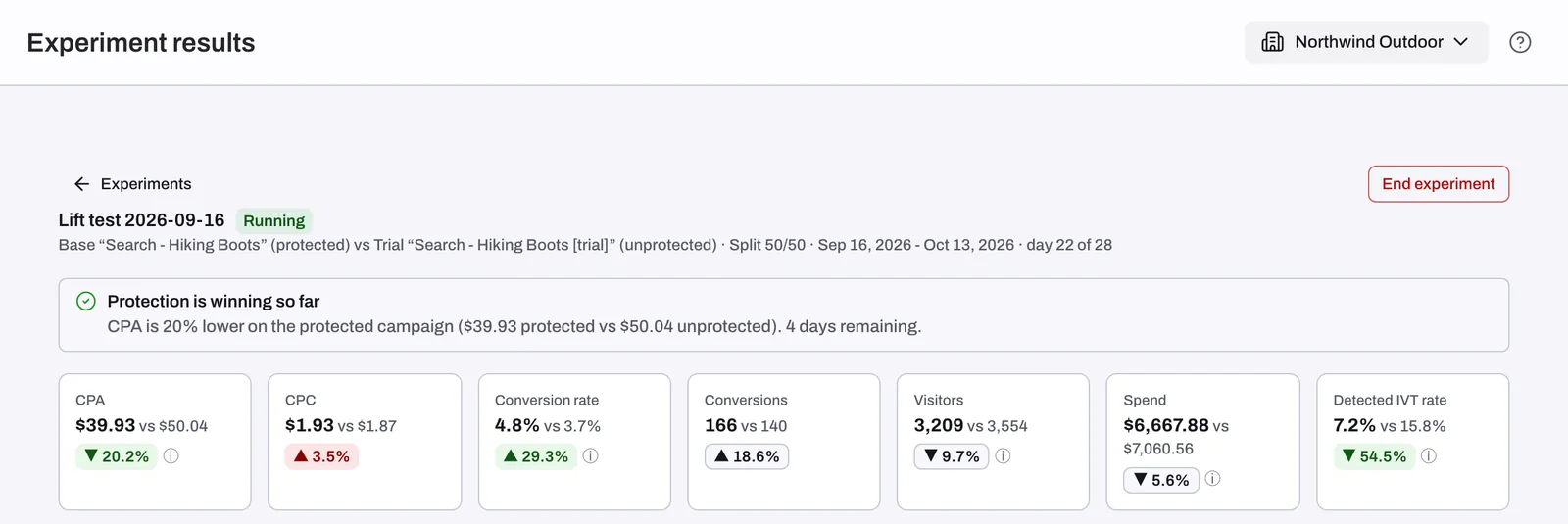
Click an experiment to open Experiment results. The header shows the base campaign (protected) against the trial campaign (unprotected), the split, the dates and how far the experiment has run (day N of M). Only days on which both campaigns ran are compared.
Until there is something to compare, the page shows No results yet: first results are expected within 24 hours of the experiment starting. After that, a verdict sits at the top:
| Verdict | When it shows |
|---|---|
| Protection is winning so far | The protected campaign's CPA is at or below 90% of the unprotected campaign's CPA |
| The unprotected campaign is ahead so far | The protected campaign's CPA is at or above 110% of the unprotected campaign's CPA |
| No clear CPA difference yet | The protected campaign's CPA is between 90% and 110% of the unprotected campaign's CPA |
| Too early to call | Either half has fewer than 100 clicks or fewer than 10 conversions |
The verdict leaves out the last 3 days. Below it, tiles compare CPA, CPC, Conversion rate, Conversions, Visitors, Spend and Detected IVT rate for both halves, followed by charts such as Performance over time, Google invalid click rate - both arms and Invalid traffic by reason - Base (enforced). Data refreshes every hour.
Compare several experiments
Tick the box next to running, ended or graduated experiments, then:
- View summary (N) opens Experiments summary: the protected base arms against the unprotected treatment arms, summed across the experiments you ticked, with a Per-experiment breakdown. It needs at least 2 experiments, all in the same currency.
- Native A/B (N) opens Native A/B analysis, which works with a single experiment too. It is "Built from Tapper's own data (conversions matched to the ad click, and block decisions), separate from the Google-reported summary." The analysis takes a few minutes and the page updates on its own. It leaves out campaigns with fewer than 20 converting clicks in either group, an uneven split or no blocks, and a finished analysis is kept for 6 hours.
You can tick up to 50 experiments. Once 50 are ticked, the boxes of the other experiments are disabled and a note under the list reads "Up to 50 experiments can be compared at once." Untick one to pick another.
If something goes wrong
- "This account has no Search, Display, Video or Hotel campaigns. Experiments are only supported for those campaign types." Pick another ad account, or create a campaign of one of those types first.
- "This test cannot show Tapper's effect yet": Tapper is in monitoring-only mode on this account, so the protected campaign is not blocking anything. Until you turn blocking on for this account, the test cannot show Tapper's effect.
- "This experiment failed during setup": remove it with Remove and create it again.
- "These experiments use different currencies": the summary only adds up experiments in the same currency. Tick experiments from accounts that share a currency.
Related
Was this helpful?
Related articles
Still need help?
Chat with our team and mention this article.