

The Invalid Traffic Audience and its retention window
Besides excluding IP addresses, Tapper Block keeps the visitors it flags in lists inside your Google Ads account and excludes those lists from your protected campaigns. Google then stops showing your ads to those visitors, and the exclusion does not depend on their IP address.
How it works
When you connect a Google Ads account to a Block + Lift workspace, Tapper creates two user lists and two audiences in it:
| In Google Ads | What it holds |
|---|---|
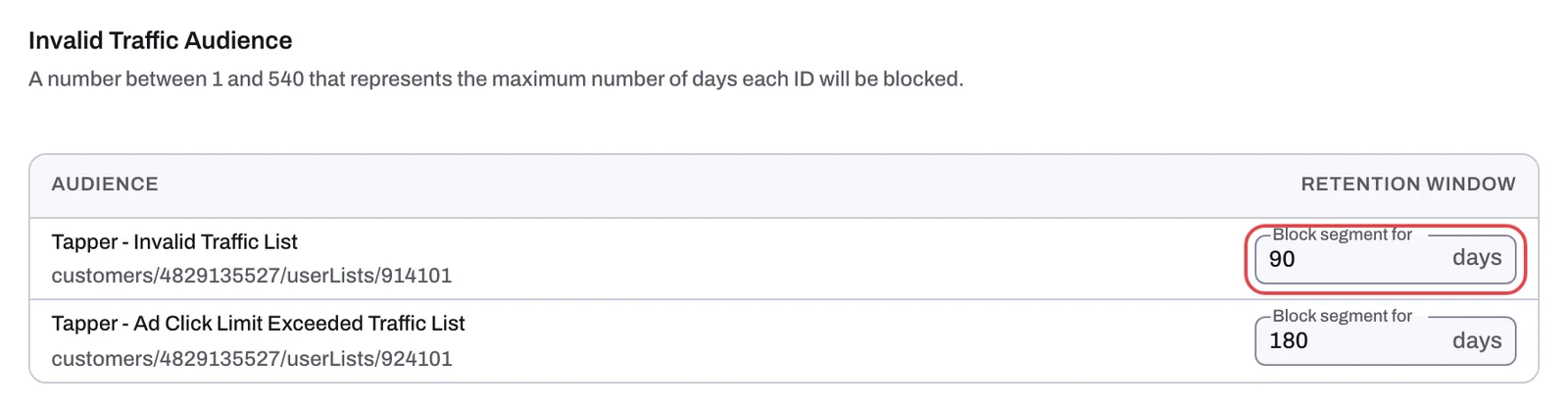
| "Tapper - Invalid Traffic List" | Visitors Tapper flagged as invalid. Created with a 90-day membership. |
| "Tapper - Ad Click Limit Exceeded Traffic List" | Visitors who went over the ad click limit. Created with a 180-day membership. |
| "Tapper - Invalid Traffic Audience" and "Tapper - Invalid and Ad Click Limit Exceeded Traffic Audience" | Audiences built on those lists. |
Each flagged visitor is added to a list and stays there for the list's retention window. Tapper excludes both lists from every protected campaign of a type it covers, so a flagged visitor stops seeing those ads for as long as they are in a list.
In monitoring-only mode, which every new rule set starts in and which stays on during the free trial, Tapper applies no audience exclusions. Switching an entity to monitoring-only also removes the ones it applied. Lift only workspaces have no lists at all.
The Invalid Traffic Audience card
Open Protected Entities, open the entity, choose Google protection and scroll down the Overview sub-tab to Invalid Traffic Audience.
- The Audience column shows each list by name, with its Google Ads resource name under it: one row per list, so two rows per connected account.
- The Retention window column holds the Block segment for field, in days.
- Create audience appears only on a row whose list shows no Google Ads resource name. Click it to create the audience.
Change the retention window
You need the Owner or Admin role.
- In the row you want to change, type a number of days from 1 to 540 in Block segment for.
- Press Enter, or click outside the field.
Tapper changes the list's membership duration in Google Ads. A number outside 1 to 540 is refused. A longer window keeps flagged visitors out for longer; a shorter one lets a visitor who has stopped behaving badly see your ads again sooner. The window applies to the list as a whole, so it also changes how long any value rule or exclusion that uses the list keeps a visitor.
Campaigns that get the exclusion automatically
For every campaign whose Protection switch is on, Tapper applies the exclusion itself:
| Campaign type | Where the exclusion goes | Chip on Manage campaigns |
|---|---|---|
| Search, Display, Shopping, Performance Max | On the campaign | Audience Exclusion |
| Demand Gen | On the campaign's ad groups | Audience Segment Exclusion, in the Ad groups view |
| Video, Hotel and other types | Nothing automatic | No switch |
New campaigns pick up the exclusion after the next campaign sync, which runs every 6 hours, or when you click Refresh campaigns. See Which exclusions Tapper applies to each Google Ads campaign type and Choose which campaigns Tapper protects.
Exclude the list by hand on a Video campaign
Tapper writes nothing to Video campaigns, so if you want flagged visitors kept away from one, add the exclusion yourself in Google Ads. The same steps work for any campaign where you manage audiences yourself.
- In Google Ads, open the campaign and go to its Audiences page.
- In the Exclusions section, click Add exclusions and choose the whole campaign or one ad group.
- Search for "Tapper - Invalid Traffic List", select it and click Save.
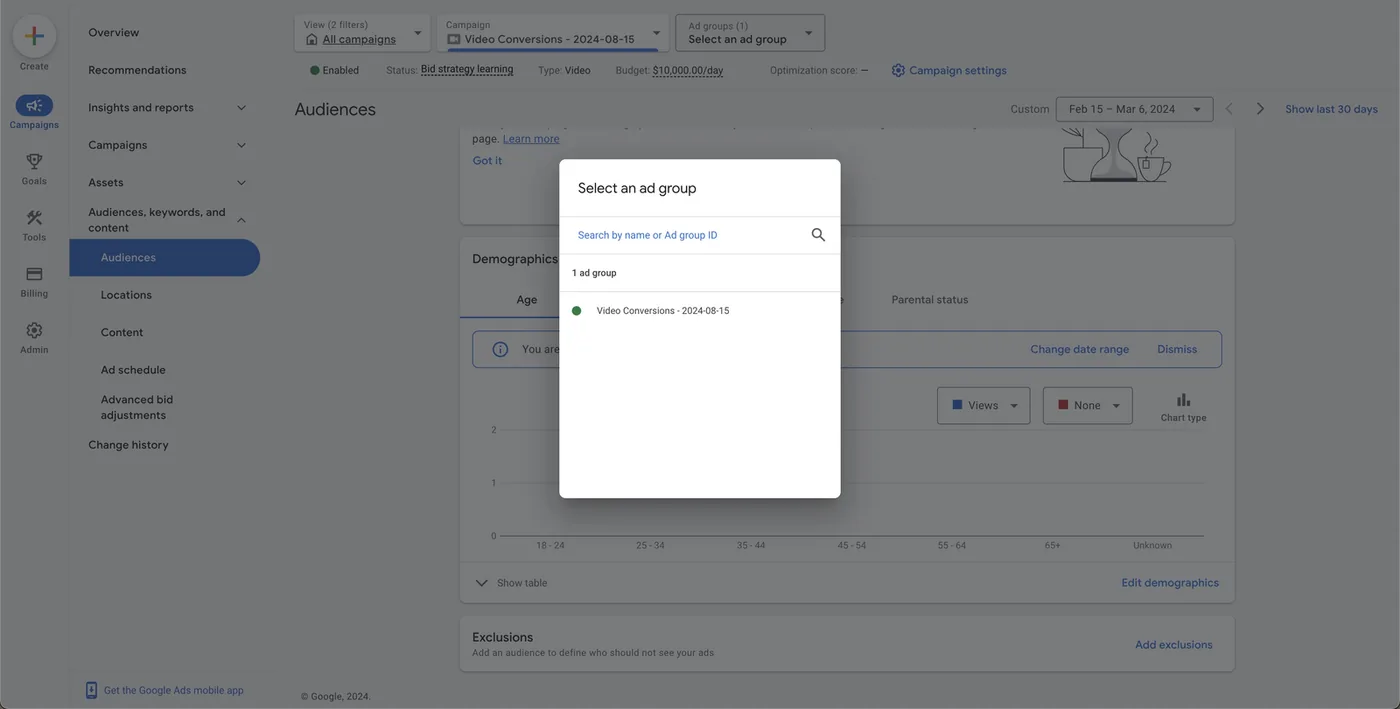
If the ad group already has an audience attached, you can instead edit that audience, add "Tapper - Invalid Traffic List" under its exclusions and save.
If the list does not appear in Google Ads
Check its membership status in Google Ads under Tools > Shared library > Audience manager > Your data segments: it must be Open. Tapper creates the list open and reopens it if Google refuses to use it while closed, so this is rarely the cause. If your account's conversion tracking is managed by another Google Ads account, Tapper creates the lists in that account and their names end with " - " and your ad account's ID.
Meta and TikTok
Meta and TikTok have no IP exclusions, so the audience is their main protection. Tapper excludes a 90-day custom audience of flagged visitors from each ad set or ad group whose Protection switch is on. The Meta protection tab has an audience card like Google's. See How Block protects Meta ads and How Block protects TikTok ads.
Related
Was this helpful?
Related articles
Still need help?
Chat with our team and mention this article.