

The Vantage Results page, section by section
On this page
Vantage > Results shows one store or Salesforce org at a time, for the date range you pick.
Headline
The top card is where a test's result appears: extra net revenue against your current setup for a store, extra qualified leads at the same spend for Salesforce. Before your first test is read, it says "Your first Vantage test measures it."
Vantage status
One sentence on where your pilot is, the Pilot stages (Data gathering, Models deployed, A/B test, Read, Live) and Days since data connected.
Your data, for a store
| Tile | What it means |
|---|---|
| Orders received | Paid Shopify orders in the range. Test orders are left out. |
| Net order value | Order totals minus refunds and VAT. |
| Refund rate | Refunded value as a share of order value. |
| Median order | Half of orders are worth more, half less. |
| Orders from a Google ad click | Found through the Tapper visitor ID or the click ID in the landing page, counted once. |
| Orders tied to a Meta click | Orders with a Facebook or Instagram click ID, organic posts included. |
| Orders with a customer ID | Orders that carry Shopify's customer ID. |
| Orders linked to a visit | Orders matched to a Tapper visitor ID. |
| Customers linked to an ad click | The ceiling on what can reach Google: values are sent only for customers linked to an ad click. |
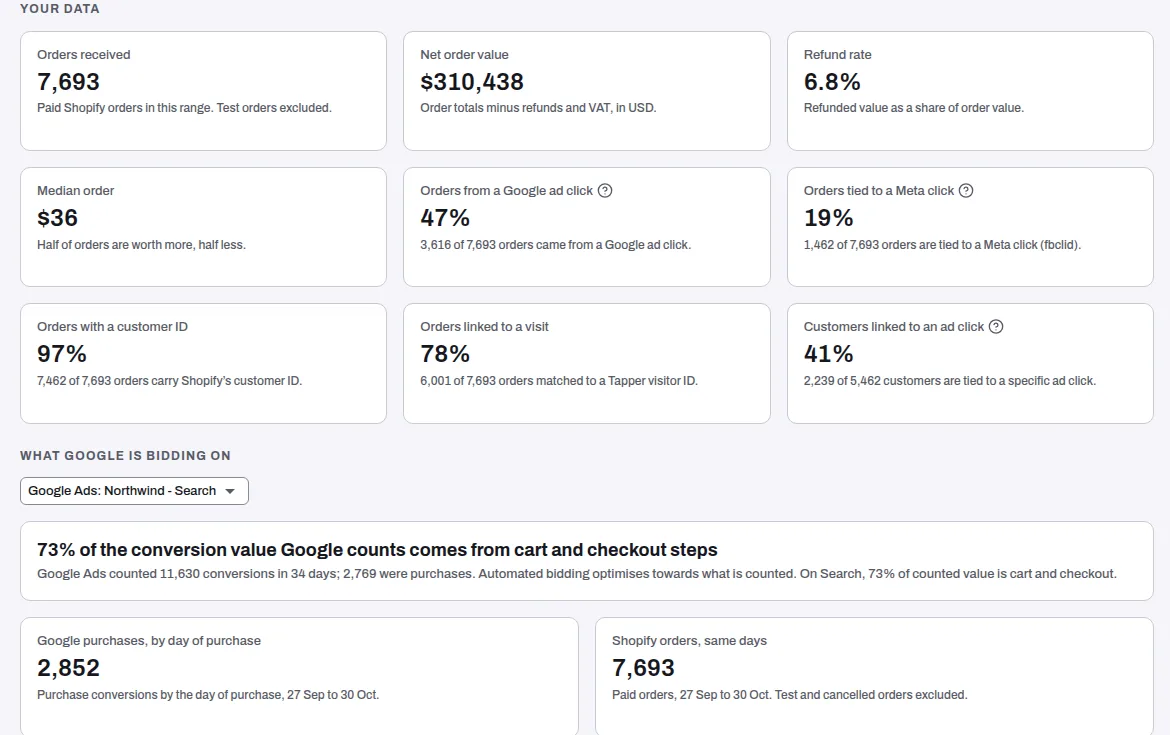
Below the tiles, What Google is bidding on shows, per Google Ads account, the conversions Google counts and their share of value, purchases by campaign, and Google's purchases next to your Shopify orders. Connections lists Shopify, Google Ads, Meta and Mailchimp.
Data checks run daily: orders every day, customer ID on orders, at least 15 Google purchases a month, two or more distinct order values, customers linked to an ad click, and 30 and 60 days of history. Each is Blocking, Warning or Note. Every Blocking check must pass before models deploy and the A/B test starts.
Your data, for Salesforce
Salesforce sync, Leads read, Opportunities read, Median days to qualified (from a lead's creation to its first qualified stage) and Match rate (outcomes matched to an ad click). The Stages table shows how each stage is marked, its outcomes, how many matched and the median days from lead.
Customer value, for a store
Value by first-order campaign: new customers by the campaign behind their first order, with First order value, Value since first order and Predicted 90-day value, averaged per customer. A window still open shows the date it fills.
Value added
Fills in after your pilot read: what the test measured, and how your results move once Vantage is live.
Related
Was this helpful?
Related articles
Still need help?
Chat with our team and mention this article.