

Dashboard numbers differ from Google Ads
Your dashboard shows one click count, Google Ads shows another, and the daily lines do not sit on the same days. In most cases nothing is broken: Tapper and Google Ads count different things, cut the day at different hours and refresh on different clocks.
Why it happens
Total Clicks counts what Tapper saw, not what Google counted
The Total Clicks tile on the Overview tab is labeled "Tapper-tracked clicks": the clicks Tapper's own tracking recorded, through the tracking template Tapper sets on Google Ads and through the monitoring script on your pages for Meta and TikTok. Google Ads counts the clicks it recorded on its side. The two are measured differently, and Tapper's figure is usually the lower one. For Google Ads, the Clicks & Failed Script Load % card under Script load shows a related figure, the share of Google Ads clicks on which the monitoring script did not load: "Failed load rate {x}% of Google Ads clicks".
Spend and conversion tiles work the other way. Avg CPC reads "Spend / {N} ad clicks" (or "Spend / ad-platform clicks") and Conversions reads "Ad-platform reported": both come straight from the ad platform, so they are the figures meant to match the Google Ads UI. On the Overview tab, Conversions by Country is the exception: it says "Tracked by Tapper", so it counts Tapper's conversion events, not Google's. The device and OS conversion charts on Conversions & Spend work the same way.
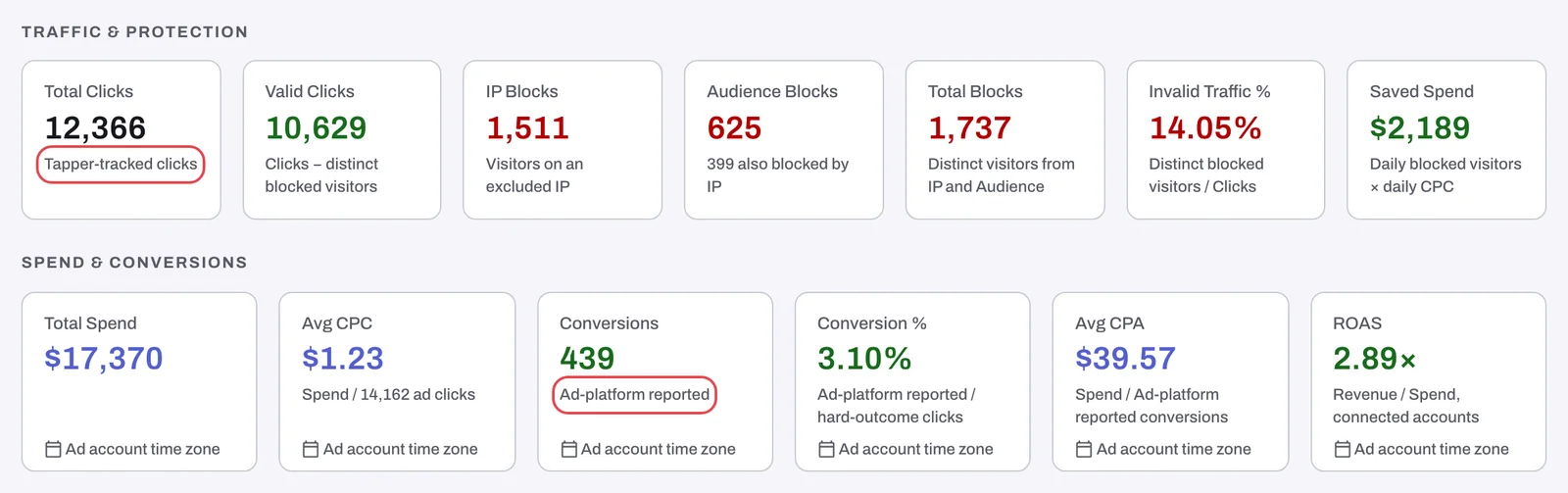
Daily platform charts keep the ad account's day
Dates on the dashboard follow your workspace time zone, except on daily charts built from your ad platform's own daily figures: those stay in the ad account's time zone, because that is the only way they can agree with the platform. Those cards carry an Ad account time zone chip. If the two zones differ, the same click or conversion can fall on one day in Tapper and the next day in Google Ads. See Workspace time zone: which day your numbers count in.
Some cards ignore the date filter
A few cards use a rolling window instead of the dates you picked and say so in their caption: Keyword-level Invalid Traffic on the Invalid Traffic tab ("Rolling window · ignores the date filter"), Traveling Users on Traffic & Geo ("Seen in 2+ countries · rolling window, not the date filter") and Placement Exclusions ("Date filter not applied"). A card that cannot apply one of your filters says "{Filter} filter not applied" or "partially applied".
The data is a few hours behind
The data behind the dashboard updates every 4 hours, so the latest hours can still be missing in Tapper while Google Ads already shows them. Microsoft Ads needs about 3 hours before an hour's figures are final.
Clicks Tapper never saw
Tapper sets the tracking template at account level when you connect Google Ads. If a campaign, ad group or ad sets its own template, it overrides Tapper's and those clicks never reach Tapper. The dashboard warns with the banner Some ads skip Tapper's tracking.
Fix it
- Read Total Clicks as the clicks that reached your site, and compare Total Spend, Avg CPC and Conversions with Google Ads.
- Set the same date range in both tools and, on charts with the Ad account time zone chip, read the dates in the ad account's zone. See Dashboard filters, date ranges and time zone.
- Skip cards whose caption says rolling window or "filter not applied".
- Wait 4 hours after the period ends before you compare, and about 3 hours for a Microsoft Ads hour.
- If the Some ads skip Tapper's tracking banner is showing, click Fix tracking, then Fix all in the Fix ad-level tracking dialog. Details in Fix campaigns, ad groups or ads that override Tapper's tracking.
If it still happens
If Total Clicks stays far below the platform's clicks with no override banner, the monitoring script may not run on every landing page (this matters most for Meta and TikTok, whose clicks Tapper records only when the script loads): see Check that the monitoring script is working on your site. If a platform shows nothing at all while Google Ads shows traffic, start with No clicks on the dashboard: what to check. For what every tile measures, see How the dashboard metrics are calculated.
Was this helpful?
Related articles
Still need help?
Chat with our team and mention this article.