

Reading the Invalid traffic tab: reasons, click frequencies and IP types
On this page
The Invalid traffic tab shows what Tapper blocked, why, how often blocked visitors clicked, and where their exclusions landed. Open Dashboard in the sidebar's Analytics section, then the Invalid traffic tab.
The tiles
Total Blocked ("Blocked visitors, counted once a day"), IP-Blocked Visitors, Audience Blocks and Invalid Traffic % match the Overview tiles of the same name; see How the dashboard metrics are calculated. Below them, Clicks & invalid traffic % in the Overview section charts clicks and the invalid rate over your dates.
Block reasons
- Block reason trend shows which reasons Tapper blocked visitors for, over time.
- Blocked traffic by block reason lists each Reason with its count in the Block reasons column.
Both count one row per visitor per reason per day, so a visitor caught on several days or by several rules counts each time, and the cards add up to more than Total Blocked. See Block reasons explained: what each label means.
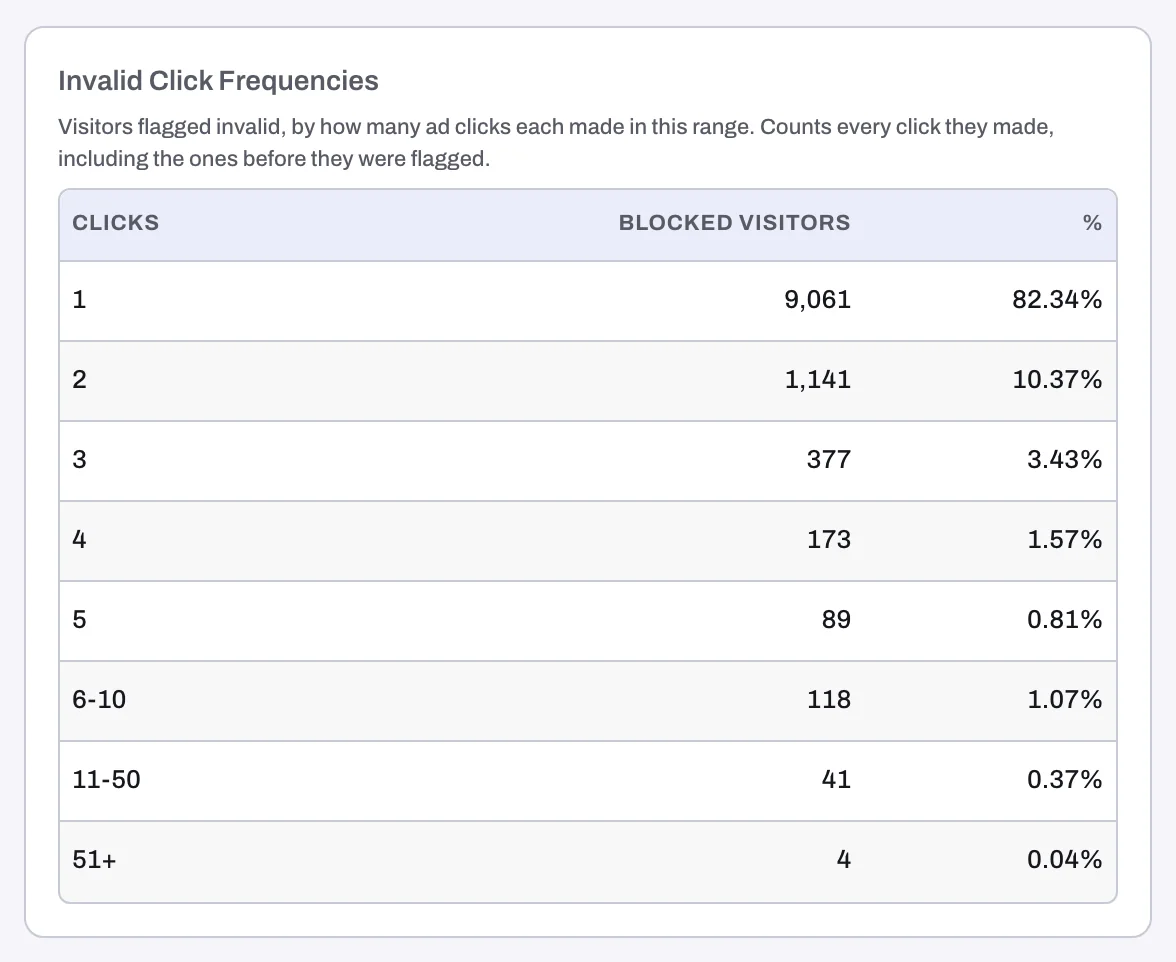
Invalid click frequencies groups flagged visitors by how many ad clicks each made in your dates: 1, 2, 3, 4, 5, 6-10, 11-50 and 51+. The columns are Clicks, Blocked visitors and %. It counts every click, including those before the visitor was flagged.
Use it to choose an invalid click threshold
A threshold flags an IP that clicks your ads more than a set number of times within a time window. Set it above what genuine customers do and below what bad actors do.
- On the Conversions tab, find Converted clicks in Conversion journey. It shows how converting visitors click, Within 10 min, Within 2 days and Within 7 days.
- Back on Invalid click frequencies: if a real share of flagged visitors sits in 6-10, 11-50 or 51+, repeat clicking is a pattern on your account, and a threshold catches it earlier.
- Pick a limit above what converting visitors do in the same window. For example, "Block an IP if they click on an ad more than 3 times within 10 minutes."
- Set it on the Click limits tab of a rule set (Setup > Rule sets), under Ad click limits, as Block after [N] clicks within [M] and a unit. Click limits belong to each entity and act on IP addresses. See Set invalid click thresholds and Suggested thresholds by industry.
Exclusions & sources
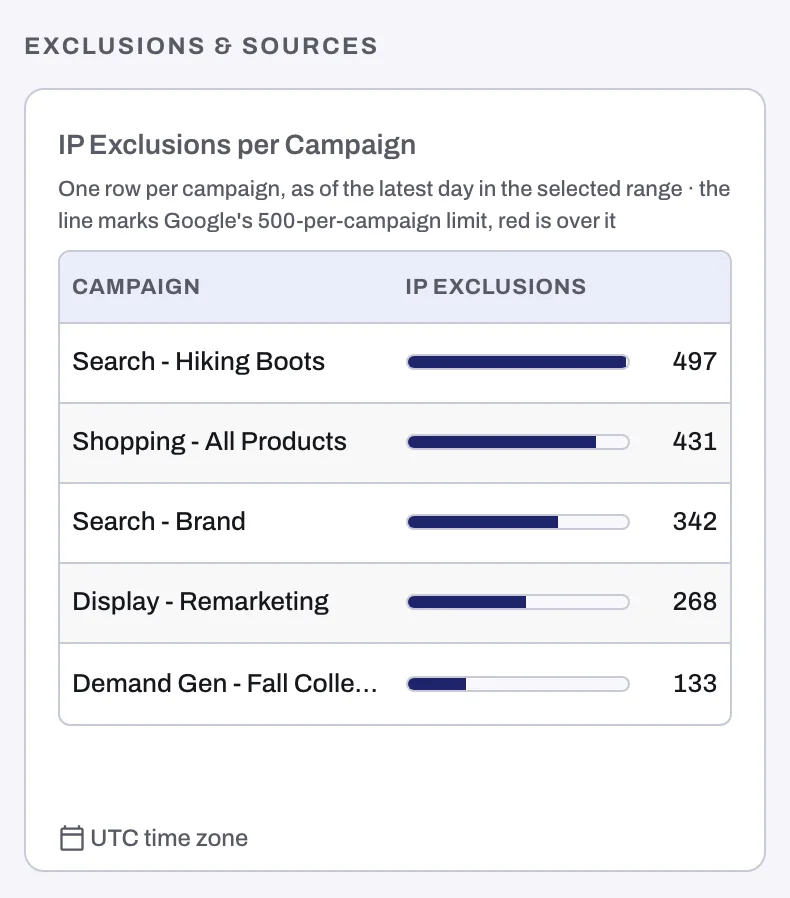
- IP exclusions per campaign shows each Google Ads campaign's IP exclusions on the latest day of your range, as a bar against Google's limit of 500 per campaign. A campaign over the limit turns red; hover a bar for its count. See The 500 IP exclusions per campaign limit in Google Ads.
- Audience exclusion list size tracks how many visitors sit on the audience Tapper excludes from your ads. See The Invalid Traffic Audience and its retention window.
- Invalid traffic by device type splits blocks by device; see Where invalid traffic comes from.
Traffic quality and IP types
- Clicks from public IPs (Traffic quality) tracks clicks from data center and hosting IP addresses as a share of all clicks. Real shoppers rarely browse from a data center, so a rising share is worth a look.
- Visitors by IP type (Details) counts visitors by the type of IP address they came from, blocked or not. One address can have several types, so the bars do not add up to Total Blocked.
Details and timing
Details also holds Blocked traffic by country, Invalid traffic by OS, Keyword-level invalid traffic (its own rolling window, ignoring the date filter) and Top blocked campaigns; see Where invalid traffic comes from: campaigns, keywords, devices and countries.
Invalid click rate by day and hour (Timing) is a grid of weekdays by hours shaded by invalid click rate, showing when invalid traffic peaks. It covers the whole workspace, all platforms and accounts.
On a monitor-only workspace
Nothing is blocked, so the labels change:
| Blocking label | Monitor-only label |
|---|---|
| Total Blocked | Total Invalid |
| IP-Blocked Visitors | IP-Flagged Visitors |
| Audience Blocks | Invalid Audience Exclusion Users |
| Block reasons section | Invalid traffic reasons, with Invalid traffic reasons trend and Invalid traffic by invalid traffic type |
| Blocked visitors column | Invalid visitors |
| Block reason filter | Invalid traffic reason |
See Monitor-only: why nothing is blocked yet and what changes when blocking starts.
Related
Was this helpful?
Still need help?
Chat with our team and mention this article.