

The Sources page: clicks not matched to a connected ad account
Sources lists ad clicks Tapper recorded on your website but could not match to a connected ad account. Clicks that match a connected account are on the Clicks page and the dashboard. Use it to spot paid traffic from a platform you have not connected, and ads with no campaign parameter Tapper can match.
Open it from the sidebar: under Block, select Traffic, then the Sources tab.
How it works
Tapper recognizes the platform from the click ID in the URL of the visit, with or without a connected account:
gclid: Google Adsfbclid: Meta Adsttclid: TikTok Adsmsclkid: Microsoft Ads
A click is unmatched when its ad account is not connected, or its ad carries no campaign parameter Tapper can match. So a connected platform can still appear here.
The page covers the whole workspace over the last 30 days, in your workspace time zone, with no filters.
What you see
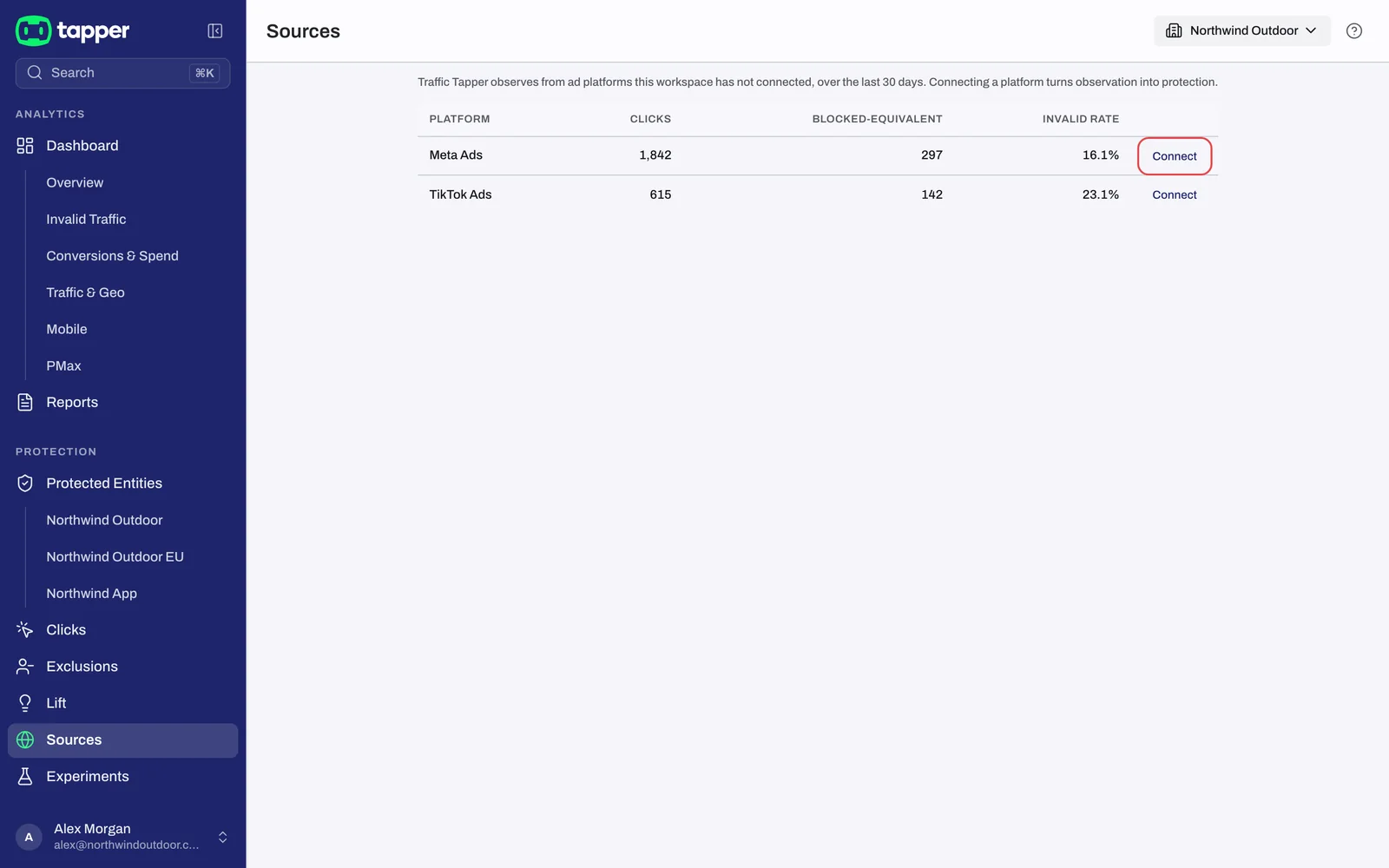
One row per platform with unmatched clicks:
| Column | What it means |
|---|---|
| Platform | The ad platform Tapper recognized from the click ID. |
| Clicks | Every unmatched click from that platform in the last 30 days. |
| Invalid clicks | How many of those clicks came from a visitor Tapper flagged. |
| Invalid rate | Invalid clicks divided by Clicks. It reads "-" when there are no clicks, and some workspaces do not show this column. |
Each row ends in a button:
- Set up ad account, for a platform you have not connected, opens Setup > Ad accounts, where you add the account to an entity. See Connect Google Ads, Connect Meta Ads, Connect TikTok Ads or Connect Microsoft Ads.
- Manage, for a platform you have connected, because connecting does not fix its unmatched clicks.
Empty or unavailable
- No ad account connected: "Ad clicks Tapper records without a connected ad account are listed here, per platform." Click Connect an ad account.
- Every click matched a connected ad account: nothing to fix. See your clicks opens the Clicks page.
- An error with a retry button: the data did not load. Click Retry.
A Lift only workspace has no Sources tab: Lift works on your ad accounts without the monitoring script, so there is no website traffic to list. See Lift only: what your workspace includes and leaves out.
Related
Was this helpful?
Still need help?
Chat with our team and mention this article.