

Suggested thresholds by industry
Tapper Block suggests ad click limits by industry. Onboarding applies them when you pick an industry, and Suggest limits on a rule set's Click limits tab offers them at any time.
How the presets work
Each preset is three limits, Block after [N] clicks within [M] [unit], counted per IP: a short window for bursts (10 minutes to 1 day), and a medium and a long window for slow repeat clicking over days or weeks. Most industries allow 2 clicks in the short window and 3 or 4 over the long one. Retail is the loosest, since shoppers often come back to the same ad many times.
Every count is ad clicks per IP within the window.
| Industry | Short window | Medium window | Long window |
|---|---|---|---|
| Automotive | 2 in 1 hour | 3 in 14 days | 4 in 30 days |
| Beauty | 2 in 1 hour | 3 in 7 days | 4 in 30 days |
| E-Commerce | 2 in 10 minutes | 3 in 2 days | 4 in 7 days |
| Entertainment | 2 in 1 day | 3 in 7 days | 4 in 30 days |
| Finance & Banking | 2 in 1 day | 3 in 7 days | 3 in 30 days |
| Healthcare | 3 in 1 day | 4 in 7 days | 5 in 14 days |
| Insurance | 2 in 1 day | 3 in 14 days | 5 in 30 days |
| Marketing | 2 in 1 hour | 3 in 7 days | 4 in 30 days |
| Media | 2 in 1 day | 3 in 14 days | 4 in 30 days |
| Real estate | 2 in 1 day | 3 in 7 days | 5 in 30 days |
| Retail | 3 in 10 minutes | 7 in 7 days | 10 in 30 days |
| Sports/Fitness | 2 in 1 day | 3 in 14 days | 4 in 30 days |
| Telecommunications | 2 in 1 hour | 3 in 1 day | 4 in 30 days |
| Travel | 2 in 10 minutes | 3 in 1 day | 4 in 7 days |
Not in the list? Pick the industry whose customers behave most like yours: compare each preset's long window with how often your genuine customers come back before buying. Or skip the presets and set your own rows. For a few expensive clicks, such as high-CPC lead generation, you can go as low as 1 click; see Set invalid click thresholds.
During onboarding
Industry (required) on the Name your workspace step is mandatory. When you press Continue, Tapper creates the entity and, on a workspace with Block, adds the industry's three limits to its default rule set, plus one Aborted ad clicks row (5 aborted clicks within 1 day). That row does not decide the Aborted ad click flag; see Aborted ad clicks.
Apply a preset from a rule set
- If your workspace has more than one protected entity, pick it in the switcher at the top of the sidebar.
- In the sidebar, under Setup, click Rule sets, and select the set you want to change. The default set is marked Default.
- On the Click limits tab, press Suggest limits.
- In Choose your industry, pick the industry and press Use suggested rules.
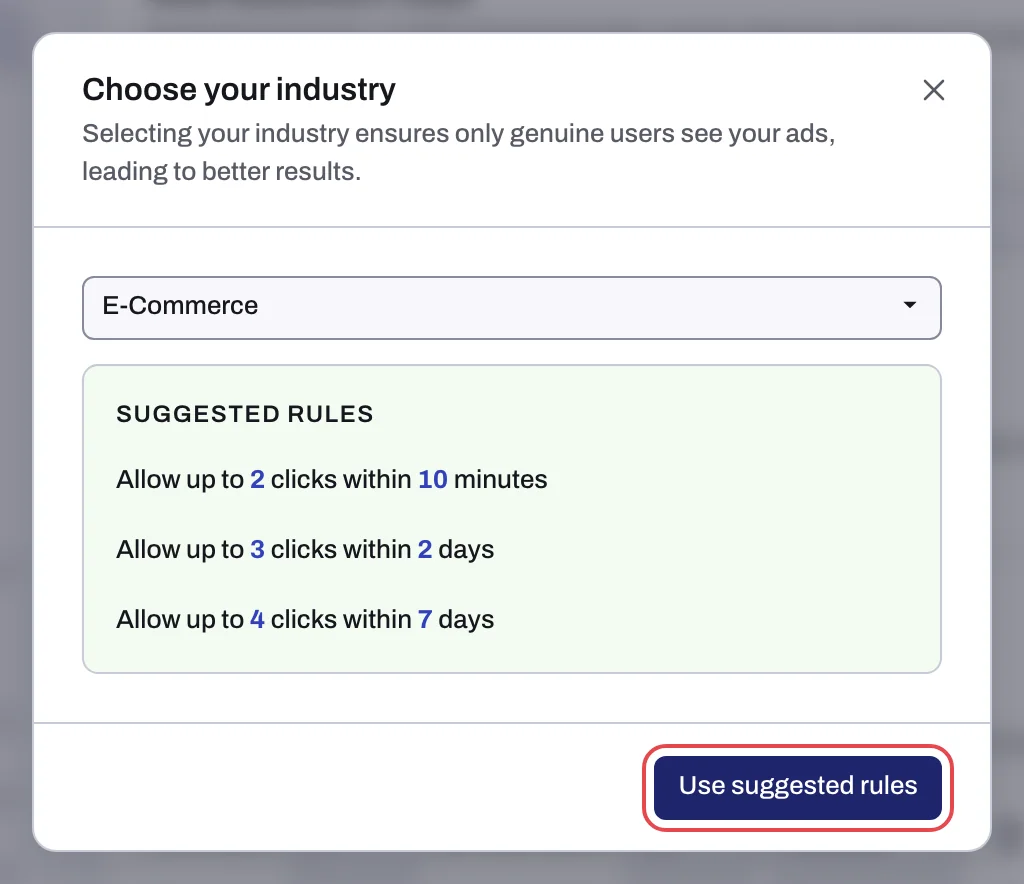
Once blocking is on for the rule set, an IP over a limit is excluded on your protected ad platforms (How Tapper Block works). Every row can be edited afterwards.
Related
Was this helpful?
Still need help?
Chat with our team and mention this article.