

The Performance Max placement report
The PMax dashboard tab shows where your Performance Max ads actually serve: the apps, websites and YouTube channels that carried your impressions, which of those placements Tapper flagged, and which it has already excluded. Google reports no per-placement spend, clicks or conversions, so the tab keeps placement figures (impressions only) apart from campaign figures (spend, conversions, cost per conversion), and it withholds the placement report when Google disclosed too little of the inventory for it to be representative.
Before you start
- Open Dashboard in the sidebar's Analytics section and choose PMax.
- The tab is on every Block + Lift workspace, whether or not you run Performance Max. Lift only workspaces have a single Lift dashboard with no tab children.
- It fills in once a connected Google Ads account has Performance Max campaigns delivering in the selected range.
- Only the date filter applies. The platform toggle and the Add filter menu are not offered, because Performance Max is Google only.
How it works
Google discloses Performance Max placements for website, app and YouTube inventory only. Impressions served on Search, Maps, Gmail and other networks have no placement attached. Coverage is visible impressions divided by total impressions: the share of your delivery that landed on a disclosed placement. Below 60% coverage too much of your delivery is undisclosed for the report to be representative, so Tapper withholds it.
Each card names its own window, because the tab mixes two:
- Placement inventory, coverage and flags are a snapshot of the newest report day in your range, refreshed daily.
- Spend, conversions and the exclusions removed are sums over the dates you selected. Excluded alone ignores the date filter: it counts placement exclusions on record, all time.
Dates follow the Google Ads account's own calendar day. The exclusions themselves are Tapper Block writing placement exclusions to your Google Ads account at account level; there is no switch for it on the entity page. See Placement exclusions on Display and Performance Max.
What you see in Tapper
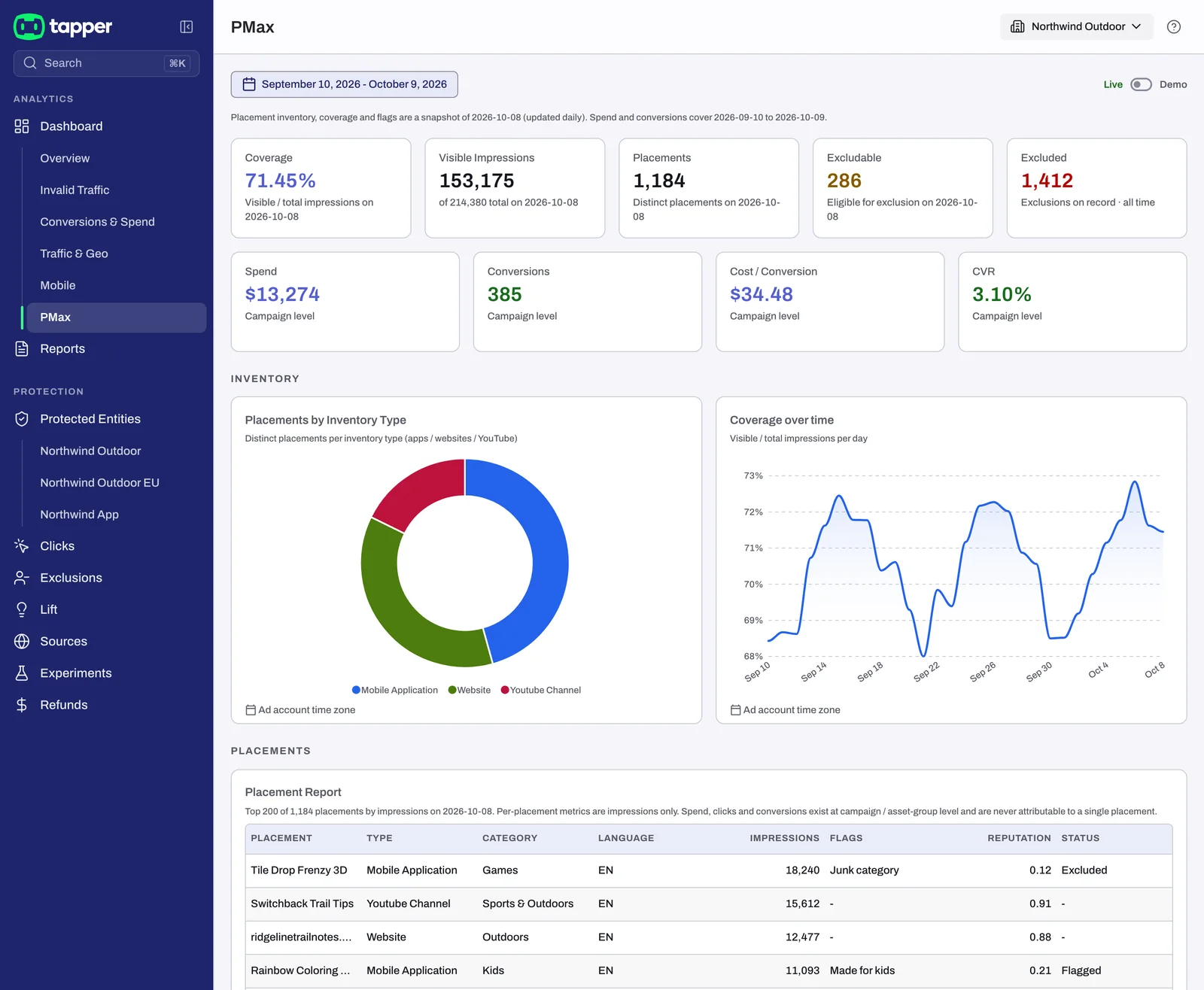
KPIs
| Tile | Sub-line | Window |
|---|---|---|
| Coverage | "Visible / total impressions on {date}" | snapshot day |
| Visible Impressions | "of {N} total on {date}" | snapshot day |
| Placements | "Distinct placements on {date}" | snapshot day |
| Excludable | "Eligible for exclusion on {date}" | snapshot day |
| Excluded | "Exclusions on record · all time" | all time |
| Spend | "Campaign level" | selected range |
| Conversions | "Campaign level" | selected range |
| Cost / Conversion | "Campaign level" | selected range |
| CVR | "Campaign level" | selected range |
"Campaign level" means the figure exists for the campaign (at finest, the asset group), never for one placement. A figure Tapper could not read shows "-" rather than a zero; when the placement model has no rows for your range, Visible Impressions says "Placement inventory unavailable for this range".
Inventory
- Placements by Inventory Type: distinct placements per inventory type (apps, websites, YouTube) on the snapshot day.
- Coverage over time: "Visible / total impressions per day". A day on which Google reported more visible than total impressions is left out, and the caption says how many days were not plotted.
Placements
The Placement Report lists the largest placements by impressions on the snapshot day; its caption says how many of that day's placements are shown and repeats the rule: "Per-placement metrics are impressions only. Spend, clicks and conversions exist at campaign / asset-group level and are never attributable to a single placement."
| Column | What it holds |
|---|---|
| Placement | the app, site or channel name, or its identifier |
| Type | the inventory type |
| Category | the content category, or "-" |
| Language | the language code, or "-" |
| Impressions | impressions on the snapshot day |
| Flags | Junk category, Made for kids, Off language, Off context, Age restricted, or "-" |
| Reputation | Tapper's reputation score, to two decimals |
| Status | "Excluded" once Tapper has excluded it, "Flagged" when it carries a flag, otherwise "-" |
Cleanup
- Caught: "Placements flagged on {date}" (snapshot day).
- Excludable: "Of caught, eligible for exclusion on {date}" (snapshot day).
- Removed: "Exclusions applied {from} to {to}" (selected range). Narrowing the dates moves this tile while the other two stay put.
Cost by Asset Group lists Asset Group, Cost, Conversions and CPA. Its caption says whether it covers every asset group or the top ones by cost, which dates it spans, and that "Figures are in the ad account's own currency, not converted." The Spend tile is converted, so the two can differ.
When the report is withheld
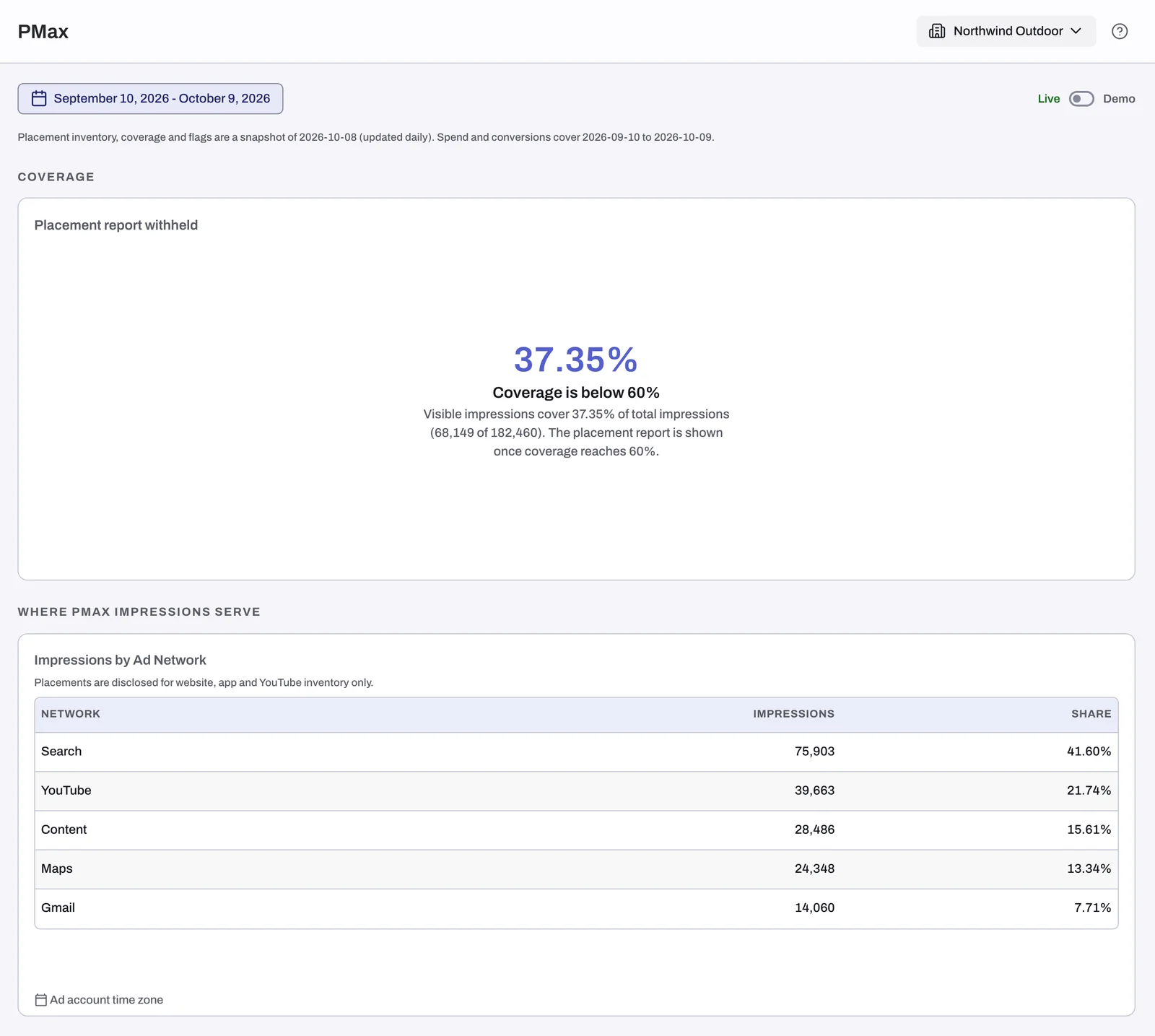
If coverage on the snapshot day is below 60%, the report is replaced by one Coverage card, Placement report withheld, showing the coverage figure. The placement report is shown once coverage reaches 60%.
Below it, Where PMax Impressions Serve gives Impressions by Ad Network (Network, Impressions, Share), captioned "Placements are disclosed for website, app and YouTube inventory only." That is the explanation: when most of your delivery is on Search, Maps or Gmail, there are no placements to report. Coverage rises when more of the campaign's impressions serve on app, website and YouTube inventory.
Empty state and demo data
With no placements and no Performance Max spend in the range, the tab shows No Performance Max data for this range. Connect Google Ads opens Protected Entities; Try the demo switches the dashboard to Demo.
In Demo the tab renders a sample report under a Sample data chip. Switch back with the Live / Demo control. See Live and Demo mode on the dashboard.
Related
- Placement exclusions on Display and Performance Max
- The Exclusions page and the proof drawer: the Placements view lists each excluded placement with its score and date.
- The Conversions & Spend and Traffic & Geo tabs: the Placement Exclusions card on Traffic & Geo.
- Dashboard filters, date ranges and time zone
Was this helpful?
Related articles
Still need help?
Chat with our team and mention this article.