

Placement exclusions on Display and Performance Max
Display and Performance Max ads run on websites, apps and YouTube channels that Google picks for you. Tapper Block scores the placements your ads appeared on and excludes poor ones in your Google Ads account.
How it works
- Account level. Tapper adds placement exclusions to the Google Ads account's exclusion list, not to one campaign, so they apply to every campaign in the account that can serve on those placements, such as Display and Performance Max.
- Scored. Each excluded placement carries a score, which you see in Tapper next to it.
- Capped at 65,000. Tapper keeps the account list within 65,000 entries. When it is full, the lowest-scored placements are removed to make room for new ones.
- No switch. Placement exclusions are on by default and there is no control for them on the entity page.
- Google Ads only. Tapper writes no placement exclusions on Meta, TikTok or Microsoft Ads.
- Only while blocking. In monitoring-only mode, which covers the free trial, Tapper writes none, and switching an entity to monitoring-only removes the ones it wrote.
Because the exclusions are account-wide, the Protection switch on a single campaign does not turn them off for that campaign. See Which exclusions Tapper applies to each Google Ads campaign type.
Where to see them in Tapper
The Exclusions page, Placements view
Open Exclusions in the sidebar, pick Google Ads and switch to Placements. The view exists for Google Ads only. Each row is one excluded placement:
| Column | What it shows |
|---|---|
| Ads account | The Google Ads account the exclusion was written to |
| Protection script | The entity it came from |
| URL | The website or app |
| Score | Tapper's score for the placement |
| Created at | When Tapper excluded it |
With nothing in the selected range, it reads No placement exclusions in this range with a Review detection rules button.
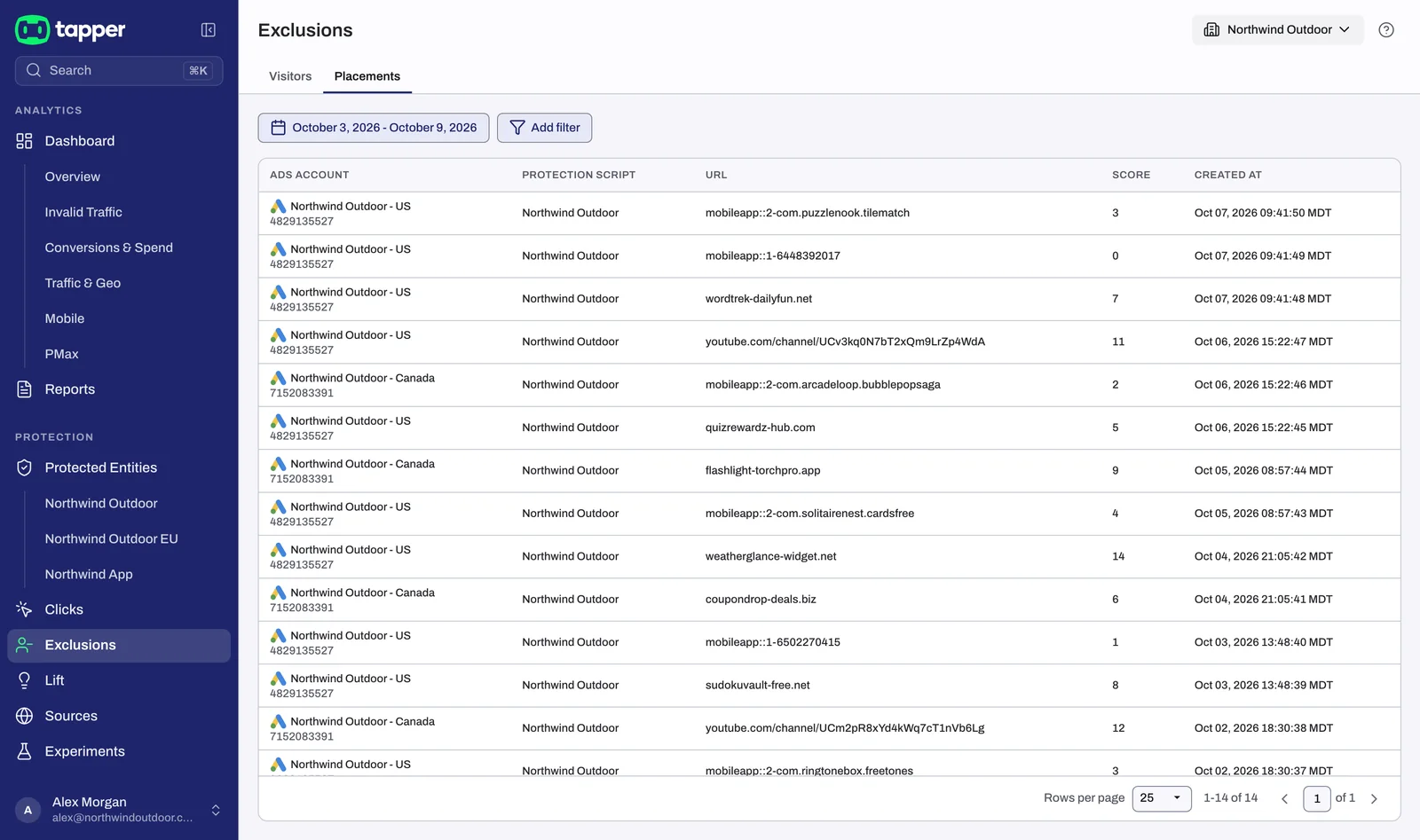
See The Exclusions page and the proof drawer.
The Placement Exclusions card on Traffic & Geo
On the dashboard, the Traffic & Geo tab has a Placement Exclusions card in its Engagement section, with the columns Placement, Platform, Clicks and Score. The card ignores the date range you picked.
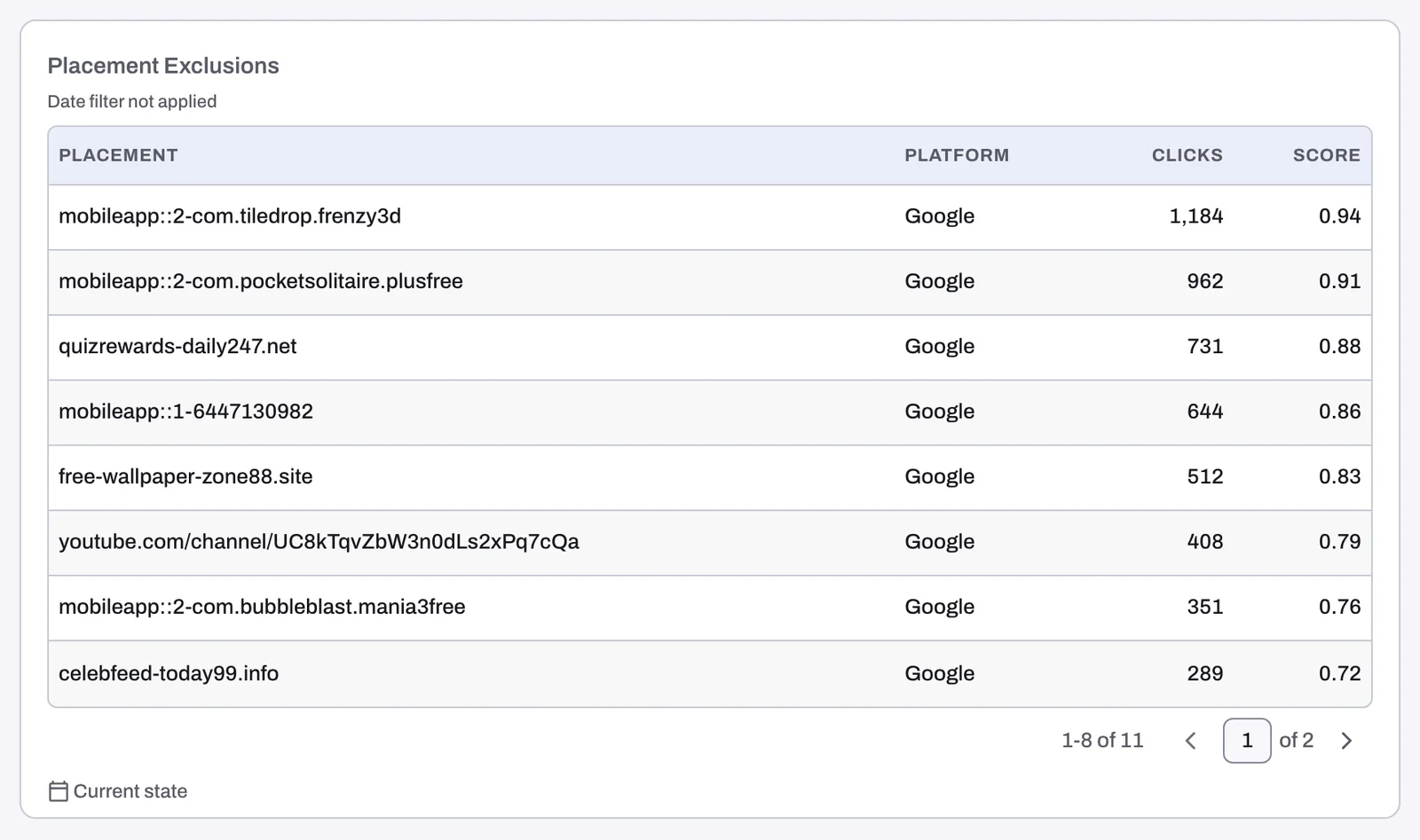
The PMax tab
The dashboard's PMax tab shows where your Performance Max ads actually serve and which placements Tapper flagged or excluded:
- KPI tiles Coverage, Visible Impressions, Placements, Excludable and Excluded, then Spend, Conversions, Cost / Conversion and CVR.
- The Placement Report, with Placement, Type, Category, Language, Impressions, Flags, Reputation and Status.
- A Cleanup section with Caught, Excludable, Removed and Cost by Asset Group.
When visible impressions cover less than 60% of total impressions (the Coverage figure), the report is replaced by Placement report withheld. See The Performance Max placement report.
Lift's placement check
Tapper Lift looks at placements from a different angle: cost. Its check Sites and apps not worth paying for flags placements that spend without paying back. The card's Exclude placements button adds them to the same account-level exclusion list in Google Ads, and Revert this fix removes what that fix added. Lift works on Lift only workspaces too. See Lift: what it does and where to find it.
Removing a placement exclusion
Tapper has no action to release a placement that Block excluded. If Tapper excluded a placement you want to keep, contact Tapper support. See How to get help from Tapper.
Related
Was this helpful?
Related articles
Still need help?
Chat with our team and mention this article.