

Where invalid traffic comes from: campaigns, keywords, devices and countries
Tapper breaks invalid traffic down by campaign, keyword, device, operating system and country, so you can see which parts of your advertising attract it. The breakdowns are spread over the Overview, Invalid Traffic, Conversions & Spend and Traffic & Geo tabs of the dashboard.
Where to look
| Question | Card | Tab, section |
|---|---|---|
| Which campaigns get the most invalid traffic? | Top Blocked Campaigns and Top Blocked Campaign Types | Overview, Overview (Top Blocked Campaigns also on Invalid Traffic, Details) |
| Is a campaign type getting worse over time? | Invalid Traffic by Campaign Type over time | Overview, Overview |
| Which keywords attract invalid clicks? | Keyword-level Invalid Traffic | Invalid Traffic, Details |
| Which keywords convert, and how clean are they? | Keyword by Conversion | Conversions & Spend, Conversion journey |
| Mobile or desktop? | Invalid Traffic by Device Type | Invalid Traffic, Exclusions & sources |
| Which operating systems? | Invalid Traffic by OS | Invalid Traffic, Details |
| Which countries? | Invalid Traffic by Country; Blocked Traffic by Country | Overview, By country; Invalid Traffic, Details |
Each card follows the date range and filters at the top of the page unless its chip or caption says otherwise. See Dashboard filters, date ranges and time zone.
By campaign
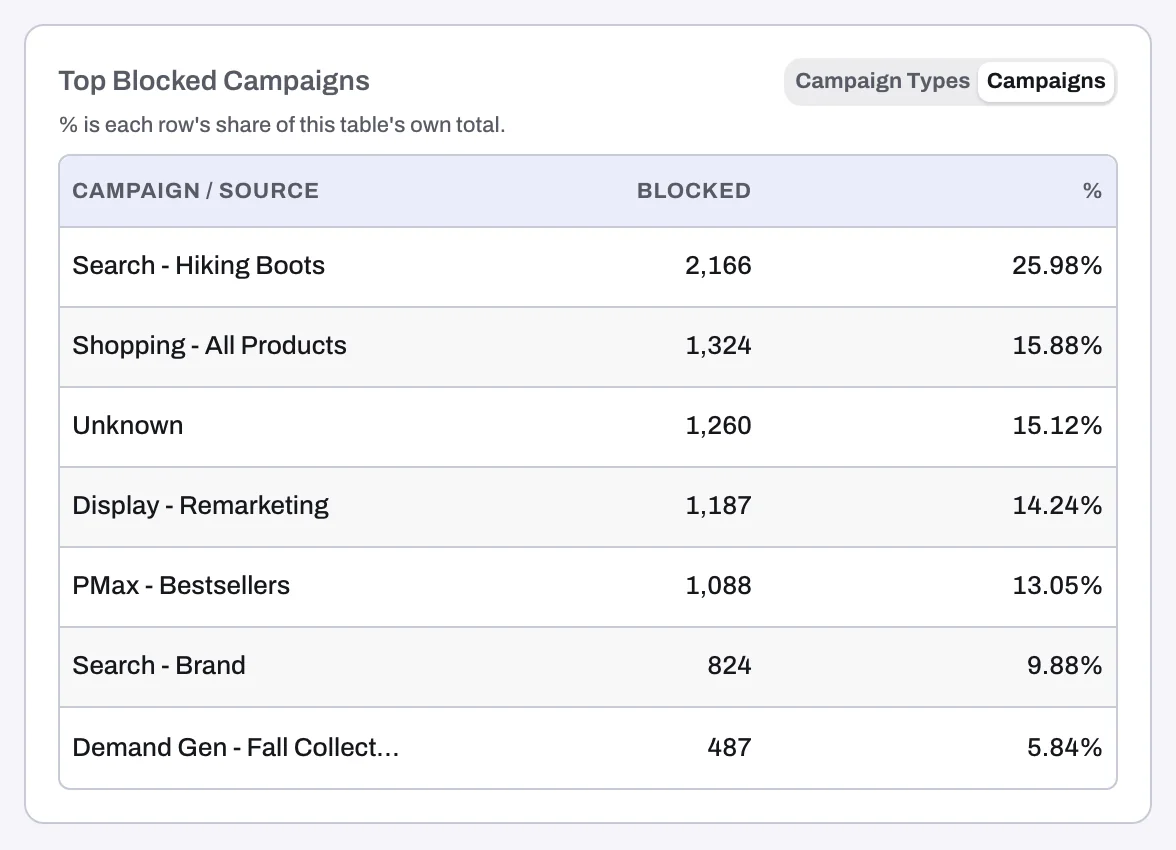
On the Overview tab, Top Blocked Campaign Types and Top Blocked Campaigns rank your campaign types and campaigns by blocked visitors. The % column is each row's share of the table's own total, so the rows add up to 100% of what the table shows. Invalid Traffic by Campaign Type over time shows the split by campaign type over the date range.
To judge whether a campaign attracts more than its share, compare it with the Top Clicks by Campaigns card on the same tab (toggle Campaign Types / Campaigns). A campaign with a small share of clicks and a large share of blocks is where invalid traffic concentrates.
Two things to know:
- Audience blocks have no campaign. A visitor excluded through an audience is not tied to one campaign, so these blocks appear as Unknown.
- The campaign type chart can add up to more than Total Blocks. As its caption says, a visitor blocked for more than one reason is counted under each.
By keyword
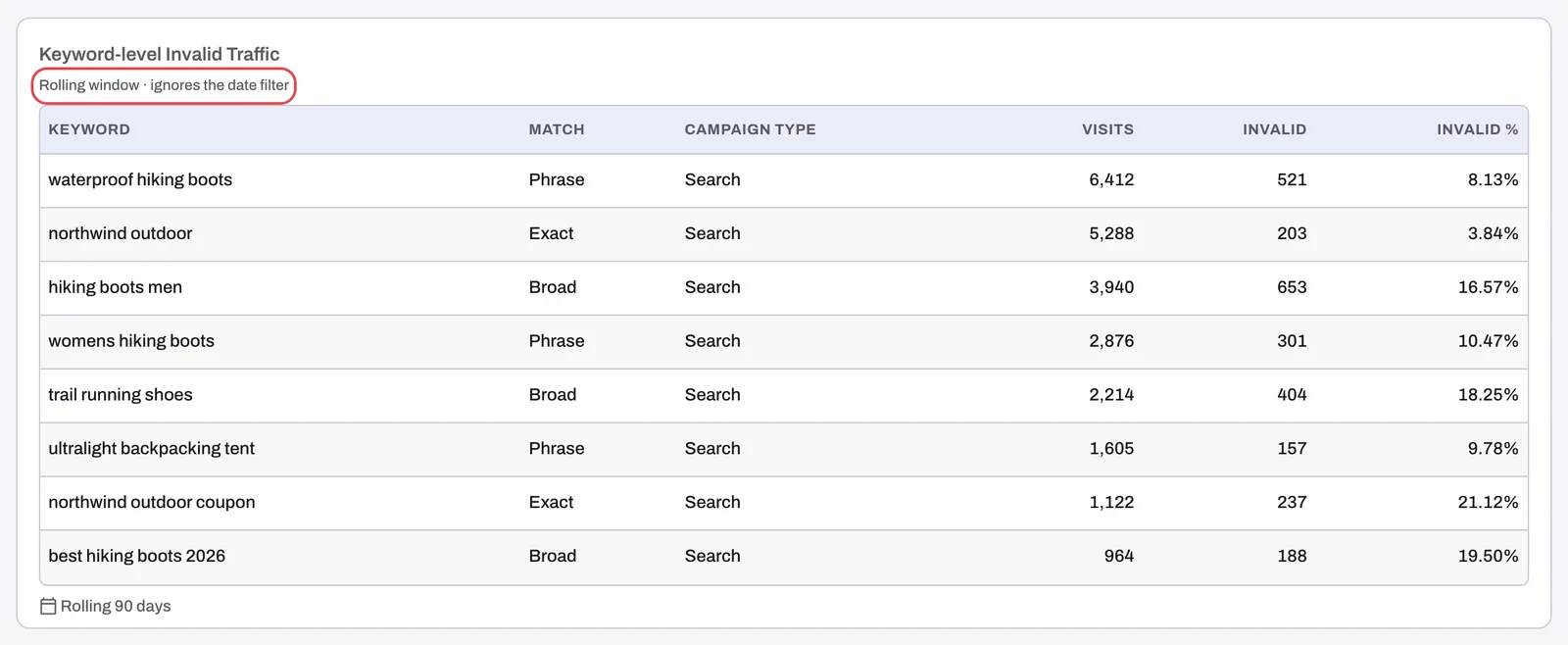
Keyword-level Invalid Traffic on the Invalid Traffic tab lists your Google Ads keywords with the columns Keyword, Match, Campaign Type, Visits, Invalid and Invalid %. It uses its own rolling window, marked "Rolling window · ignores the date filter", so changing the dates does not change it. It does not follow the Campaign filter either.
Keyword by Conversion on the Conversions & Spend tab ranks keywords by conversions, with Keyword, Match, Campaign Type, Top Block Reason, Conversions and Invalid %. It also uses its own rolling window instead of your dates. Use it to see which keywords bring customers and how much invalid traffic rides along with them.
Keywords reach Tapper through the Google Ads tracking template that Tapper sets on your account when you connect it. When a campaign, ad group or ad has its own tracking template, it overrides Tapper's and Tapper does not see those clicks at all, keywords included; see Fix campaigns, ad groups or ads that override Tapper's tracking.
By device and operating system
Invalid Traffic by Device Type, on the Invalid Traffic tab, stacks invalid traffic by device type over time. It counts block actions, not unique visitors: a visitor blocked both by IP and by audience counts twice. It does not follow the Campaign or Block reason filters. Invalid Traffic by OS, in the Details section of the same tab, gives the split by operating system and counts block actions the same way.
To compare with all your traffic, open Clicks by Device Type on the Traffic & Geo tab (Devices & browsers section). Conversions by Device Type on Conversions & Spend shows where conversions come from.
By country
Invalid Traffic by Country sits on the Overview tab in the By country section, alongside Clicks by Country and Conversions by Country, so you can read the three together. Blocked Traffic by Country on the Invalid Traffic tab gives the blocked side in the Details section.
Act on what you find
- A campaign you do not want protected, or one you do: switch its Protection on or off under Manage campaigns on the entity's Google protection tab. See Choose which campaigns Tapper protects.
- Keywords that waste money: Lift checks your ad accounts every day and, on Google Ads, raises recommendations such as "Keywords not paying their way" and "Add exact-match negatives for wasted search terms". See Lift: what it does and where to find it.
- A country you never sell to: see Block or allow clicks by country.
Related
Was this helpful?
Related articles
Still need help?
Chat with our team and mention this article.