

Saved Spend: how your savings are estimated
Saved Spend is Tapper's estimate of what the visitors it blocked would have cost you in ad spend. You find it on the dashboard's Overview tab, in the Traffic & protection group, with the sub-line "Daily blocked visitors × daily CPC".
How it works
Tapper works day by day and platform by platform. For each day in your date range and each ad platform, it multiplies:
- the number of distinct visitors blocked that day on that platform, by
- that platform's average cost per click on that day.
Then it adds up the results across every day and platform.
What follows from that:
- It follows your dashboard filters. Change the date range or the platform toggle and Saved Spend is recalculated for that selection.
- Each platform is priced at its own CPC. A visitor blocked on Meta is priced at Meta's average CPC for that day, not at a blended rate across platforms.
- It is not Total Blocks × Avg CPC. Because the sum runs per day, a visitor blocked on two different days counts on each day, and each day uses its own CPC. Multiplying the two tiles on screen gives a different number.
- There is no multiplier. Each blocked visitor is priced at one click for each day it was blocked.
Why it is an estimate
Tapper cannot know how many more times a blocked visitor would have clicked your ads, or what each of those clicks would have cost in the auction. So it prices each blocked visitor at one click, at the average CPC of its platform that day. Read Saved Spend as a guide to the scale of what blocking keeps out, not as an amount that will appear on your ad platform invoice.
The most reliable way to see Tapper's effect on your budget is your own campaign results: watch CPA and conversions by campaign over time. To measure it directly on Google Ads, run a blocking-lift experiment, which splits a campaign into a protected control and an unprotected treatment and compares them.
What you see in Tapper
| Where | Name | Notes |
|---|---|---|
| Overview tab, Traffic & protection | Saved Spend tile | Sub-line "Daily blocked visitors × daily CPC". |
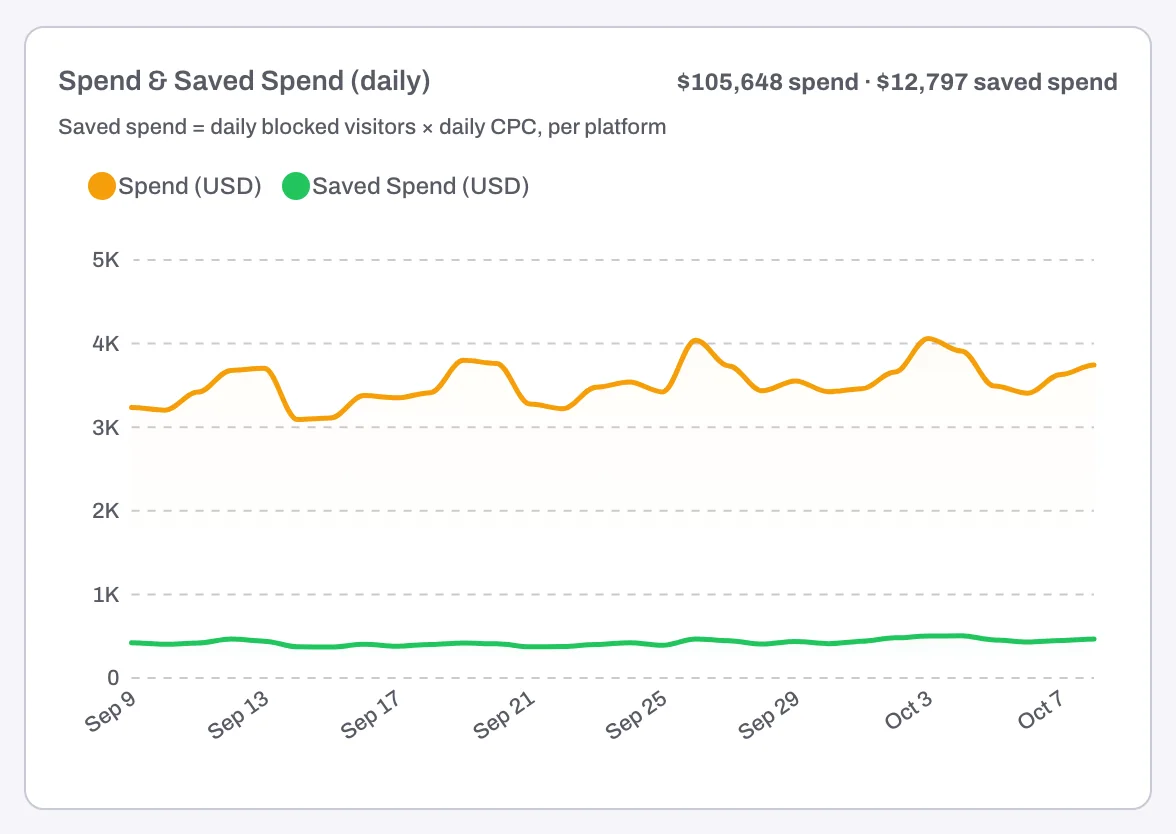
| Overview tab, More section | Spend & Saved Spend (daily) chart | Your spend and Saved Spend side by side, day by day. |
| Conversions & Spend tab | Saved Spend tile and Spend & Saved Spend over time chart | The same figure next to spend, CPA and ROAS. |
| Monthly report | Reallocated Spend card | The figure for the month in your report under Reports. |
On a monitoring-only workspace
While your workspace only monitors, nothing is blocked, so nothing is saved yet. The tile becomes Wasted Spend, shown in red: the same calculation, applied to the invalid visitors Tapper flagged but did not block. The daily chart becomes Spend & Wasted Spend (daily), and the monthly report card reads Wasted Spend instead of Reallocated Spend. See Monitoring-only mode: why nothing is blocked yet and what changes when blocking starts.
Not the same as Lift's Recovered spend
The Lift group lower on the Overview tab has its own money tiles. Recovered spend ("Estimated: detection impact × days fixed") is the daily waste Lift priced when it detected a problem in one of your ad accounts, times the days each fix has been in effect. Impact is the savings Lift priced on recommendations still open, a day and a month, with possible savings shown beside it and never added in. These are separate estimates from Saved Spend, and they are never added to it. See Lift on the dashboard.
Related
Was this helpful?
Related articles
Still need help?
Chat with our team and mention this article.