

Connect Microsoft Ads
Connecting Microsoft Ads is a Microsoft sign-in and a pick from a list. Tapper then syncs your campaigns and reads their spend and clicks. You need to be a workspace Owner or Admin, signed in with a Microsoft account that can manage the Microsoft Ads accounts.
Steps
- Start from the wizard's Connect an ad account step, or the Microsoft Ads page of Setup > Ad accounts: Connect Microsoft Ads (Add ad account once one is connected). See Add another ad account to an entity.
- On the Microsoft Ads row, click Sign in with Microsoft. Accept permission to manage your Microsoft Ads accounts, including when you are not signed in to Tapper. Your sign-in is held for 30 minutes.
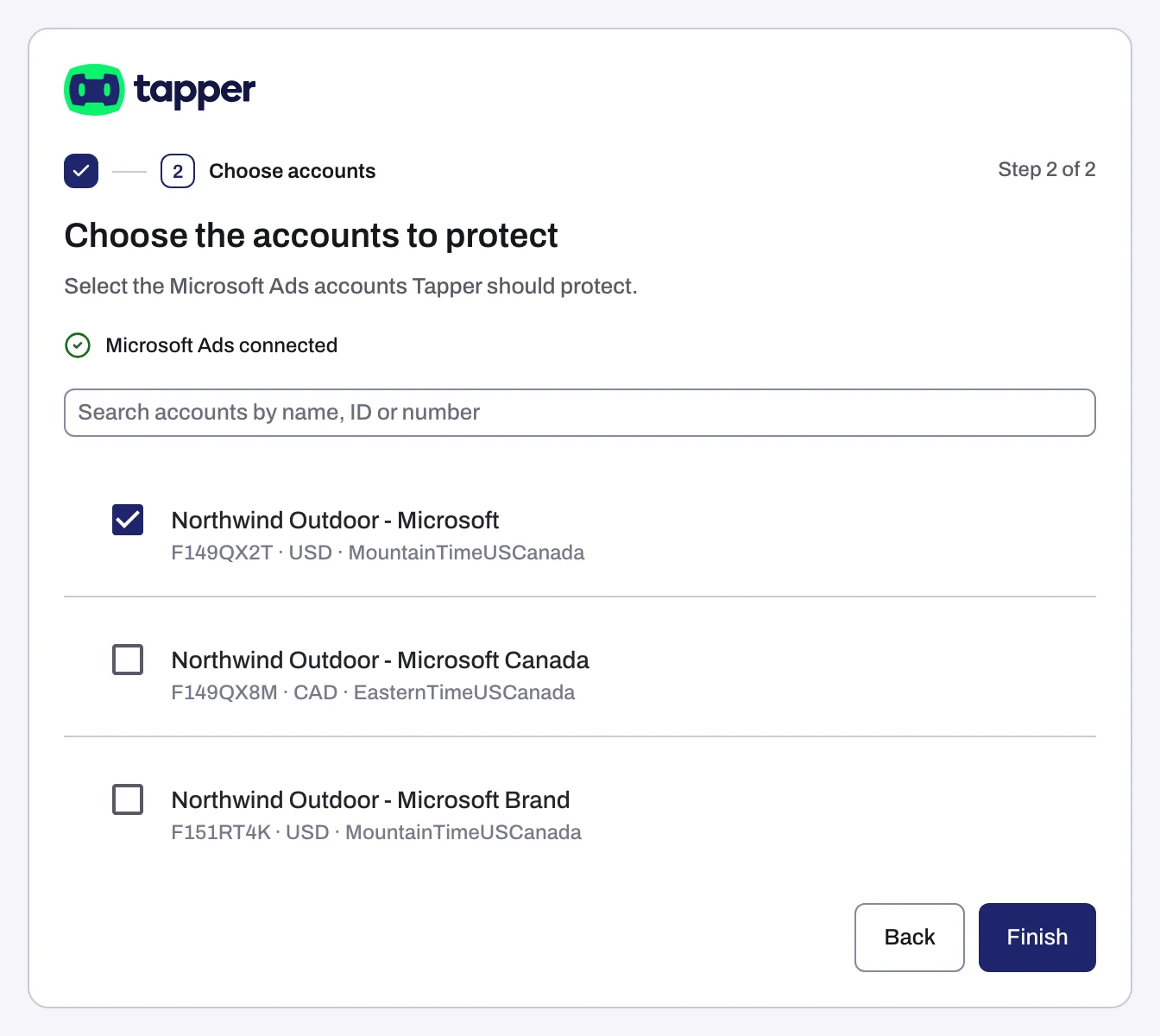
- On Choose the accounts to protect (Lift only: Choose the accounts to connect), each row shows the name, account number, currency, time zone and the status of an inactive account. Search accounts by name, ID or number helps on a long list.
- Tick each account and click Continue (wizard with Block) or Finish. Linking takes up to 90 seconds (messages while accounts link).
What Tapper sets up
| Workspace products | What happens when you connect |
|---|---|
| With Block | Tapper sets the account-level tracking template, turns on Microsoft click ID (MSCLKID) auto-tagging, creates offline conversion goals, a UET tag and two remarketing lists, then syncs your campaigns. |
| Lift only | Tapper reads the accounts' campaigns and spend. |
Campaigns sync at connect, then every 6 hours. Microsoft needs about 3 hours before an hour's numbers are final, so the latest hours on the dashboard can still change (When your data shows up).
The Microsoft Ads page
It has Ad accounts, Campaigns and Ad groups tabs. Each account row shows Connected, its Account ID and Manage campaigns, which opens Campaigns for it. Campaigns has Account and Campaign columns, and the chip Custom tracking template on campaigns with their own.
With Block, Ad accounts can show Some Microsoft Ads clicks skip Tapper's tracking: a template on a campaign, ad group or ad overrides Tapper's, so Tapper never sees those clicks. Click Fix tracking, then Fix all, or Fix tracking template on one row (Close leaves them). Fixing rewrites those templates in Microsoft Ads, so check first with whoever owns them if they serve another tool.
If something goes wrong
- "Microsoft Ads didn't return account ... Check the account is still open, then connect it again.": check the account is open, then connect again.
- "Microsoft Ads didn't return a customer for account ... Contact support.": write to support@tapper.ai with the account number.
- "Microsoft Ads signed Tapper out of this account. Reconnect Microsoft Ads to continue.", or a row showing Needs reconnecting: click Reconnect (Reconnect an ad account that stopped working).
- Popup messages: Connection failed, Sign-in cancelled or Connection status unknown.
Related
Was this helpful?
Still need help?
Chat with our team and mention this article.