

Read a Lift card: money, priority and evidence
Each card on the Lift tab is one finding in a Google Ads, Meta Ads (Facebook and Instagram) or TikTok Ads account: what Lift found, usually what to do, the money per day where Lift can price it, and the evidence. Its buttons are explained in Fix, mark as done, dismiss and revert.
The row and the card
A row shows the card's headline, its tags and its money: a month (30 days), then the day line. Press a row to open its card beside the list; on a wide screen the top card is already open. On a phone, the card opens as its own page, with Back to the list.
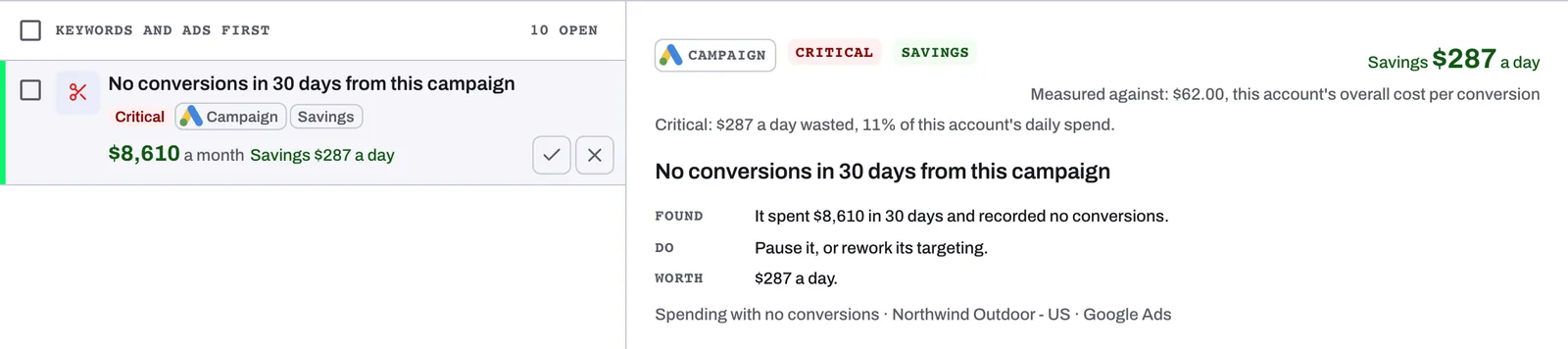
The tags, in order: the severity or priority (see below), or Counted in campaign total when another card on the same campaign already counts this money; New until you open the card; the platform's logo and level, such as Keyword or Ad set; the kind, Savings, Not yet checked, Optimisation, Over target or Upside; Possible savings · and its first reason; Conversions at stake on Over target cards; and the funnel stage on Meta cards.
The open card then reads, top to bottom:
- The tags and the money, as on the row. Under the money, a card that names what it was compared with adds a Measured against: line, such as "Measured against: $62.00, this account's overall cost per conversion".
- The priority line: why the card has its severity or priority.
- The headline: the card's whole sentence.
- Found, Do and Worth, on most cards: what Lift found, the change to make and, on a card with money, the figure a day (on Meta and TikTok cards, how it was measured). Other Google Ads cards give one sentence saying why.
- An amber Possible savings. line with its reason, on a card with possible savings but no How we priced this.
- The context line: the check, the ad account and the platform.
- How we priced this and, on a card about a whole campaign, Daily spend, N days: daily bars for its last 30 full days, green on a day with a result.
- The buttons, which stay in view as you scroll the card. On a Google Ads card with a fix button, press it (it is named for the change, for example Pause campaign) and confirm: Tapper makes the change for you, with nothing to copy into Google Ads. Otherwise make the change in the ad platform and press Mark as done, or press Dismiss, with a reason. Nothing changes in an ad account until a person confirms a fix (on Google Ads, unless you set an automation band that lets Tapper move a target on its own).
- Where to find it, Evidence and History.
Open card on the Activity tab opens the same card in a window.
The money
Lift prices money per day, in the ad account's own currency, in whole units (cents only under 10); How we priced this shows cents. On the row, money in a currency other than US dollars also shows US dollars in brackets when Tapper has the exchange rate, such as "AED 10,890 ($2,965) a month". Hover over the row's money for the check's formula.
| Money label | What it is |
|---|---|
| Savings {money} a day | Wasted spend Lift is confident in |
| Possible savings {money} a day | Wasted spend Lift found but cannot be sure of yet |
| {money} a day alone | Wasted spend not sorted yet (Not yet checked) |
| Potential upside +{money} a day | An estimate of what a tighter bid target could gain on the same budget, not money measured |
| Affects {money} a day of spend | The spend a recommendation is about; its row shows the change to make |
| {money} a day, counted at campaign level | Already counted on another card for the same campaign |
| For review, not priced | Single words to check: a negative on one word blocks every search containing it |
| Not priced | No figure, as on every Meta and TikTok recommendation |
Why money is possible savings
The row's tag names the first reason; How we priced this names them all, with what would make each count as savings.
| Tag | Reason | When it counts as savings |
|---|---|---|
| brand campaign | Few conversions can be brand protection | Once marked as not brand protection |
| judged on under 14 days | Under 14 days of data, for example since a target changed | At 14 days of data |
| different kind of campaign | Compared with another kind, such as Display against the account's overall cost per conversion | When compared with the same kind |
| app conversions? | Priced on app conversions as Google counts them | It stays possible savings |
| purchases counted twice?, conversion value broken?, conversion count changed? | Another open card says the campaign's figures may be wrong | Once that card is fixed or dismissed |
| above usual spend | The campaign's cards add up to more than its usual daily spend | Never, for the part above it |
| under a 90% chance | Meta and TikTok: under a 90% chance it costs more than the figure it was judged against | At 90% or more, for the low end of its range |
| above the range low end | Meta and TikTok: only the low end of its range is savings | As more results raise the low end |
On a brand card, an Owner or Admin can press Mark as not brand protection: the money counts as savings after the next daily check, and Undo takes the mark back. Nothing changes in the ad account.
Severity and priority
Both measure the card's whole daily figure, savings and possible savings together, against the ad account's own average daily spend:
| Share of the account's daily spend | Waste card | Other cards |
|---|---|---|
| 5% or more | Critical | High priority |
| 1% or more | Attention | Medium priority |
| Under 1% | Low impact | Low priority |
A Meta Ads or TikTok card, and a Google Ads card in its campaign's last 7 days, stop at Attention. The priority line gives the reason, such as "Critical: {money} a day wasted, {share} of this account's daily spend.", where {money} is that whole figure; a card with no money ranks low.
How we priced this
On a waste card whose figure the daily check has sorted, this always-open block shows how Lift reached the figure from the card's own numbers, leaving out any number the card does not carry.
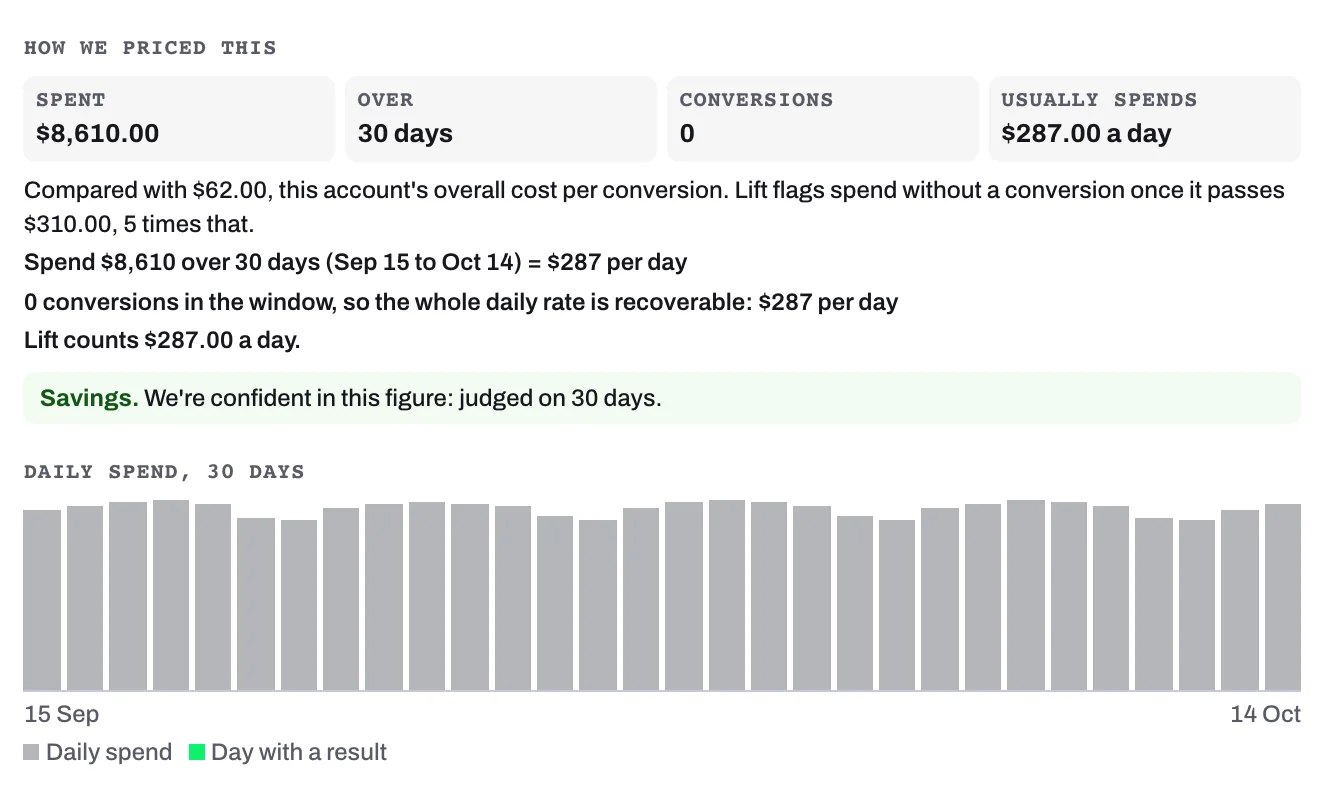
- The figures: Spent (or, for example, Spent on these 3 search terms), Over (the days judged), Conversions and Cost per conversion or Usually spends; on Meta cards, Results and Cost per result.
- The comparison, such as "Compared with $62.00, this account's overall cost per conversion.", often with the rule that raised the card.
- The working, ending on the figure: "Lift counts $287.00 a day."
- The box: green "Savings. We're confident in this figure: judged on 30 days." or amber Possible savings. with the reasons.
Most Google Ads figures are counted over the account's Detection window (30 days unless changed in Setup), Meta and TikTok figures over 28 days.
Where to find it, Evidence and history
Where to find it names the campaign and, where they apply, the ad group or ad set and the item, then Campaign ID: so you can search for the campaign in the ad platform.
Evidence is closed until you press it. On a Google Ads card it opens with a notice when a target, budget or bid strategy change shortened the days judged, then the sentence saying why the card was raised (on a card with Found, Do and Worth), the rule the check applied with the numbers it used, How this number was calculated where there is no How we priced this, and, where the check has one, a table with Measure and Value columns. On Meta and TikTok cards it lists the card's figures by name.
With a contribution margin set for a Google Ads account in Lift Setup, a card judged on ROAS, such as Return on ad spend under target, adds Margin on ad spend (the ROAS times the margin) and Breakeven ROAS (1 divided by the margin) to its Evidence, for reading only: they change no figure, severity or priority.
History, closed until you press it at the foot of the card, shows when Lift first detected the finding (Detected) and last saw it (Last seen), then who has opened the card and every change made to it.
When a card leaves the list
Tapper checks each card, and each account's data, before cards reach your list; a card that has not passed is not shown yet. On a day when an account's figures have not fully arrived, or do not match the ad platform's own totals, its cards leave the list and its totals with no notice, then come back at the next complete daily check with their first Detected date, or close. A link to such a card opens the list with a notice that the recommendation is not available. A savings card worth under 1 a day in the ad account's own currency is not shown, and an open one closes once its figure falls below that.
Meta and TikTok cards
They read the same way, apart from the points below. See How Lift works on Meta Ads and How Lift works on TikTok Ads.
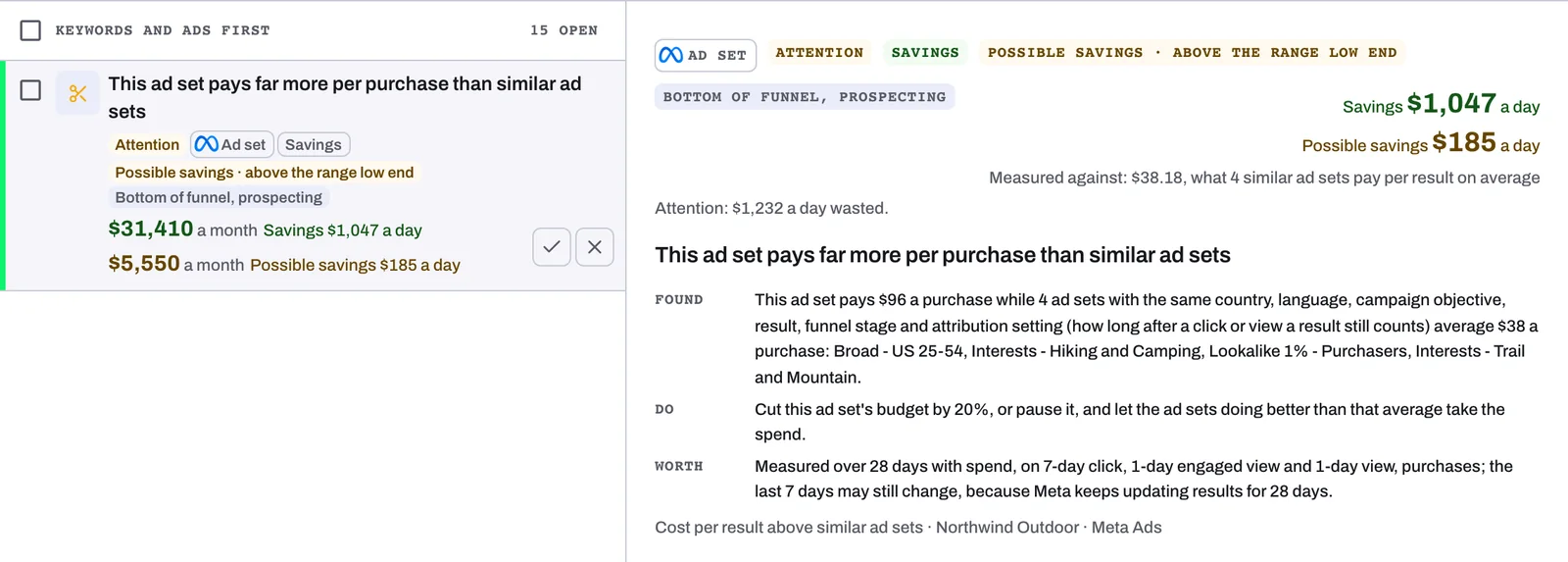
- Funnel stage, on Meta cards only: Top of funnel, Middle of funnel, Bottom of funnel, Retargeting or Not classified yet, sometimes with prospecting, retargeting or re-engagement and, where Meta reports it, the largest share of spend, as in "Bottom of funnel, prospecting · 62% new customers". See Check the funnel stage Lift gives each Meta ad set.
- Similar ad sets: a Meta cost card compares the ad set with ad sets on the same ad account that share its campaign objective, result, funnel stage and sub-segment, attribution setting, countries and languages, names up to four of them, and says how sure Lift is that it costs more.
- Priority line: it gives no share of the account's daily spend, as in "Attention: {money} a day wasted."
- Money: a priced Meta figure sits inside an estimated range. On TikTok, only Spend with no results and Cost per result above similar ad groups or your target carry money. Cards without a figure read Not priced.
- Links out: Open in Meta Ads Manager opens the card's campaign, ad set or ad in Ads Manager. Apply in TikTok Ads Manager opens your campaigns in TikTok Ads Manager, where you make the change before pressing Mark as done; a TikTok card's Where to find it names the campaign only.
Related
Was this helpful?
Related articles
Still need help?
Chat with our team and mention this article.