

The checks Lift runs on TikTok Ads
Once Tapper has set your workspace up, Lift checks each TikTok Ads account connected to it every day and lists what it finds as cards on the Lift tab (pick TikTok above the list to see only those). Lift never changes your TikTok account: you make each change in TikTok Ads Manager, and every open card takes you there.
The checks at a glance
| Check | What to do | Money on the card |
|---|---|---|
| Results stopped | Check your tracking before changing any budget | Not priced |
| Spend with no results | Pause the ad group, or one ad | Waste per day |
| Cost per result above similar ad groups or your target | Cut the ad group's daily budget, or pause it | Waste per day |
| Move budget to the cheaper ad group | Move part of one ad group's daily budget to another in its campaign | Not priced |
| Creative wearing out | Pause the ad or add new videos; if fewer clicks convert, check tracking and the page first | Not priced |
| Buying clicks instead of page views | Move a traffic ad group's budget to a new ad group optimized for landing page views | Not priced |
| Frequency above the brief | Cap the ad group's frequency, or cut its budget | Not priced |
A card names its check in the line "{check} · {ad account} · TikTok Ads".
How the checks judge
- A result is TikTok's own result for the ad group's optimization goal, such as a purchase, a lead or a 6-second view, on the ad group's own attribution. Similar ad groups share the account, goal and objective, funnel stage and attribution, and exactly the same locations and languages; Lift needs at least 3 with 5 or more results each, or the checks that compare costs stay quiet. A TikTok account has no target of its own in Tapper (Lift's Setup has no TikTok section), so costs are always compared with similar ad groups.
- The funnel stage comes from the goal (reach, impressions, views, follows, profile visits and brand consideration at the top; clicks, landing page views, engaged sessions and leads in the middle; conversions, purchases, installs and in-app events at the bottom) and from the audiences targeted, and it decides which checks look at an ad group. TikTok cards do not show it, and it cannot be changed. An ad group with a middle or bottom goal that is aimed only at existing customers (customer files or offline event audiences) gets no money card.
- Quiet ad groups get no advice. TikTok does not report learning, so Lift estimates it: usually 7 days or 25 results after an ad group is created or materially changed, whichever comes first. Lift gives no advice on an ad group in learning, with fewer than 7 days of spend in the last 28, or in a campaign that has not spent in the last 3 days; only Results stopped does not wait.
- The days judged. TikTok revises recent conversions, so Lift judges each account up to three days back, in the account's own time zone, reading 28 days and judging most checks on the last 7. It raises no card on a campaign, ad group or ad that TikTok is not delivering, and leaves out TopView and Promote campaigns.
How Lift works on TikTok Ads covers these rules in full. The Settings tab and the Products tab cover Google Ads accounts only.
The checks
Results stopped
Lift writes one card per account when it finds any of these:
- a campaign buying conversions, purchases, installs, in-app events or leads that recorded results on at least 8 of the 14 days before its results stopped, then none on any settled day since (2 or more) while still spending;
- more than 20% of the last 7 days' spend on such ad groups going to ad groups that recorded none, counting only ad groups out of learning that spent enough to be judged;
- results per click under half their usual level on ad groups carrying half or more of the spend, while clicks did not more than double.
A stopped campaign stays listed on the card until a result comes back, for up to 20 days.
The card tells you to check the TikTok pixel or Events API and the landing pages before changing any budget. While results are missing, and for 7 days after the card goes, only Results stopped, Buying clicks instead of page views and Frequency above the brief run on the account: the cards of its other checks leave the list until then, then come back, or close if their own problem is gone. The spend is at stake, never savings: the card's Evidence shows it as At stake per day, and its Worth line gives it too.
Spend with no results
Looks for an ad group buying conversions, purchases, installs, in-app events or leads that spent at least twice what similar ad groups pay for a result over the last 7 days, with no result at all. The headline reads, for example, "This ad group spent {money} in 7 days with no purchases", and the card tells you to "Pause this ad group in TikTok Ads Manager; a paused ad group keeps its settings, so it can be switched back on".
If the ad group does get results and has 3 or more active ads, an ad that spent that much with no results gets its own card, which names the ad and tells you to "Pause this ad in TikTok Ads Manager; the ad group keeps delivering through its other ads". Ads in an ad group with no results never get cards of their own: the card, if any, is the ad group's.
Cost per result above similar ad groups or your target
Looks for an ad group with a 90% or higher chance that its true cost per result is more than 1.3 times what similar ad groups pay, after pulling a small ad group's figures toward the average. Ad groups at the top and in the middle of the funnel are judged on their own goal, such as cost per 6-second focused view or per landing page view. It raises no card on an ad group with no results (Spend with no results covers those buying conversions, purchases, installs, in-app events or leads) or on a reach ad group.
The Found line names up to four of the similar ad groups. The card tells you to "Cut this ad group's daily budget by up to 30%; TikTok applies it from the next midnight in the account's time zone. Do not move the saving into another ad group", or, at a 90% or higher chance that the ad group costs more than twice what they pay, to pause it.
Move budget to the cheaper ad group
This is the budget move. Two ad groups in one campaign chase the same goal in the same locations and languages: one gets its results for less than similar ad groups and keeps spending its whole daily budget, the other pays more. Lift suggests moving part of the dearer one's daily budget to the cheaper one, for more results at the same total.
- Where it runs: only on TikTok accounts that spend in US dollars, and only between ad groups with their own daily budget, fixed or dynamic, in a manual campaign. Never with a lifetime budget, under campaign budget optimization, in Smart+ campaigns, or in Reach & Frequency or brand consideration campaigns.
- The pair: both had results in the last 28 days, are out of learning and were not edited in the last 2 days; the cheaper one spent at least 90% of its daily budget on 5 or more of the last 7 days. Lift pairs the cheapest with the dearest.
- The amount: at most 30% of the smaller daily budget and no more than the dearer ad group really spends a day, never leaving it under $20 a day, in whole dollars. The total stays the same.
The card sits on the ad group that gives up budget. Its headline reads "Move {amount} a day from {ad group} ({cost} a {result}) to {ad group} ({cost} a {result}). Your total budget stays the same", and it tells you to lower one daily budget and raise the other by the same amount. On fixed budgets, TikTok applies both from the next midnight; on dynamic daily budgets, the card adds that TikTok still spends more on some days and less on others. It reads Not priced, because the move buys more results rather than saving money. Its Evidence gives Lift's estimate of what the extra results are worth a day: Value per day point, Value per day low and Value per day high.
Creative wearing out
Looks for a video ad fading against its own earlier weeks, never against other ads. An ad that shows no video, such as a catalog carousel, gets no card. TikTok has no 3-second view, so Lift reads a video's opening as 2-second views per impression, and its hold as 6-second views per 2-second view. The frequency in these rules is the ad group's, over 7 days.
- Top of the funnel: the opening or the hold at 75% or less of the ad's first 7 days in the last 4 weeks, at a frequency of 2 or more.
- Middle: the click-through rate at 75% or less of the ad's best week, at a frequency of 2.5 or more (5 for website, shop activity, app activity, engagement, lead generation or business account audiences).
- Bottom and existing customers, where the result is a conversion, purchase, install, in-app event or lead: the click-through rate at 70% or less of the first 7 days at a frequency of 3 or more (5 for website, app activity or shop activity audiences), or the share of clicks that convert at 60% or less of its 28-day level, over 10 or more conversions.
- The opening alone, at the top and in the middle: 2-second views per impression at 75% or less of the first 7 days, at any frequency, with 5,000 or more impressions in each period.
Every rule needs 14 days of delivery in the last 4 weeks, including each of the last 7 (and the stage rules 10,000 impressions in those 7), and none runs on an ad group edited in the last 7 days, as a fresh round of learning looks like wear.
A card's headline gives the figures, for example "4% watch the first 2 seconds, down from 7%, at 3.4 views a person a week." Its Do line says to pause the ad when the ad group keeps 3 or more other active ads, otherwise to add new videos to the same ad group, which TikTok recommends over a new one. A card about fewer clicks converting says instead to check tracking first, then the landing page and the offer, and never to pause the ad. Cards from the stage rules show the ad's recent spend as Spend at stake per day in their Evidence, never as savings; a card about the opening alone carries no figure.
Buying clicks instead of page views
Looks for a traffic ad group optimized for clicks where TikTok measures landing page views (at least 5 per 100 clicks over 7 days) and some clicks never load the page. Under 5 in 100, Lift reads it as page views not being measured on that page (no pixel there, or the event not set up) and raises no card.
The card tells you to "Create a new ad group optimised for landing page views and move the budget to it. TikTok does not change the goal of a live ad group, so the new one starts learning". It carries no money: optimizing for landing page views usually costs more per click and brings more visitors who actually arrive.
Frequency above the brief
Looks for an ad group at the top of the funnel whose 7-day frequency is more than half a view above the top of its band, with its 28-day frequency above the band too, 1,000 or more people reached in 7 days, spend on each of the last 7 days, and the ad group out of learning. The band is Tapper's default of 1 to 2 a week. The headline says so, with the spend a day that bought views past it and whether a frequency cap is set.
What to do: on a Reach ad group, set a frequency cap in TikTok Ads Manager or cut its budget. On any other goal, cut its budget or move budget to a Reach ad group under its band, keeping the total the same (TikTok allows frequency caps on Reach ad groups only). A Reach & Frequency reservation cannot be edited: book the next flight with a lower frequency.
Its Evidence shows the 7-day and 28-day frequency and Spend at stake per day: the impressions above the band, priced at the ad group's own cost per 1,000 impressions, never savings.
Money on TikTok cards
- Only Spend with no results and Cost per result above similar ad groups or your target carry money: waste per day, in the ad account's own currency, priced over 28 days and never above the ad group's recent daily spend. Currencies are never added together.
- The money splits into Savings and Possible savings. At a 90% or higher chance that the ad group's true cost per result is above what similar ad groups pay, the low end of its range is savings and the rest possible savings; under 90%, all of it is possible savings. The row's tag says which: Possible savings · above the range low end or Possible savings · under a 90% chance.
- Neither check raises a card on an ad group in learning, with fewer than 14 days of spend, with no spend in the last 7 days, or whose only spend is in the last 3 days. The Worth line says how the figure was measured.
- Lift checks a money card's spend and results against TikTok's own report before showing it (every card above $50 a day, and all of them on an account that does not spend in US dollars); a card whose figures disagree waits for a later day.
- A money card worth less than 1 of the ad account's currency a day is not shown.
- Every other card reads Not priced: its spend at stake, or the budget move's estimate, never counts as savings. No TikTok card is marked Critical: money cards stop at Attention.
- A row on the Lift tab shows the money a month (30 days) over the day figure, with US dollars in brackets on an account in another currency.
How money reads on any Lift card: Read a Lift card: money, priority and evidence.
Make the change in TikTok Ads Manager
- On the Lift tab, pick TikTok and press a row. Its card opens beside the list; on a phone, it opens as its own page.
- Press Apply in TikTok Ads Manager. TikTok Ads Manager opens on the account's campaign list, in a new tab.
- Open the campaign that Where to find it names (search for its Campaign ID; an account-wide card reads Account-wide), find the ad group or ad the card is about, and make the change.
- Back in Tapper, press Mark as done and confirm. The card moves to Done.
Most cards are about one ad group or ad but do not name it: the row's tag reads Campaign, and Where to find it stops at the campaign. Only a Move budget to the cheaper ad group card names its two ad groups, and a Spend with no results card about one ad names the ad in its Found line. Find the others in the campaign by their figures. On a Cost per result above similar ad groups or your target card, it is the ad group whose cost per result over the last 28 days is about the headline's first figure: $82 a purchase on the card below. The ad groups its Found line lists are the similar ones it was compared with, and some can sit in the same campaign: leave them as they are.
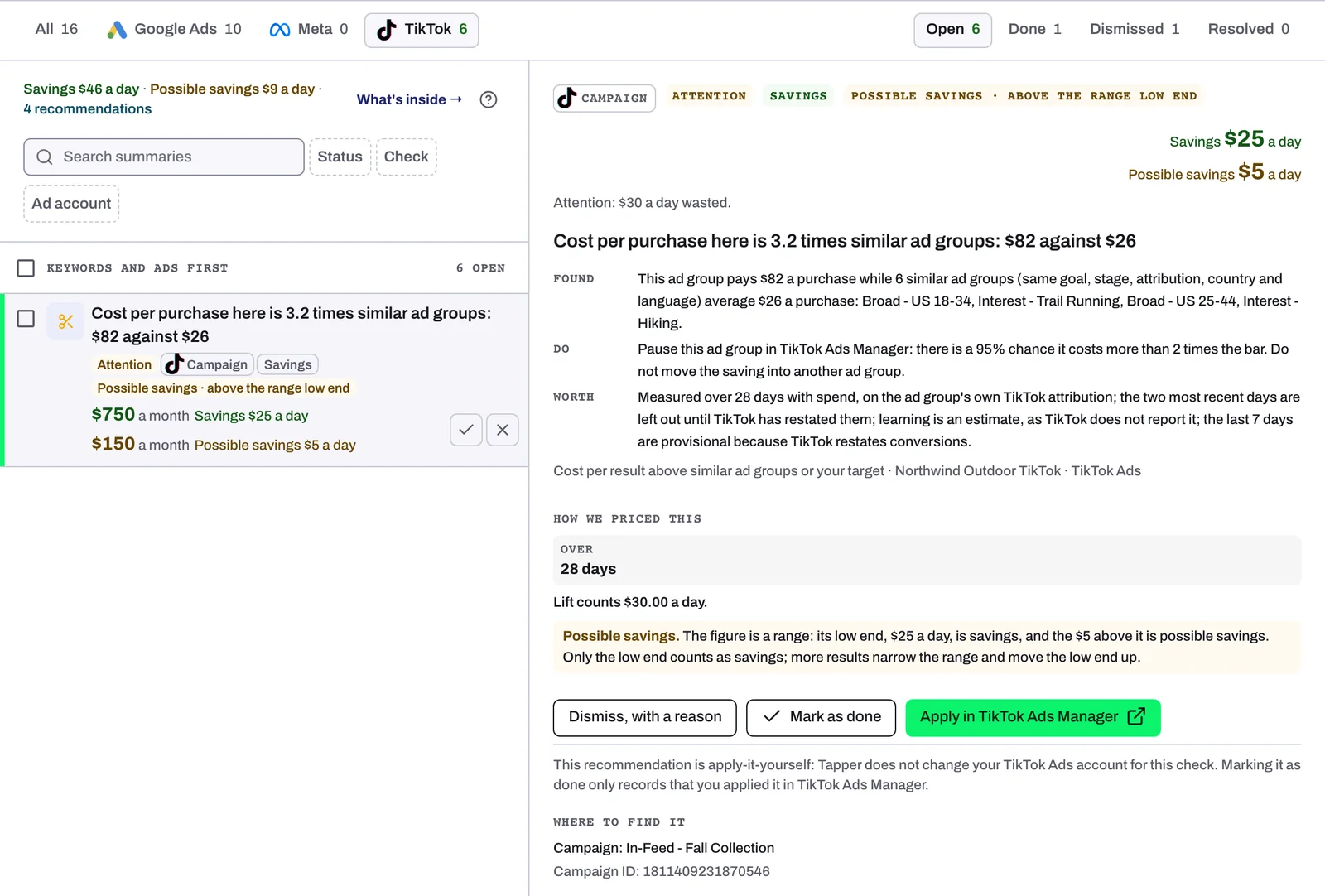
To drop a card that does not fit how you run the account, use Dismiss, with a reason. On TikTok, stopping the check for the account closes its open cards there, but the check keeps running and can raise new ones. See Fix, mark as done, dismiss and revert.
Related
Was this helpful?
Related articles
Still need help?
Chat with our team and mention this article.