

Automatic fixes and the Activity tab
The Activity tab shows what has been done in Lift: every fix applied, failed or reverted, with an undo while Tapper can still remove the change, and every other action taken in Lift. Automatic fixes are off unless you switch them on, and only on Google Ads, where Tapper can tighten a target CPA or raise a target ROAS on its own, inside a band you set, once a person's own fix of that kind has stuck on that account.
Where to find it
Open Lift in the sidebar, then the Activity tab, after Lift, Why and Settings. It covers every ad account of the selected protected entity, on every platform, with no filter, and like the rest of Lift it is for workspace Owners and Admins. From top to bottom it shows Waiting (only when an automation band held a change back), Fixes and Changes (every action taken in Lift).
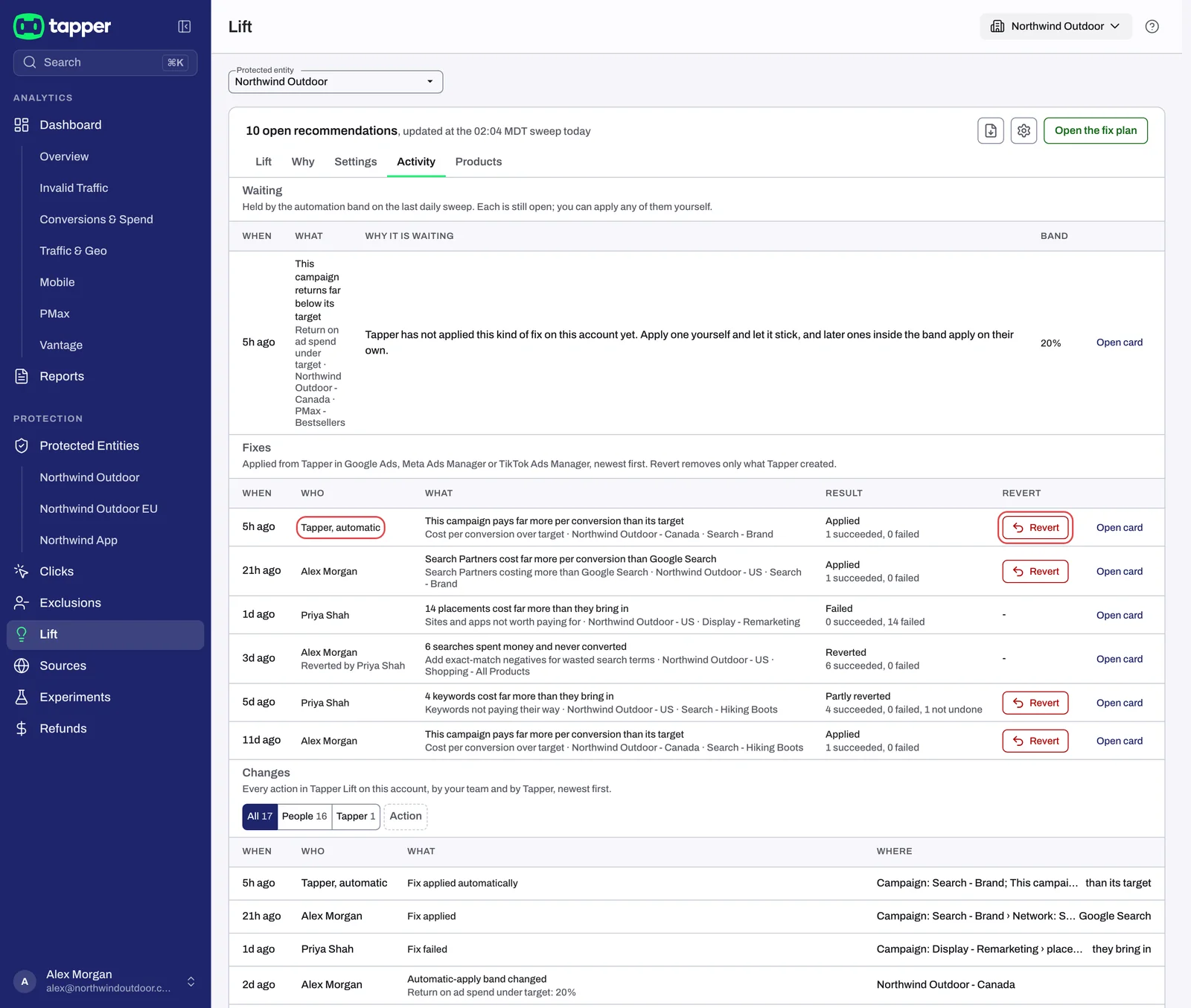
The Fixes table: every fix
The Fixes table lists every fix applied, failed or reverted from Tapper, newest first, including the automatic ones. A card marked as done is not a fix, so it shows only under Changes.
| Column | What it shows |
|---|---|
| When | How long ago the change landed, was reverted or (if it failed) was tried, such as "3d ago". Hover over it for the date and time in your workspace's time zone. |
| Who | The person who pressed the fix, or Tapper, automatic for a change an automation band made. After a full revert, "Reverted by" and a name appear under it. |
| What | The card's headline, with the check, the ad account and the campaign under it. |
| Result | Applied, Failed, Reverted or Partly reverted, with counts such as "3 succeeded, 1 failed" or "1 not undone" under it. |
| Revert | A Revert button while Tapper can still undo the change, otherwise a dash. |
| Open card | Opens the whole card in a window, even one that has left every list. |
Revert a fix from here
- Find the fix in the Fixes table.
- Press Revert on its row.
- In Revert this fix?, press Revert.
Tapper undoes only its own change: it removes the exclusions and negative keywords it added (never your own), and sets anything else it changed, such as a target, a budget, a network setting or a pause, back to how it was just before the fix, even if it was changed in Google Ads since. After a full revert, the card goes back to the Open tab. If Tapper could not undo all of it, a red message says how many changes are still live, the card stays in Done, and the row reads Partly reverted and keeps its Revert button.
Revert shows while the fix is the newest applied fix on its card, has not been fully undone, and Tapper can still make changes in the ad account. There is no time limit. The card's own Revert this fix does the same: see Fix, mark as done, dismiss and revert. If a row shows a dash or a revert is refused, see A fix was refused or cannot be reverted.
The Changes table
Changes lists every action taken in Lift on these accounts, newest first: fixes, reverts, cards marked as done, dismissals, checks switched off and back on, Closed by Tapper when a daily check closed cards, and changes to Lift settings, such as a band (Automatic-apply band changed, with the check and its new band or "off"). Its columns are When, Who (Tapper, automatic for what Tapper did itself), What and Where (the card or ad account, named as it was then).
Above the table, Who switches between All, People and Tapper, and an Action filter narrows it to kinds of action, each with its count. Repeats of the same automatic action, such as a daily check closing cards, fold into one row, such as "9 times, Sep 29 to Oct 11": press it to see each one.
Automatic fixes on Google Ads
An automation band is the largest change to a campaign's target that Tapper may make on its own, as a share of the current target. It is set per Google Ads account and per check, and it is off until you set it.
- Two moves only: tightening the target CPA on Cost per conversion over target cards and raising the target ROAS on Return on ad spend under target cards, as the Tighten target CPA to {money} and Raise target ROAS to {n} buttons do. Every other fix waits for a person.
- Google Ads only. On Meta Ads and TikTok Ads, Tapper changes nothing in the account: the card's Open in Meta Ads Manager or Apply in TikTok Ads Manager opens the ad platform, where you make the change.
- Only after a person's own fix of that kind has stuck on that account: someone pressed that target fix there, it applied, nobody reverted it, and a later daily check no longer found the problem. A reverted fix never counts.
- Only when a press would work: Tapper can make changes in the account, the card is about one campaign, and the target is the campaign's own, not a portfolio strategy or targets set by its ad groups.
At the end of each daily Google check, Tapper moves each qualifying target by your band or by its usual 20% step, whichever is smaller: with a 10% band, a target CPA is lowered by 10%, not 20%. Pressing the fix yourself still moves the full 20%. The card moves to Done, the change shows on this tab as Tapper, automatic, and you can revert it like any other fix. Tapper sends no email about automatic changes, so check this tab.
Set a band
You need to be a workspace Owner or Admin.
- On the Lift page, press the gear (Setup) in the top bar.
- Open Google Ads in the left rail.
- If the protected entity has more than one Google Ads account, choose one in Ad account.
- Under Automation bands, type a percentage from 1 to 50 in Automation band, Cost per conversion over target, Automation band, Return on ad spend under target, or both. Leave a field empty to keep that check off.
- Press Save at the bottom of the page.
- The dialog This lets Tapper change this account on its own names each check and its band. Press Save anyway.
To switch a band off, clear its field and press Save; that needs no confirmation. If the fields are grayed out, One-click fixes, just above them, is turned off for this account and nothing is applied automatically: ask your Tapper contact to turn it back on. Your bands are kept. For the other settings here, see Lift Setup: business type, emails and Google Ads settings.
The Waiting table
When a band looks at a card on the daily check and does not apply the change, the card is listed in Waiting, above Fixes, largest money first. Nothing in it has changed in the ad account: each card is still open, and Open card lets you act on it yourself. Each daily check rewrites the table. Its columns are When, What, Why it is waiting, Band (your band, with "Tapper would move {n}%" under it when Tapper worked out a move) and Open card. The reasons:
- No fix of this kind has stuck on this account yet: press one yourself and let it stick.
- One-click fixes are turned off for this account: ask your Tapper contact.
- Tapper cannot write to the account: reconnect it or give Tapper edit access in Google Ads, then ask your Tapper contact if it still waits.
- The change cannot be made from Tapper (for example, a portfolio target): make it in Google Ads.
- Tapper could not read the campaign's current target.
- The band is too narrow: once the new target is rounded, the change would go past it or change nothing. Press the fix yourself, or widen the band.
Related
Was this helpful?
Related articles
Still need help?
Chat with our team and mention this article.