

Set your Meta targets: cost per result, frequency and budget split
Workspace targets tell Lift what good looks like on a Meta ad account: what a result should cost, the return on ad spend you aim for, how often one person should see an ad, and how the budget should be split across funnel stages. Several Meta checks read them, so a figure here changes what Lift flags. Each Meta ad account has its own targets, in its own currency, with nothing converted.
Before you start
- You need the Owner or Admin role: members with the Editor role cannot load or save targets.
- The protected entity needs a connected Meta ad account: see Connect Meta Ads for Lift.
- Bands apply by funnel stage, so first check each ad set's stage: see Check the funnel stage Lift gives each Meta ad set.
Set your targets
- In the sidebar, select Lift. If the workspace has several protected entities, pick the right one in the Protected entity dropdown.
- Press the gear icon (Setup) in the top bar. Setup opens on General.
- In the left rail, under Meta, select Workspace targets (on a phone, pick it in Setup section).
- If the entity has more than one Meta ad account, pick one in Ad account.
- Fill in the fields you know, described in the table below. A field you leave empty leaves its checks as the table says.
- Press Save targets at the foot of the block. It can't be pressed until you change something, and it saves only what you changed.
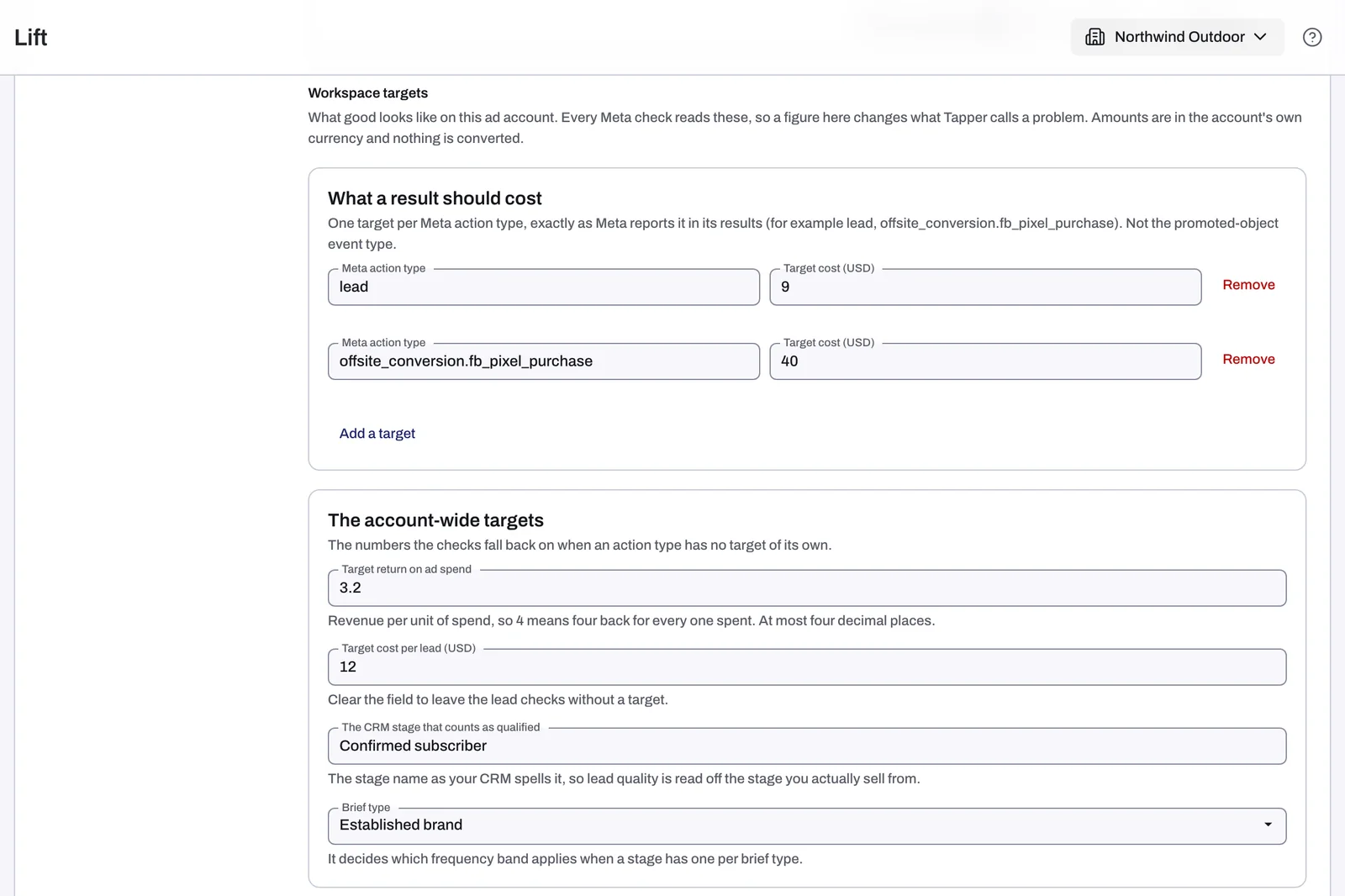
What each target does
| Field | What to enter | Which checks read it |
|---|---|---|
| What a result should cost | Up to 32 rows: the Meta action type exactly as Meta reports it, such as lead or offsite_conversion.fb_pixel_purchase, and its Target cost. | Ad set for existing customers missing its target judges only against it, and raises no card without it. Cost cap flags a cost cap or bid cap above it. One place the ads appear costing more than the rest of the ad set judges a placement other than Audience Network once it has spent that much (otherwise, the ad set's own cost per result). |
| Target return on ad spend | Revenue per unit of spend: 4 means four back for every one spent. | Return on ad spend under target over 3 days and 7 days flags a return under it over both the last 3 and the last 7 days (otherwise, it compares cost per result with similar ad sets). Cost cap flags a minimum return goal below it. |
| Target cost per lead | A cost per lead. | No check. To give lead ad sets a target, add their action type, such as lead, under What a result should cost. |
| The CRM stage that counts as qualified | The stage name as your CRM spells it. | No check. |
| Brief type | Not set, Established brand, Launch or Burst. | Picks which frequency band applies. Not set, or a brief type the stage has no band for, uses its Established brand band. |
| How often one person should see an ad | Per Funnel stage and Brief type: the Lowest and Highest impressions per person per 7 days. | Top of funnel: People seeing the ads more often than planned (otherwise, 1 to 2 a week) and People seeing the ads too few times a week to remember them (no card without a band). Middle of funnel: the Highest is the limit for People who know the brand seeing the ads too often as clicks fall (otherwise, 6 a week). No check reads other stages. |
| How the budget should be split | Per Funnel stage: the Lowest share, percent and Highest share, percent of the account's spend. | Funnel stage getting more or less budget than planned judges each stage's share against your band or, without one, an industry reference: Top of funnel 40% to 80%, Middle of funnel 15% to 30%, Bottom of funnel 10% to 20%, Retargeting 5% to 30%. It runs once 90% of the spend is in ad sets with a stage, and its card calls the stages awareness, consideration, conversion and existing customers. |
| Most of the spend that may go to existing customers, percent | A share of the whole account: 15 means 15 percent. | No check. |
| Budget may be moved between campaigns | A switch, off by default. | When on, Budget to move from a weaker ad set to a stronger one can suggest moving budget from an ad set in another campaign; when off, only from one in the same campaign. |
| Meta enhancement and What is allowed | One row per creative enhancement, by its Meta name, and whether Meta may use it, for example off. | New launch set up differently from the rest of the account lists a new ad that uses one you do not allow. |
| Expected languages | Languages, separated by commas (en, fr, es unless you change it). | No check. |
| Leads from this account get a call | A switch, off by default. | No check. |
| Add a quiet period | A First day and Last day, like 2026-12-24, and optionally What it is. | No check: a quiet period pauses nothing. |
A target cost counts only for a result Lift treats as a conversion, such as a purchase, lead or install: never for link clicks, landing page views or add to cart. No results after real spend, the Cost per cards named for their result (such as Cost per purchase) and Cost per lead above similar ad sets keep comparing an ad set with similar ad sets: a target is what you aim for, while similar ad sets show what the account actually pays.
What happens next
Lift reads your targets at each daily check, so a save applies from the next one. Cards judged against them are re-scored then: new ones can appear, and one that no longer applies leaves the open list, with no saving counted. Some cards name the figure they used, such as "our default of 1 to 2 a week" or "the range set for this account".
If something goes wrong
- No Meta ad account: the block only describes itself, and Accounts under Meta in the rail shows a small hollow circle (point at it to see Not connected). Connect one first.
- This account has no currency on record: amounts save as typed, but the page cannot name their currency. Reconnect the ad account, and if the notice stays, contact your Tapper contact.
- Save targets can't be pressed: nothing has changed, or a field shows an error. "Use a Meta action type as the key." means the key has a space or a sign other than a dot, underscore or hyphen, or starts with one of those three. On the existing customers field, "Must be between 0 and 1." asks for a plain number from 0 to 100, with no % sign.
- A target changes nothing: check that the action type matches the ad set's result letter for letter, that the band's stage and brief type are the ones read, and that a daily check has run since you saved.
Related
Was this helpful?
Related articles
Still need help?
Chat with our team and mention this article.