

How Lift works on Meta Ads
Every day Lift reads each Meta ad account you connect (Facebook and Instagram alike), checks its campaigns, ad sets and ads, and lists what is worth changing as cards under the Meta tab of the Lift page. The checks themselves are in The checks Lift runs on Meta Ads.
Which accounts Lift checks
Lift starts once Tapper has set your workspace up. From then on it checks every Meta ad account connected to a protected entity. There is nothing to switch on: connecting the account starts it (Connect Meta Ads for Lift). Lift first reads up to 90 days of the account's history, so the first cards usually come the day after you connect. If no cards appear after a few days, see No Lift recommendations yet.
An account Tapper can no longer read, because Meta signed Tapper out or cannot reach the account, is not checked until you reconnect it, and its cards stay as they were. An account that cannot run ads (not active in Meta, or with no payment method) gets only two checks: Ad account disabled or flagged by Meta and Spending limit or balance close to stopping delivery.
What Lift reads, and when
Lift reads through your existing Meta connection, and reading changes nothing: it creates nothing in the account and changes no setting. Once a day Lift reads how the account, its campaigns, ad sets and ads are set up (budgets, bids, goals, attribution settings, targeting, creative and more) and their daily results, with breakdowns such as placement, age and gender, and country. It never reads the business behind the account, payment card or invoice details, the rules inside your website audiences, lookalike seeds, or who an automated rule notifies.
- Each daily check judges the previous day, in the ad account's own reporting time zone. A change you make in Ads Manager shows after the next daily check, and while cards are open, the top of the Lift page says when the list was last updated.
- Meta keeps updating results for 28 days, so Lift reads the last 28 days again every day (7 for ads), and a priced card says "the last 7 days may still change".
- The windows are fixed: money is counted over the last 28 days, and the checks' triggers use the last 3, 7 or 14 days. The Detection window in Setup is for Google Ads only.
What counts as a result
A result is what the ad set is set to get, from its performance goal and the event it optimizes for, not from the campaign objective: for example purchases, leads, registrations, app installs or ThruPlays. Link clicks, landing page views and add to cart never count as conversions, so an ad set optimizing for one of them gets no money figure, even in a sales campaign.
Results are counted on the ad set's own attribution setting, as in Ads Manager: 1-day click, 7-day click, or click and view. On a click-only setting, results within a day of a view without a click are shown, not priced. A day with spend but no results returned counts as unknown, never zero, so no money rests on it.
Funnel stages
Each ad set gets a funnel stage, shown as a tag on its cards. The stage decides which checks run on the ad set and which ad sets it is compared with. Lift reads it from the ad set's goal and audience, never from names unless you set up a naming rule.
- An awareness goal, such as reach or video views, is always Top of funnel.
- A consideration goal, such as link clicks, landing page views, messages or leads, gives Middle of funnel, and a conversion goal, such as purchases or app installs, Bottom of funnel. The sub-segment says who the ad set reaches: prospecting for new people (an ad set with Advantage+ audience on counts as reaching new people), retargeting for site or app visitors, and re-engagement for people who engaged with the brand, which puts a conversion ad set in Middle of funnel too.
- A consideration or conversion ad set aimed only at existing customers (customer lists or offline conversion audiences) is Retargeting, and one Lift cannot place is Not classified yet: only the checks that run on every stage judge it.
- If your business is leads (your sign-up answer Leads, or else the business type Leads (forms, calls, sign ups) on the entity's Google Ads accounts, when they agree), lead goals count as conversion goals.
- With audience segments set up in Ads Manager, the tag also shows who the ad set reached, as in Bottom of funnel, prospecting · 62% new customers. That never changes the stage.
The full table of goals and audiences, and how to correct a stage in Setup's Stage map, are in Check the funnel stage Lift gives each Meta ad set.
Similar ad sets and the bar
Cost comparisons judge an ad set against similar ad sets on the same ad account, with the same campaign objective, result, stage and sub-segment, attribution setting, countries and languages (an ad set targeting all languages matches any language in its country).
- Lift needs 3 similar ad sets with 5 or more results each. With fewer, it drops the sub-segment and tries again, never the country, language or attribution setting; if there are still too few, no comparison card is shown.
- The bar is pooled: the total spend of those with 5 or more results, divided by their total results.
- An ad is compared only with its own history, never with the other ads in its ad set.
- On a Cost per card, the ad set needs 5 or more results, and a retargeting ad set is compared only with retargeting ad sets that include the same audiences.
Checks built around a target read your Workspace targets, in Setup's Meta section, instead: for example your target return on ad spend or a frequency band. See Set your Meta targets: cost per result, frequency and budget split.
How the money is worked out
Six checks put money on their cards, all on ad sets whose result is a conversion; every other Meta card reads Not priced. Money is per day, in the ad account's own currency, and currencies are never added together. A money card worth less than 1 of that currency a day is not shown.
- The figure is the ad set's spend over the last 28 days beyond what its results would have cost at the bar, divided by the days it spent, and capped at what it spends on a day it runs. A small ad set's cost per result is first pulled toward what similar ad sets pay.
- There is no money without spend in the last 7 days, with spend on fewer than 14 of the last 28 days, or with spend only in the last 3 days.
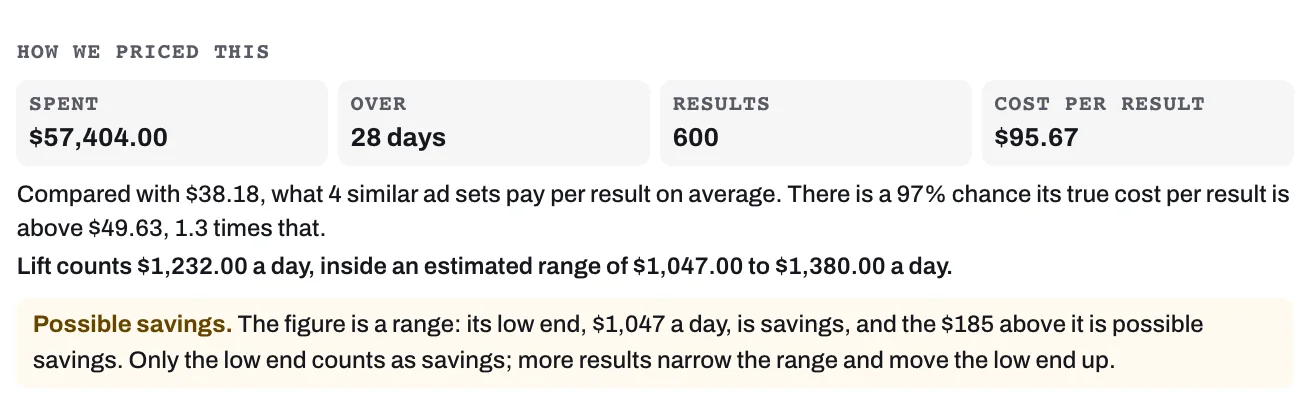
- At a 90% or higher chance that the ad set really pays more per result than its bar, the low end of its estimated range is Savings and the rest Possible savings; under 90%, all of it is possible savings. How we priced this on the card shows the working. On a Cost per card named for its result, such as Cost per purchase, or a Cost per lead above similar ad sets card, its line "There is a {N}% chance its true cost per result is above {amount}, 1.3 times that." is a different test: the chance of paying more than 1.3 times the bar, which must be 90% or more for the card to show at all. The chance the split uses, of paying more than the bar itself, is not shown as a figure.
Rules Lift never breaks on Meta
- Never spend more: budget advice is a cut, or a move that keeps the account's total the same; caps are only tightened and return goals only raised.
- Leave learning alone: no card on an ad set in its learning phase, except from the three checks about learning and New launch set up differently from the rest of the account. An ad set counts as learning when Meta says so, and for 7 days after a significant edit even if Ads Manager shows it out of learning.
- Settled, active ad sets only: learning and new launch checks aside, no card on an ad set with spend on fewer than 7 of the last 28 days, or whose campaign spent nothing in the last 3 days. Cards cover only what Meta shows as active: pause it, and its card moves to Resolved at the next daily check, with no saving counted.
- You make the change: on every card, Open in Meta Ads Manager takes you to the item. Make the change there, then press Mark as done.
The daily data check
Before a card shows, Tapper checks the account's data and the card itself. A card that does not pass is not shown yet.
- The day's settings and results must have fully arrived, and Tapper's 7-day spend for the account must be within 5% of Meta's own figure. If not, the account gets no new card and none closes that day, and its open cards leave the list and the totals until a check with complete data, coming back with their first Detected date if Lift still finds them.
- Each card must hold up too: money no more than the ad set spends, similar ad sets that really match, numbers that match its figures.
- A priced card that Lift no longer finds leaves Open without appearing under Resolved, and no saving is counted for it.
- When results per click fall by more than half on most ad sets at once, Lift shows one card, Tracking break: results per click fell on most ad sets at once. Until results recover, and for 7 days after, the cards that read results leave the list.
What works on Google Ads only
- Setup's General section (Business type, Emails and alerts) and Google Ads section (Detection window, Monthly budget, Automation bands, Checks switched off and more) list Google Ads accounts only. A Meta account's weekly digest goes to the Owners and Admins who turned the Lift emails on.
- The Settings, Why and Products tabs cover Google Ads accounts only. Export report covers Meta ad accounts too.
- Dismissing a Meta card with Not for this account stops that check on the ad account and closes its open cards there. It cannot be switched back on in Setup: contact Tapper support (How to get help from Tapper).
Related
Was this helpful?
Related articles
Still need help?
Chat with our team and mention this article.