

Lift emails: settings alerts and the weekly digest
Lift can send you two emails: a settings alert when it flags a setting on one of your Google Ads accounts, and a weekly digest of each ad account's open recommendations, on Google Ads, Meta Ads and TikTok Ads alike. Both are off until you turn them on, and each person turns them on for themselves. Neither email changes anything in an ad account: every link in them opens Lift, except the unsubscribe link.
Turn the emails on
- In the sidebar, select Lift (in the Protection section).
- On the Lift tab, under the search box and the filters, just above the list, press Turn on alerts on the banner Get alerted when account settings drift.
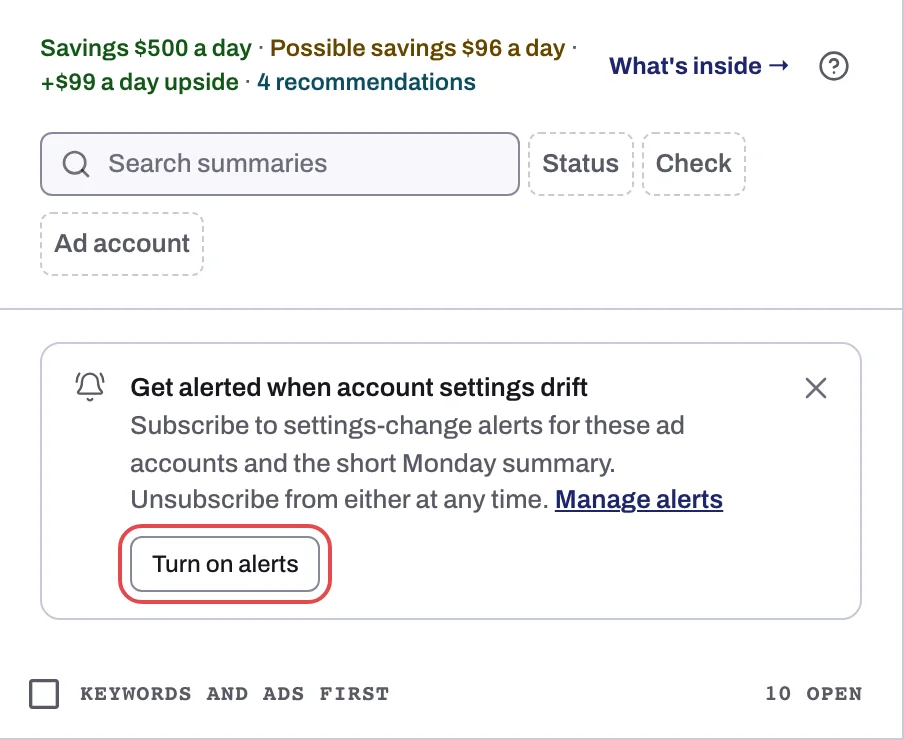
One press turns on both emails (the banner's "short Monday summary" is the weekly digest). The banner and the confirmation both carry a Manage alerts link to Settings > Notifications. The subscription is yours: whatever "for these ad accounts" on the banner suggests, one press covers every ad account in every workspace you belong to, not only those of the protected entity you are on. The banner shows until you have both emails; closing it hides it on that protected entity for 14 days, in that browser.
Turn an email off
Open Settings and select Notifications. Under Email, each email has its own switch: Settings-change alerts and Monday digest. A switch takes effect at once, in every workspace you belong to, and turns an email back on too.
Each email also ends with an Unsubscribe link for that email only. It works without signing in and stops that email for every ad account and workspace. Turn on alerts on the banner turns both back on: the banner shows whenever either email is off for you, unless you closed it in the last 14 days.
Choose who receives an account's emails
By default, Lift emails go to the workspace's Owner and Admins who turned them on; Editor members are not among them. For each Google Ads account, an Owner or Admin can narrow that down:
- On the Lift page, press the gear icon (Setup) in the top bar. Setup opens on General.
- In Ad account, pick the Google Ads account (with only one, it is already picked).
- Under Emails and alerts, tick who should get its emails, then press Save.
With nobody ticked, every Owner and Admin who turned the emails on gets them; tick people and only they do. Meta Ads and TikTok Ads accounts have no such setting, so their digests go to every Owner and Admin who turned the emails on. See Lift Setup: business type, emails and Google Ads settings.
The settings alert
Settings alerts cover Google Ads accounts only: Lift has no settings checks on Meta Ads or TikTok Ads. Lift sends one when its daily check sees, on an account:
- a new finding on the Settings tab, or one that comes back, for example Search Partners switched on for a campaign; or
- a setting back on after it had been switched off.
You get at most one settings alert per ad account a day.
The subject reads "{account}: {N} setting changes need review", and the email lists every open settings finding on the account, not only the new one, each followed by its campaign's name in parentheses. Review settings opens the Settings tab; with several protected entities, pick the account's entity in Protected entity at the top of the page. If an account runs a watched setting such as Search Partners on purpose, choose Don't flag for it under What to flag on that tab: see The Settings tab: account settings Lift watches.
The weekly digest
Every Monday at about 08:00 in your workspace's time zone (see Workspace time zone: which day your numbers count in), Lift sends one digest per ad account with open recommendations, on any platform; an account with nothing open gets none. The subject reads "{account}: {N} open opportunities this week".
| Part | What it shows |
|---|---|
| Opening lines | How many recommendations are open, then the estimated savings and possible savings a day, in the account's own currency, never added together, also split by kind of fix. |
| Recoverable today | Up to 10 cards with money to save, largest first: headline, campaign, reason, and what each is worth a day. |
| Recommendations | Up to 5 other open cards, such as settings findings, with no money. |
Review this week's recommendations opens Lift, and each row has two links:
- Review opens the card. On a Google Ads card with only one fix button, that button's confirmation opens too, unless the button is Pause campaign or grayed out, so you can check the change and confirm it. Any other card, including every Meta Ads and TikTok Ads card, just opens.
- Skip opens the card's Not for this account? dialog.
Nothing changes until you confirm: see Fix, mark as done, dismiss and revert. A card that closed after the email opens with "This recommendation is no longer open." The digest lists open cards only, so a card marked as done, dismissed or resolved drops out of the next one.
What no email covers
The settings alert and the digest are the only Lift emails. No email goes out for:
- a new card on the Lift tab (the digest rounds them up);
- a fix applied, failed or reverted (the Activity tab lists them);
- a setting change on a Meta Ads or TikTok Ads account;
- a day when an account's cards leave the list until its data comes in;
- an ad account that loses its connection: Tapper marks it Needs reconnect, Not active or Needs attention instead (see Reconnect an ad account that stopped working).
Lift has no Slack or other chat alerts. In the app, the dashboard shows Campaign settings need review while a High settings finding is open (see Lift on the dashboard). Your monthly report's email also mentions Lift when the report has a Tapper Lift section (see Monthly reports: what is in your report and how to download it).
If an email does not arrive
- The banner Get alerted when account settings drift still shows: at least one email is off for you. Press Turn on alerts, or check the switches in Settings > Notifications.
- You have the Editor role, or members are ticked under Emails and alerts for that Google Ads account and you are not one of them.
- No digest: the account had nothing open, or it has lost its connection.
- No settings alert: the account is not on Google Ads, nothing opened or was switched back on, or it already had an alert that day.
- Your Lift page shows its recommendations blurred, with an Unlock recommendations button: no Lift email goes out while they are.
- Lift starts once Tapper has set your workspace up. If your workspace is new and the Lift page stays empty, contact your Tapper contact: see No Lift recommendations yet.
Each email Lift sends shows on the Activity tab, in the Changes table, as Email sent with its ad account. If an email's link opens Lift with a notice that the recommendation is not available: the card has left the list, or the email is about another workspace: switch to that workspace and press the link again.
Related
Was this helpful?
Related articles
Still need help?
Chat with our team and mention this article.