

Block reasons explained: what each label means
Every invalid click Tapper records carries a block reason: a short label such as Bad Bot, VPN or Ad Click Limit Exceeded that says why the visitor was flagged. A visitor can carry more than one.
Where you see block reasons
| Where | What it shows |
|---|---|
| Clicks page | The Block reason column and filter, one row per ad click |
| Exclusions page | The Block reason column per excluded visitor, and the Block reason field in the visitor drawer (No block reason when none was recorded) |
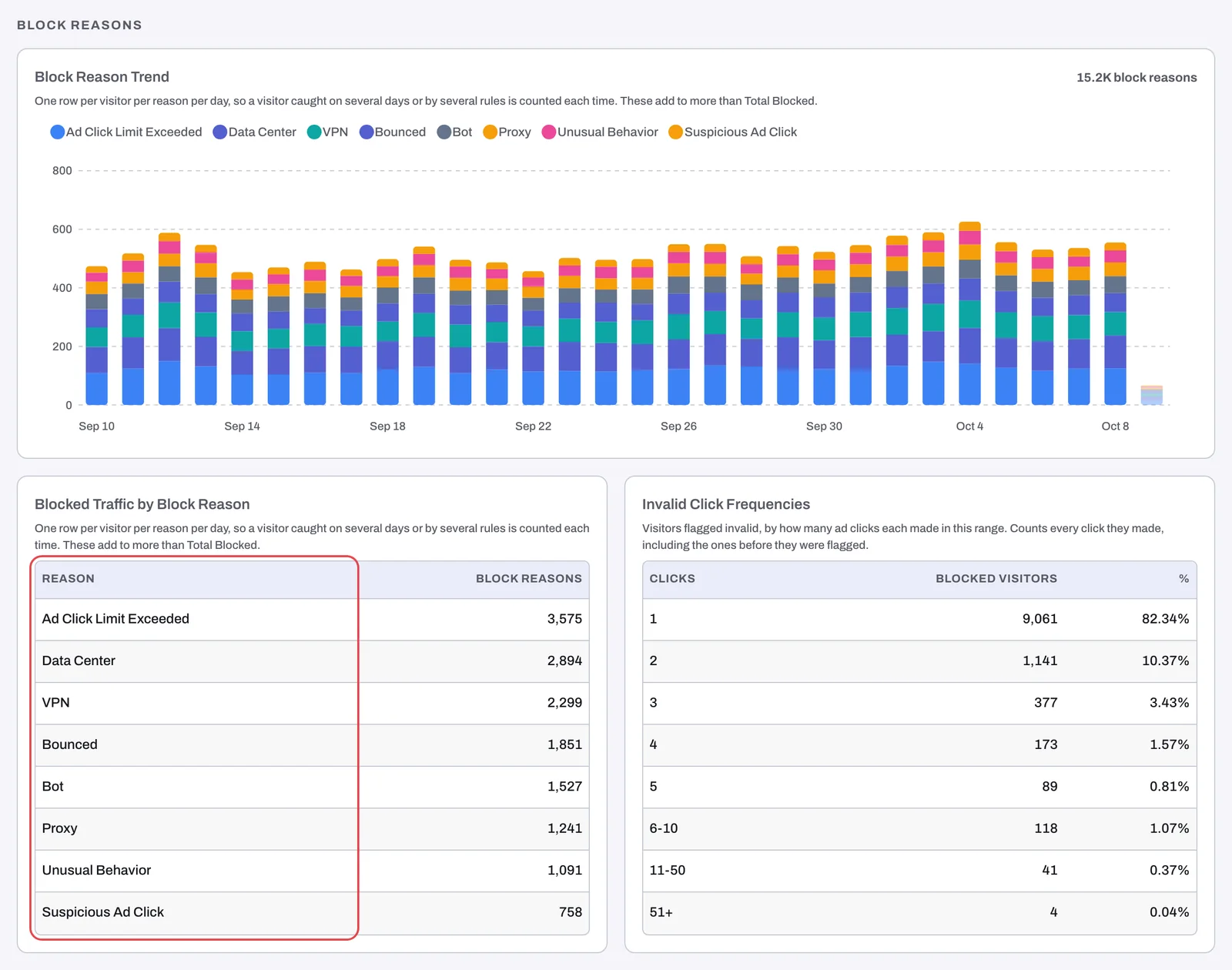
| Dashboard | The Block reason filter under Add filter; on Overview, the Clicks vs Invalid Traffic Types over time chart; on the Invalid Traffic tab, the Block Reason Trend chart and the Blocked Traffic by Block Reason card; on Conversions & Spend, the Top Block Reason column of Keyword by Conversion |
| Monthly reports | The Invalid Traffic Types section, one per platform |
| Refunds page | The Block reason tiers you pick for a Google refund report, and the reasons column in the file |
On a workspace in monitoring-only mode nothing is blocked, so the wording around the reasons changes, but the reason labels do not:
- On the dashboard, the filter reads Invalid traffic reason, the two block reason cards become Invalid Traffic Reasons Trend and Invalid Traffic by Invalid Traffic Type, and the Top Block Reason column reads Top Invalid Traffic Reason.
- The Exclusions page is titled Invalid Traffic, in the sidebar and on the page.
- The column on the Clicks and Exclusions pages is named Invalid traffic, and the Block reason field in their visitor drawers reads Invalid traffic type.
The tables below use the labels of the Clicks and Exclusions pages. The dashboard, in its Block reason filter and in every chart, card and column that names a reason, writes seven of them differently:
| On the Clicks and Exclusions pages | On the dashboard |
|---|---|
| Bad Bot | Bot |
| Tampered Device | Suspicious Device |
| Geographical Inconsistency | Geo Inconsistency |
| JS Disabled | Js Disabled |
| iCloud Relay | Icloud Relay |
| Tor | TOR |
| Click Farm | Returning Non Converter |
Reasons from your detection rules
These come from a row on the entity's Web detection rules tab, so you can change how often they fire.
| Label | What it means | Setting behind it |
|---|---|---|
| Ad Click Limit Exceeded | The IP clicked your ads more often than an Invalid click threshold rule allows | Invalid click threshold |
| Aborted Ad Click | Ad clicks registered but your page never loaded and no events were recorded, more often than your rule allows | Aborted ad clicks |
| Suspicious Ad Click | The IP clicked your ads the set number of times without any events on the page | Suspicious Ad Clicks |
| Bounced | The IP spent less than the set number of seconds on your site | Minimum Seconds on Site |
| JS Disabled | A browser with JavaScript disabled clicked your ad | Block JavaScript-disabled browsers |
| VPN | The click came through a VPN | VPN blocking |
| Geographical Inconsistency | The click's location conflicts with your country rule | Block IPs by country |
| Unusual Behavior | The behavior the monitoring script recorded points to an invalid source | Behavior analysis |
| Cross Platform Blocked | The visitor was flagged on another ad platform | Cross-platform blocking |
For each setting, see How Tapper decides a click is invalid.
Reasons from IP intelligence
Tapper checks every click's IP address against network data. These reasons have no switch of their own.
| Label | What it means |
|---|---|
| Data Center | The IP belongs to a hosting or cloud provider, not a home, office or mobile connection |
| Proxy | The click came through a proxy service |
| Tor | The click came through the Tor network |
| iCloud Relay | The click came through Apple's iCloud Private Relay |
| Anonymous | The IP belongs to a service that hides where the visitor really is |
| Known Attacker | Intelligence sources list the IP as a source of attacks |
| Known Abuser | Intelligence sources list the IP as a source of abuse |
| Threat | Intelligence sources flag the IP as a threat |
| Bogon | The address should not appear on the public internet at all |
| Suspicious ASN | The network the IP belongs to (its ASN, the block of addresses one operator runs) is associated with invalid traffic |
Reasons from device and browser signals
| Label | What it means |
|---|---|
| Bad Bot | The visit shows signs of automation, such as a headless browser or an automation tool |
| Fake User Agent | The browser identifies itself as something it is not |
| Suspicious Screen Resolution | The reported screen size is not one a real device has |
| Tampered Device | The device's fingerprint shows anomalies, signs that it was altered or spoofed |
Other labels
- Click Farm: a visitor who keeps coming back through your ads without converting. The dashboard and the monthly reports write it as Returning Non Converter. It has no setting on the tab.
- Aggregated Range: when a Google campaign reaches Google's limit of 500 IP exclusions, Tapper can combine many excluded addresses that sit close together into one range exclusion. The range carries this label. See The 500 IP exclusions per campaign limit in Google Ads.
- You may also meet general labels such as Invalid Traffic, Suspicious IP, Aggressive Clicking or Other. If one appears on a visitor you need to understand, contact support with the visitor id (see How to get help from Tapper).
Block reasons in the refund report
On the Refunds page, Block reason tiers group the reasons by how strong the evidence is for a Google Ads claim:
- Tier 1 - High confidence: its label names Bot, Data Center, Known Attacker and Geo Mismatch among its reasons. It is the only tier checked by default.
- Tier 2 - Supporting evidence (VPN, Proxy, TOR, Suspicious IP)
- Tier 3 - Weak signals (Unusual Behavior, JS Disabled, Bounced)
Each tier holds more reasons than its label names, and the tier labels use short forms (Bot, TOR, Geo Mismatch) of the labels shown elsewhere. See Generate a Google Ads refund report.
Related
Was this helpful?
Related articles
Still need help?
Chat with our team and mention this article.