

The 500 IP exclusions per campaign limit in Google Ads
Google Ads lets each campaign hold at most 500 IP exclusions. Tapper Block works within that limit: once a campaign is full, it keeps the IPs with the strongest and most recent evidence and rotates the others out to make room for new ones.
How it works
- The limit is per campaign, not per account. Each campaign that takes IP exclusions (Search, Display, Shopping, and Demand Gen for IPs sent as each click is flagged) has its own 500. Performance Max and Video campaigns take no IP exclusions, so the limit does not apply to them.
- Below 500, nothing is rotated out. Automatic exclusions are not on a timer.
- At 500, Tapper ranks. Every excluded IP is ranked by the kind of invalid behavior it showed and how recently it was flagged. A new IP replaces the lowest-ranked one only when it ranks at least as high and its evidence is more recent. Tapper works through full campaigns in rounds, so a new IP can wait a short while for a slot.
- A rotated-out IP is not forgotten. If it clicks again and the click is flagged, it goes through the same ranking and can be excluded again.
- Dense ranges are merged. Over the limit, when 8 or more excluded addresses share one /24 range, Tapper can exclude the range instead. It shows with the block reason Aggregated Range.
- Rotation only happens while blocking is on. In monitoring-only mode, which covers the free trial, Tapper writes no automatic IP exclusions, so there is nothing to rotate.
IPs you add by hand use the same slots
IP addresses and ranges you add on the entity's Auto IP blocking tab go into the same per-campaign lists on Search, Display and Shopping campaigns. They are never rotated out, so every manual entry is a slot automatic exclusions cannot use. Keep that list to the addresses you really need. See Manually exclude IP addresses and ranges.
Why some campaigns fill up faster
A campaign reaches 500 sooner when it receives more invalid clicks or when your detection rules flag more of them. Low invalid click thresholds and many active detection features flag more visitors, so the list fills and rotates faster. That is not a problem in itself: rotation keeps the strongest evidence. If a campaign sits at the limit all the time, review your thresholds in Set invalid click thresholds.
Audience exclusions catch what the IP list cannot hold
Flagged visitors also go into Tapper's lists in your Google Ads account: "Tapper - Invalid Traffic List" (created with 90-day membership) and, for visitors who went over the ad click limit, "Tapper - Ad Click Limit Exceeded Traffic List" (created with 180-day membership). Tapper excludes them as an audience on your protected Search, Display, Shopping, Demand Gen and Performance Max campaigns. The audience does not use the 500 IP slots and does not depend on the visitor's IP address, so an IP rotated off the list does not mean that visitor sees your ads again while they are still in the audience. You set how long visitors stay with the Block segment for field on the Invalid Traffic Audience card, from 1 to 540 days. See The Invalid Traffic Audience and its retention window.
What you see in Tapper
On the dashboard, open the Invalid Traffic tab and scroll to Exclusions & sources. The IP Exclusions per Campaign card has one row per campaign, with the columns Campaign and IP exclusions.
Each row's bar fills toward 500. A campaign over the limit turns red. Hover a bar to see its count against the limit.
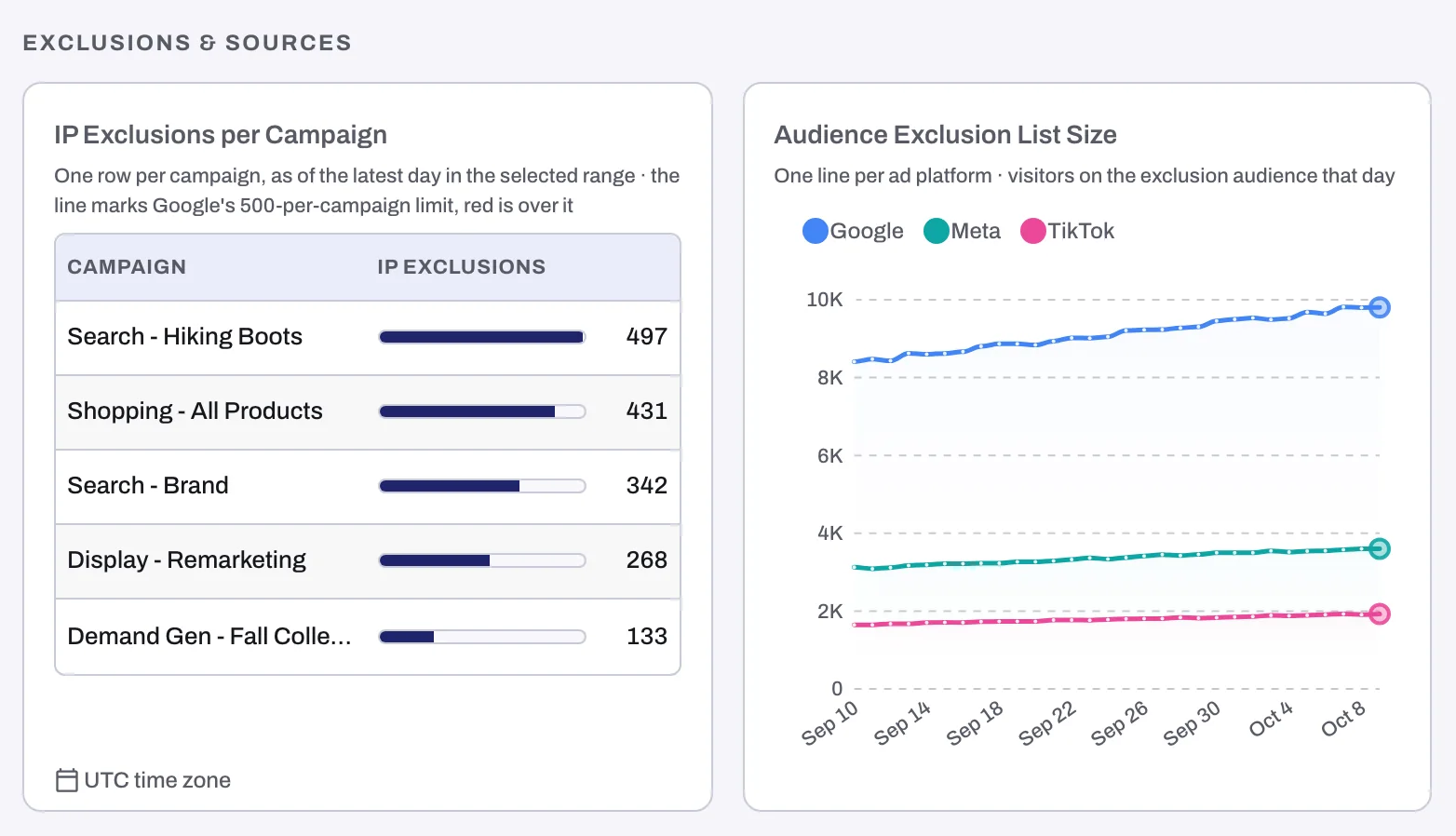
Next to it, Audience Exclusion List Size shows the visitors on the exclusion audience each day, one line per ad platform. To see which IPs are excluded, open the Exclusions page; to see them in Google Ads, look at the campaign's IP exclusions in its settings.
There is no setting for the list size: Tapper always fills each campaign up to Google's limit.
Related
Was this helpful?
Related articles
Still need help?
Chat with our team and mention this article.