

The checks Lift runs on Meta Ads
On this page
Lift checks each connected Meta ad account (Facebook, Instagram and Meta's other placements) every day and lists cards under the Meta tab of the Lift page. An open card names its check in the line "{check} · {ad account} · Meta Ads". How Lift reads results, stages, similar ad sets and money: How Lift works on Meta Ads. What Meta itself suggests: Meta's recommendations and Lift's take.
Rules every Meta check follows
- Most checks look at the last 7 days; money is counted over 28.
- A check runs only on the funnel stages it names. A Not classified yet ad set gets only the every-stage checks until you set its stage in the Stage map.
- Several checks read your Workspace targets, from the next daily check after you save.
- Never more spend: budget advice is a cut or a total-neutral move, caps only tighten, return goals only rise, and no card asks you to raise a spending limit.
- No advice on a learning ad set (or one significantly edited in 7 days), with spend on fewer than 7 of the last 28 days, or whose campaign spent nothing in 3 days, except from the three learning checks and New launch set up differently from the rest of the account.
- Cards only on what Meta shows as active. Pause it and the card moves to Resolved, with no saving counted.
- One open card per check on each campaign, ad set or ad. An ad is judged only against its own history.
- Two cards never pull a stage's budget in opposite directions: the one you have seen longest stays and says which card is not shown, and why.
- No keyword or search term checks run on Meta.
Money on a Meta card
Six checks are priced: No results after real spend, Cost per with the result's name (such as Cost per purchase), Cost per lead above similar ad sets, Return on ad spend under target over 3 days and 7 days, Cost cap and Ad set for existing customers missing its target. They price only conversion results, never link clicks, landing page views or add to cart. Every other card reads Not priced; some show spend at stake, never as savings. How the figure and its Savings and Check first split are worked out: How the money is worked out.
Top of funnel
Reach and awareness ad sets. Frequency is how many times the average person reached saw the ads in 7 days. None is priced; all but the second show spend at stake.
| Check | What it looks for | What it tells you to do |
|---|---|---|
| People seeing the ads more often than planned | Frequency more than 0.5 above the top of your band over 7 days, and above it over 28 days. Without a band under How often one person should see an ad, Lift uses 1 to 2 a week. | Set a frequency cap, use Meta's Target Frequency setting, or show the ads to a wider audience. |
| People seeing the ads too few times a week to remember them | Frequency under the bottom of your own band over both 7 and 28 days. Silent without a band. | Narrow the audience or the region, or set Target Frequency to 2, in the same budget. |
| Extra spend buying repeat views, not new people | A campaign whose spend is mostly top of funnel, with a 7-day frequency above 3 while its daily spend held or rose against the last 28 days. | Add new creative ideas, widen the audience or the area, or cap the budget. |
| Cost per person reached rising while cost per 1,000 views holds | Cost per 1,000 people reached up 15% or more on the week before, while the cost per 1,000 views moved under 5%. Not raised where the campaign has the card above. | As above. |
| Spend going where ads are rarely noticed | On an ad set with the Reach goal, one placement with 40% or more of the week's views (10,000 or more) at under half the median cost per 1,000 views of its placements. | Remove it if you choose placements by hand; otherwise change the goal or narrow the placements. Removing a placement may restart learning. |
Middle of funnel
Traffic, landing page view, messaging, call and lead ad sets (on a lead generation account, lead ad sets are bottom of funnel). The step, pixel and Advantage+ audience checks also run on bottom of funnel. Only the lead check is priced.
| Check | What it looks for | What it tells you to do |
|---|---|---|
| Paying for clicks where Meta can count page loads | An ad set set to get link clicks while Meta records landing page views for it. | Switch the goal to landing page views: duplicate the ad set with that goal, or apply Meta's own recommendation where it raised one. |
| Fewer clicks loading the page than usual | On 500 or more link clicks in 7 days, the share that loaded the page is 15 percentage points or more under the ad set's own 28-day share. | Look at the page, not the ad: weight, load time, redirects, recent scripts, and where Meta's pixel sits. |
| Ad set losing people at one step | On 500 or more link clicks in 7 days, the first step where the ad set does half as well as similar ad sets, or worse: the ad, the page load, and on bottom of funnel also the product page and the checkout. | Work on that step: the ad, the page's load, the product page (price, stock, delivery terms) or the checkout (fields, payment options, delivery costs). |
| Clicks arriving with no page loads recorded | 100 or more link clicks in 7 days and not one landing page view: a tracking fault, never priced. | Check that Meta's pixel is on the final landing page and fires, that a consent banner does not block it, and that the event is not filtered out. |
| Cost per lead above similar ad sets | No leads in 7 days after spending twice what similar lead ad sets pay per lead, or a 90% or higher chance of paying over 1.3 times their cost per lead. | Pause it, or cut its budget by 20% and move the spend to a lead ad set that delivers. If you send CRM stages back to Meta, check the cost per qualified lead first. |
| People who know the brand seeing the ads too often as clicks fall | On ad sets for people who know the brand, a 7-day frequency of 6 or more (or, with a middle of funnel band of your own, its top or more) while clicks per view fall 10% or more on the week before, or 20% or more on the two weeks before. | Rotate in new ads, or lengthen the audience's look-back window (for example 180 days of site visitors, not 30); a budget cut works too. |
| Ad set for people who know the brand spending on new people | An ad set you marked as retargeting or re-engagement in the Stage map, with an audience included and Advantage+ audience on, where half or more of the spend Meta placed in audience segments over 7 days went to people the account counts as new. | Switch Advantage+ audience off on it (this restarts learning), or mark it as reaching new people in the Stage map. |
Bottom of funnel
Sales, conversion, value and app install ad sets, plus lead ad sets on a lead generation account. The first four checks are priced.
| Check | What it looks for | What it tells you to do |
|---|---|---|
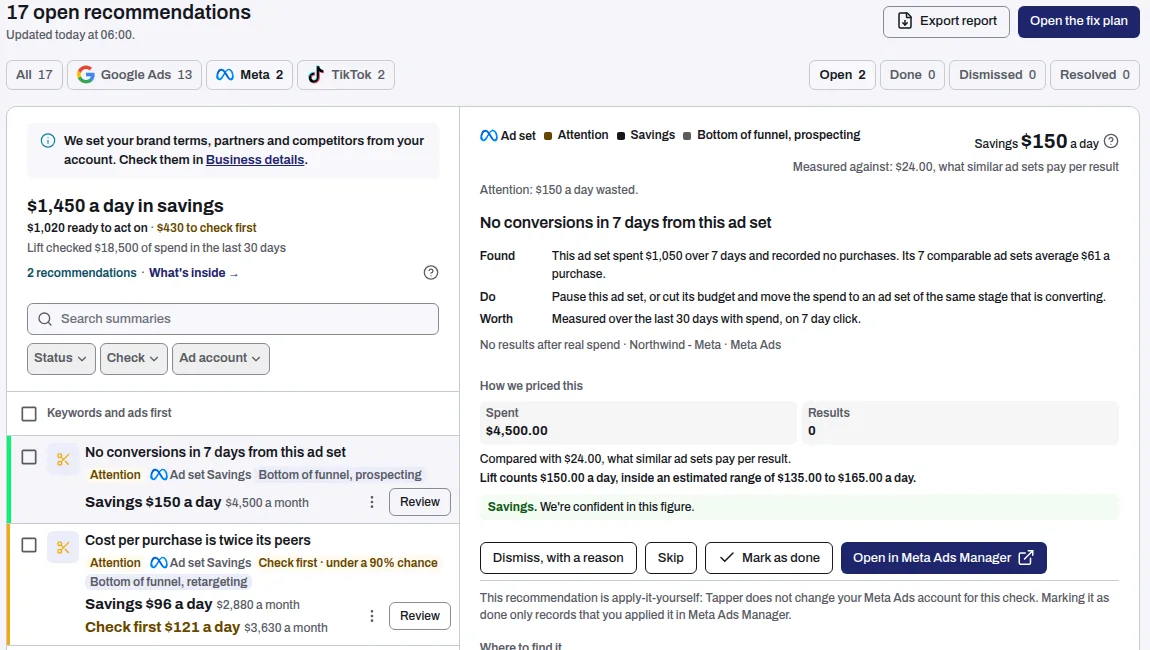
| No results after real spend | No results in 7 days after spending twice what similar ad sets pay per result. | Pause it, or cut its budget and move the spend to an ad set at the same stage that gets results. |
| Cost per with the result's name, for example Cost per purchase | On 5 or more results, a 90% or higher chance of paying over 1.3 times what similar ad sets pay per result (a small ad set's figure is pulled toward theirs). A retargeting ad set is compared only with retargeting ad sets that include the same audiences. The card names up to four of them. | Cut its budget by 20%, or pause it, and let the better ad sets take the spend. |
| Return on ad spend under target over 3 days and 7 days | Return on ad spend under your Target return on ad spend over both the last 3 and the last 7 days; without that target, a cost per result above similar ad sets over both. | Cut its budget by 20%, once, and leave it for 24 hours before deciding again. |
| Cost cap | Never on retargeting or re-engagement ad sets. On 20 or more results in 28 days: a cost cap or bid cap above your target cost, or a cost per result 1.75 times the cap or more over those 28 days, as Meta usually lands somewhat over a cap. On 20 or more results in 7 days: a minimum return goal under your target return on ad spend, or missed by about 9% or more. | Lower the cap, or raise the goal, by 5%, once a day at most. This can stall delivery: if daily spend falls after a step, stop. |
| Past buyers in prospecting | In an ad set for new customers, existing customers made 40% or more of the results Meta could place over 14 days, on at least 20 results. Not priced: this spend is not waste. | Exclude existing customers, or split it into an ad set for each (this restarts learning). |
| Legacy Advantage+ shopping campaign Meta will pause | A delivering campaign still on Meta's older Advantage+ shopping setup, which Meta has said it will pause. | Rebuild it with Duplicate Campaign as two ad sets, existing customers (audience relaxation off) and new customers, each with a minimum daily spend. |
| Budget to move from a weaker ad set to a stronger one | An ad set at its budget limit (95% spent on 5 of the last 7 days) with 50 or more results a week at 10% or more under the cost it is judged against, while a similar ad set in its campaign, also at its limit, pays more than the cost it is judged against. Not priced. | Cut the weaker one's daily budget by 20% and add the same to the stronger one, then leave both for 48 hours. |
Existing customers
Ad sets whose included audiences are all customer lists, with the Retargeting stage chip. This priced check judges them only against your target under What a result should cost, and is silent without one.
| Check | What it looks for | What it tells you to do |
|---|---|---|
| Ad set for existing customers missing its target | No repeat results in 7 days after spending twice your target, or a 90% or higher chance of paying more than your target per repeat result. | Cut its budget by 20%, or pause it and check it leaves out recent buyers; or leave out more past buyers (for example 30 days of buyers, not 7). |
Creative
An ad is judged only against its own history, usually its last 7 days against its first 7 in the last 4 weeks. It needs 14 days of delivery in those weeks, including each of the last 7, so a paused ad gets no card.
| Check | What it looks for | What it tells you to do |
|---|---|---|
| Creative fatigue | Top of funnel: fewer people watching the first 3 seconds, or on to 15 seconds or the end, down to 75% of its first week, at a frequency of 2 or more. Middle: clicks per view down to 75% of its best week, at 2.5 or more. Other stages, on conversion ad sets: clicks per view down to 70% of its first week, at 3 or more. Where the stage chip adds retargeting or re-engagement, the frequency needed is 5 instead of 2.5 or 3. Needs 10,000 views in 7 days. Shows spend at stake. | Refresh the video's opening, rework what follows it, or swap in new creative. |
| Conversion rate drop | Outside the top and middle of the funnel, on conversion ad sets: the share of clicks completing the goal down to 60% of its level over every day the ad ran in the last 4 weeks, with 10 or more results in that time. Not raised where Creative fatigue found the clicks falling. Needs 10,000 views in 7 days. Shows spend at stake. | Check tracking first, then the landing page and the offer. The card never asks for a new ad. |
| Creative fatigue, hook rate | On top and middle of funnel video ads, the share of views lasting 3 seconds at 75% or less of the first 7 days, on 5,000 views in each. Not raised where Creative fatigue found the drop. Not priced. | Refresh the opening of the video. |
Structure and audiences
All but the last run on every stage, and none is priced. The three learning checks also judge ad sets in Meta's learning phase.
| Check | What it looks for | What it tells you to do |
|---|---|---|
| Campaign funds more than one funnel stage | A campaign whose last 7 days of spend went to two or more stages, each with 5% or more. | Split the stages into their own campaigns. |
| Funnel stage getting more or less budget than planned | A stage's share of spend outside its range two weeks running, once 90% of spend has a stage. The range is yours (How the budget should be split) or an industry reference: awareness 40% to 80%, consideration 15% to 30%, conversion 10% to 20%, existing customers 5% to 30%. No existing customers card on an account Tapper has marked as selling something people buy once. | Move budget into or out of that stage from the stages on the other side of their range, keeping the account's total the same. |
| Overlapping ad sets worth merging | Ad sets in one campaign with the same result, stage, kind of audience, countries and languages and an included audience in common, each under 50 results a week. | Merge them into the one with the most results, then pause the others once it is live. |
| Ad set getting too few results for Meta to finish learning | An ad set Meta calls learning limited that spent 500 or more in the account's currency over the last 7 days, spending on at least 3 of them. | Merge it with an ad set getting the same result, move budget to it from a weaker one at its stage, or pick a more frequent result (for example add to cart). |
| Much of the account's spend in ad sets with too few results to finish learning | 20% or more of last week's measured spend in 2 or more learning limited ad sets, with 1,000 or more between them in the account's currency. | Merge ad sets with the same result and audience, move budget between ad sets at the same stage, or pick a more frequent result. |
| Meta still testing who to show an ad set to after a week | An ad set Meta still reports as learning after spending on 7 or more of the last 14 days, with no significant edit in 7 days to explain it. | Leave it alone; pause or cut the weakest other ad set at its stage that reaches the same people, and review it after a week. |
| Audience segments not set up in Ads Manager | Meta cannot split the account's results into new, engaged and existing customers, because those audiences are not defined in its advertising settings. | Define existing customers (for example 180 days of buyers plus your customer list) and an engaged audience (180 days of site visitors plus your newsletter list). Earlier results cannot be split, so do it as early as you can. |
| One place the ads appear costing more than the rest of the ad set | On middle and bottom of funnel ad sets, a placement (2,000 views or more) costing over twice the ad set's average per result, or with no results after spending what one result costs. Audience Network is judged against Facebook and Instagram instead: over twice their cost per result, over 3 times their click rate, or no results while they have 5. | Remove it from placements chosen by hand; with Advantage+ placements, choose placements yourself or add a value rule that bids it down. |
Account health
These read the account's settings once a day, so they can be a day behind Meta. The first two still run on an account that cannot deliver.
| Check | What it looks for | What it tells you to do |
|---|---|---|
| Spending limit or balance close to stopping delivery | 90% or more of the spending limit spent, the limit about 3 days away at the spend Lift can measure, or a prepaid balance lasting about 7 days or less. | Decide how the account should spend for the rest of the period and shift budget between campaigns to match. Lift never suggests raising the limit. |
| Ad account disabled or flagged by Meta | Meta reports the account as anything but active (for example disabled, unsettled, pending risk review, closed) or gives a reason for disabling it. | Open Account Quality in Business Manager, read Meta's notice, and request a review or fix the billing problem it names. |
| Attribution | Two or more ad sets of a campaign that spent in the last 28 days measure results over different attribution settings, with incremental attribution counted as a setting of its own. No card when all of them use incremental attribution. The headline names the campaign and how its ad sets split. | Give them all the same setting, then let each collect a few weeks of results before judging it. |
| Reports that split results not switched on for the account | Meta returns no data split by device for the account. | Ask the account's admin to turn the breakdowns on in Ads Manager's reporting settings. |
| New launch set up differently from the rest of the account | In a new ad set's or ad's first 7 days, or the day before it is scheduled to start, one card lists what differs from the rest of the account: for example an event with no results in 7 days, an unusual attribution setting, no customer list excluded from prospecting, a reach ad set with no frequency cap, or missing URL tags. | Fix what the card lists. |
| Events Meta bids on missing, late or poorly matched | One card lists each event a spending ad set bids on that stopped arriving, halved, arrives in batches, is also sent from your server (the Conversions API) for under 75% of events, or has a match quality under 6 out of 10. | The card says what to check for the worst one, such as testing the event in Events Manager. |
| Tracking break: results per click fell on most ad sets at once | Results per click under half their usual level on ad sets carrying half or more of the spend, while clicks did not more than double. Each ad set needs 200 clicks in the last 7 days and 20 results before; the 2 most recent days are left out. Not priced. | Check that the Meta pixel or Conversions API still sends results. Until results recover, and for 7 days after, the cards that read results leave the list. |
Act on a Meta card
Lift changes nothing in your Meta account.
- Press Open in Meta Ads Manager. It opens at the campaign, ad set or ad.
- Make the change, using the card's Do line.
- Back in Tapper, press Mark as done. The card moves to Done.
Dismiss, with a reason asks whether to stop the check on that ad account or dismiss only this card. Stopping closes every open card of the check there and stops it running. To switch it back on, contact Tapper support (How to get help from Tapper). See Fix, mark as done, dismiss and revert.
Related
Was this helpful?
Still need help?
Chat with our team and mention this article.