

The checks Lift runs on Google Ads
On this page
These are the checks behind Google Ads cards in Recommendations, in the app's areas: what each looks for, its kind of card, and whether Tapper can make the change for you. Other platforms: Meta Ads, TikTok Ads, LinkedIn Ads, Snapchat Ads and Apple Ads.
How it works
- Once a day, once Tapper has set your workspace up, up to yesterday in the account's time zone, once the day's Google Ads data is in.
- The window. Spend checks use the account's Detection window (30 days by default; 7 or 14 if set in Setup > Google Ads) unless their rule names another. Search term and placement checks look back up to 90 days but count money only inside the window.
- The numbers below are defaults. A card's Evidence gives the rule with your account's numbers, and How we priced this names its benchmark for what a conversion normally costs.
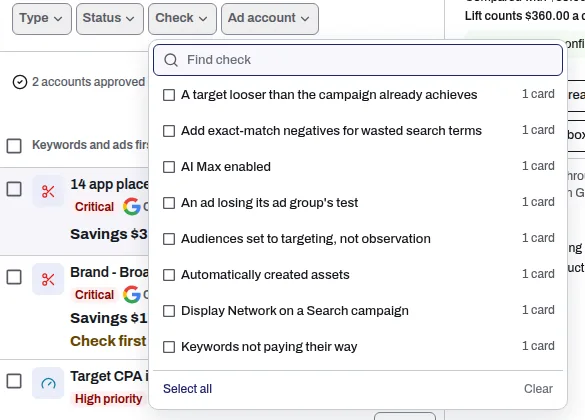
- One list, under Keywords and ads first: keywords and search terms, then ads, budgets and bidding, placements, products and conversion tracking, then audiences. The Check filter offers only checks with cards, with counts.
- Never more spend. No check asks you to spend more in total or loosen a target.
Kind: a Waste card shows money a day in the account's currency, as Savings, Check first or both, shown apart; under 1 a day it is not shown. A Recommendation card (chip Optimisation, or Over target) shows the spend it affects a day. A Not priced card carries no figure by design.
Keywords and search terms
| Check | What it looks for | Kind | Fix button |
|---|---|---|---|
| Keywords not paying their way | Keywords that spent three times what a conversion normally costs without converting, or pay three times that per conversion. The top 30% of keywords by conversions are never flagged. | Waste | Pause keywords |
| Add exact-match negatives for wasted search terms | Searches that spent three times what a conversion normally costs without converting, not covered by a keyword or negative. | Waste | Add negative keywords |
| Add phrase-match negatives for wasted patterns | A one-to-three-word pattern that keeps turning up in searches that buy nothing. A card of single words only reads For review, not priced. | Waste | Add phrase negatives |
| Good keywords worth an exact match | A loosely matched keyword converting at or better than its campaign's target, with no exact-match twin in that campaign. | Recommendation | None |
| Keywords Google scores low | Keywords with a Quality Score at or under the bar the card shows. | Recommendation | None |
| Quality score falling on high volume keywords | Keywords in the account's top tenth by impressions whose Quality Score fell 2 points or more against their own score 7 to 14 days earlier. | Recommendation | None |
Ads
| Check | What it looks for | Kind | Fix button |
|---|---|---|---|
| An ad losing its ad group's test | An ad doing clearly worse than the best ad in its ad group (95% confidence or better). Each ad needs 1,000 impressions and 15 days of delivery in the last 30 by default (Ad testing in Setup). | Waste | Pause ad |
| Ads Google rates weak | A live ad Google rates Poor or Average. If nearly all its headlines are pinned, the card says to unpin all but the brand headline. | Recommendation | None |
| Ads with empty headline slots | A live search ad with fewer than the 15 headlines or 4 descriptions Google allows. | Recommendation | None |
| Assets Google rates low | A headline, description or image Google has rated Low for more than 30 days in a running ad, or a running ad where Google has all but stopped serving at least half its headlines. | Recommendation | None |
| App ads with empty creative slots | An App ad with fewer headlines or descriptions than Google asks for. | Recommendation | None |
Extensions and creative
| Check | What it looks for | Kind | Fix button |
|---|---|---|---|
| Missing sitelinks and callouts | A campaign missing extras Google can show with the ad, such as sitelinks, callouts, snippets or images. | Recommendation | None |
| Asset groups under Google's minimum | A Performance Max asset group with fewer headlines, descriptions, images or logos than Google's minimum. Feed-only asset groups are left out. | Recommendation | None |
| Asset groups with text Google barely serves | A Performance Max asset group where at least half the headlines or descriptions each got under 5% of the average impressions in 30 days. | Recommendation | None |
Budgets and bidding
| Check | What it looks for | Kind | Fix button |
|---|---|---|---|
| Spending with no conversions | A campaign set up to get conversions that got none in the window after spending three times what a conversion normally costs, or your Zero-conversion spend threshold if you set one. | Waste | Reduce budget to {money}/day, Pause campaign |
| Far more spend than the conversions are worth | A campaign with one to four conversions in the window that spent far more than they are worth. | Waste | Reduce budget to {money}/day, Pause campaign |
| Cost per conversion over target | A campaign paying three times its target CPA or more, over at least five conversions. | Recommendation, Over target | Tighten target CPA to {money}, Reduce budget to {money}/day, Pause campaign |
| Return on ad spend under target | A campaign getting a third of its target ROAS or less, over at least five conversions. | Recommendation, Over target | Raise target ROAS to {n}, Reduce budget to {money}/day, Pause campaign |
| Monthly budget off track | The account is on course to end the month more than 15% over or under the Monthly budget you set in Setup. | Recommendation | None; Adjust monthly budget opens the setting |
| Too few conversions for smart bidding to learn | Campaigns bidding for conversions with fewer than 30 each in 30 days, listed on one card per account. | Recommendation | None |
| New customers cost more than the report shows | Winning a new customer getting more expensive than the headline cost per conversion suggests, on purchase campaigns. | Recommendation | None |
| Budget to move between similar campaigns, total unchanged | A Search or Shopping campaign losing at least 20% of its impressions to budget over 14 days while costing at least 30% less per conversion than a similar one, or returning at least 30% more. The move is at most 20% of either budget. | Recommendation | None |
Placements and channels
| Check | What it looks for | Kind | Fix button |
|---|---|---|---|
| Sites and apps not worth paying for | Sites, apps or YouTube channels that spent three times what a conversion normally costs without converting, or pay three times that per conversion. | Waste | Exclude placements |
| A Demand Gen channel not paying its way | A Demand Gen campaign spending at waste level on Discover, Gmail or YouTube. The card says where to switch the channel off. | Waste | None |
| A Performance Max network not paying its way | A network in a Performance Max campaign that spends without converting, judged against your Performance Max campaigns only, or pays three times or more what the campaign pays per conversion, not counting its Shopping ads where Google reports them apart. Performance Max has no switch per network. | Recommendation | None |
| Search Partners costing more than Google Search | Google's partner sites costing three times or more per conversion than Google Search, with at least five conversions on each side. | Waste | Turn off Search Partners |
| Display ads running inside a Search campaign | A Search campaign's banner ads that spent three times its Search cost per conversion without converting, or pay three times that per conversion. | Waste | Turn off Display expansion |
Products and feed
These read Google's daily product report for Shopping and Performance Max. None has a fix button. For an online store, the Products page also groups your products: see The Products page: your products, grouped.
| Check | What it looks for | Kind | Fix button |
|---|---|---|---|
| Products spending more than they return | Products that spent past the no-conversion limit without converting, or returned less than the campaign's target. The limit is set from campaigns of the same type, countries and languages. | Waste | None |
| Products served by several campaigns at once | Half or more of the product spend going to products that took cost in more than one Shopping or Performance Max campaign in 30 days. | Recommendation | None |
| Eligible products nobody is shown | Products Google lists as eligible and in stock that were not shown once in 30 days: at least 50 of them, and at least a quarter of all eligible products. | Not priced | None |
| Problems in the product feed | A problem on at least 5% of a feed of 50 or more products, such as a promotion or a date used as the product type, or titles under 30 or over 150 characters. | Not priced | None |
Conversion tracking
None has a fix button: which actions count, and what they send, is your change in Google Ads.
| Check | What it looks for | Kind | Fix button |
|---|---|---|---|
| Google and your Adjust count installs differently | Google's install count and your Adjust's differing by more than a quarter over 30 days, on a campaign matched to your connected Adjust app. | Not priced | None |
| Purchases that may be counted twice | Two purchase actions that look like they count the same orders, or Google counting over 1.3 times your connected store's orders (or GA4's count where no store is connected). While it is open, the campaign's other money cards are marked Check first, unless its only finding is two purchase actions counted together whose daily counts do not move closely together. | Recommendation | None |
| Conversion values that cannot be right | An action's value per conversion jumping to 20 times its normal level on a day it is worth more than the account spent, or a cart, checkout or payment step worth more than a purchase. | Recommendation | None |
| Google's conversion count drifting from yours | Google's purchase count, against your connected store's orders from Google clicks, moving 40% or more from its usual level 3 days running, with 30 or more orders in 7 days. | Recommendation | None |
| Google's return against your store's | A campaign bidding to a target return where Google's return is at least 1.5 times your store's own, on 30 or more store orders. The card says what the target means on your store's numbers. | Recommendation | None |
Audiences
| Check | What it looks for | Kind | Fix button |
|---|---|---|---|
| No audience attached to a spending campaign | A spending campaign with no list of past visitors or customers, and no in-market or custom segment. | Recommendation | None |
| No customer list uploaded | An account that has never uploaded a customer list. | Recommendation | None |
| Campaigns whose audiences are narrow or reach too little | A spending Search campaign whose audiences are all of one kind, or reach too little of what it serves. The card names your own visitor and customer lists it does not use. | Recommendation | None |
Settings
The Settings area reads each account's settings rather than its results: see Account settings Lift watches.
Fix buttons
A button in the last column means Tapper makes the change once you confirm, and Revert this fix undoes it. Exactly what each button changes, and its limits: Fix, mark as done, dismiss and revert. Exclude placements works account-wide, not only in the card's campaign. A grayed-out button gives its reason on hover; if it stays gray, contact your Tapper contact. For every other check, make the change in Google Ads and press Mark as done.
What decides whether a card shows
Each account's answers in Business details decide which checks apply.
- Business type. A Leads (forms, calls, sign ups) account, or one with no business type that Lift reads as lead generation, gets no New customers cost more than the report shows or other new-customer check. An App installs and in-app actions account gets none of those, nor Products spending more than they return or Products served by several campaigns at once.
- What results are judged on. Lift keeps, per account, what web results are judged on (Google, your store or GA4) and app results on (Google or Adjust), filled in from what you connected and confirmed by you. With web results judged on your store, Google's return against your store's uses your store's orders.
- Brand terms. Brand campaigns are judged against each other, and waste on a brand Search campaign is Check first.
- Protected terms. No negative or keyword pause on your core product terms. On an account that advertises products, no negative on a search naming a brand those products carry.
- Competitor campaigns get no Quality Score card and are judged only against each other; with too few, their cost per conversion is not judged.
- A campaign's last 7 days: its cards add "This campaign ends on {date}." and none is Critical; after that they close.
- Settings. Use ROAS for this account off stops the ROAS checks. Actions ticked under Conversions counted hold back the keyword, search term, ad, placement, channel and network checks. After a target change holds target, efficiency and low or zero conversion cards for 21 days by default.
- Checks you switch off with Not for this account stop on that account until Switch back on under Checks switched off.
The daily data check
Lift judges an account only on a complete day. If the day's data is not all in, or Tapper's last 7 days of spend does not match Google's totals, no card opens or closes that day, and open cards leave the list until a complete check, then return with their first detected date.
A card whose issue is no longer found moves to Resolved. A card the check could not see leaves the list until seen again, and closes if its campaign was removed or spent nothing for 7 days, with no money counted as saved. So a card can disappear for a day and return. Empty page: see No Lift recommendations yet.
Related
Was this helpful?
Still need help?
Chat with our team and mention this article.