

Skip to content
Support
Open Tapper
  • Getting started

    Tapper Block

    • Start here: set up Block + Lift in five steps
    • How Tapper Block works
    • What Tapper does: Block, Lift, Vantage and Screen
    • Create your Tapper account
    • Choose your products: Lift only or Block + Lift
    • Name your workspace, pick its time zone, industry and domains
    • Protected entities: what they are and how to add one
    • Accept a workspace invitation
    • Implementation checklist for larger teams
    • Tapper Screen: stop fake leads before they reach your CRM

    Check that Block is working

    • When your data shows up after connecting
    • No clicks on the dashboard: what to check
    • Live and Demo mode on the dashboard
    • Fix campaigns, ad groups or ads that override Tapper's tracking
    • How do I know if my ads are getting invalid traffic?
    • Monitoring-only mode: why nothing is blocked yet and what changes when blocking starts
    • Nothing is being blocked: what to check

    Tapper Lift

    • Get started with Lift
    • Lift: what it does and where to find it
    • Lift only: what your workspace includes and leaves out

    Getting Started (earlier help center)

    • How to connect Google (new user registration flow)
    • How to connect Meta (new user registration flow)
    • How does Tapper exclude invalid IPs and users?
    • Clean signal guard
    • Monitoring script installation
    • How to connect Meta (existing user registration flow)
    • How to connect Google (existing user registration flow)
    • Why use Tapper
    • Step-by-Step Implementation Process for Tapper
    • How to Add a New Website?
    • Welcome to Tapper
    • Resolving "Unauthorized" Errors When Connecting Google Ads
    • Why do I need the Google Ads tracking template?
    • Working with HubSpot
    • Tracking Template
    • Where to find your Google Ads tracking template & tracking code?
    • Everything you need to know about Facebook ads learning phase
    • Intro to Meta (Facebook) ads:
    • URL Parameters
    • Why Tapper requires the Meta page owner for setup
    • Everything about Tapper Meta (Facebook) ads protection
    • Where to find your monitoring script?
    • Why do I need the monitoring script?
    • How to Manually Install Tapper's Monitoring script in Shopify?
    • Value rule exclusion
    • Audience Exclusion
    • Click fraud threshold
    • Block VPN & proxy clicks
    • Block JavaScript disabled browsers
    • Behavior analysis feature
    • Block IPs by country
    • Device Blocking
    • Minimum seconds on site
    • Monitoring only mode
    • Cross Platform Blocking
    • Types of honeypots
    • How Tapper uses browser fingerprints to detect invalid traffic
    • Protected campaigns & excluded campaigns
    • Aborted Ad Click Prevention
    • Whitelist Converted IPs
    • ASN-based blocking & machine learning model
    • Suspicious Ad Click Prevention
  • Connect ad accounts
  • Website tracking
  • Block: rules and exclusions
  • Google, Meta and TikTok
  • Dashboard and reports
  • Tapper Lift
  • Tapper Vantage
  • Account, team and billing
  • Security and privacy
  • Refunds and experiments
  • Troubleshooting
  • FAQs
  1. Support
  2. Getting started
  3. Getting Started (earlier help center)

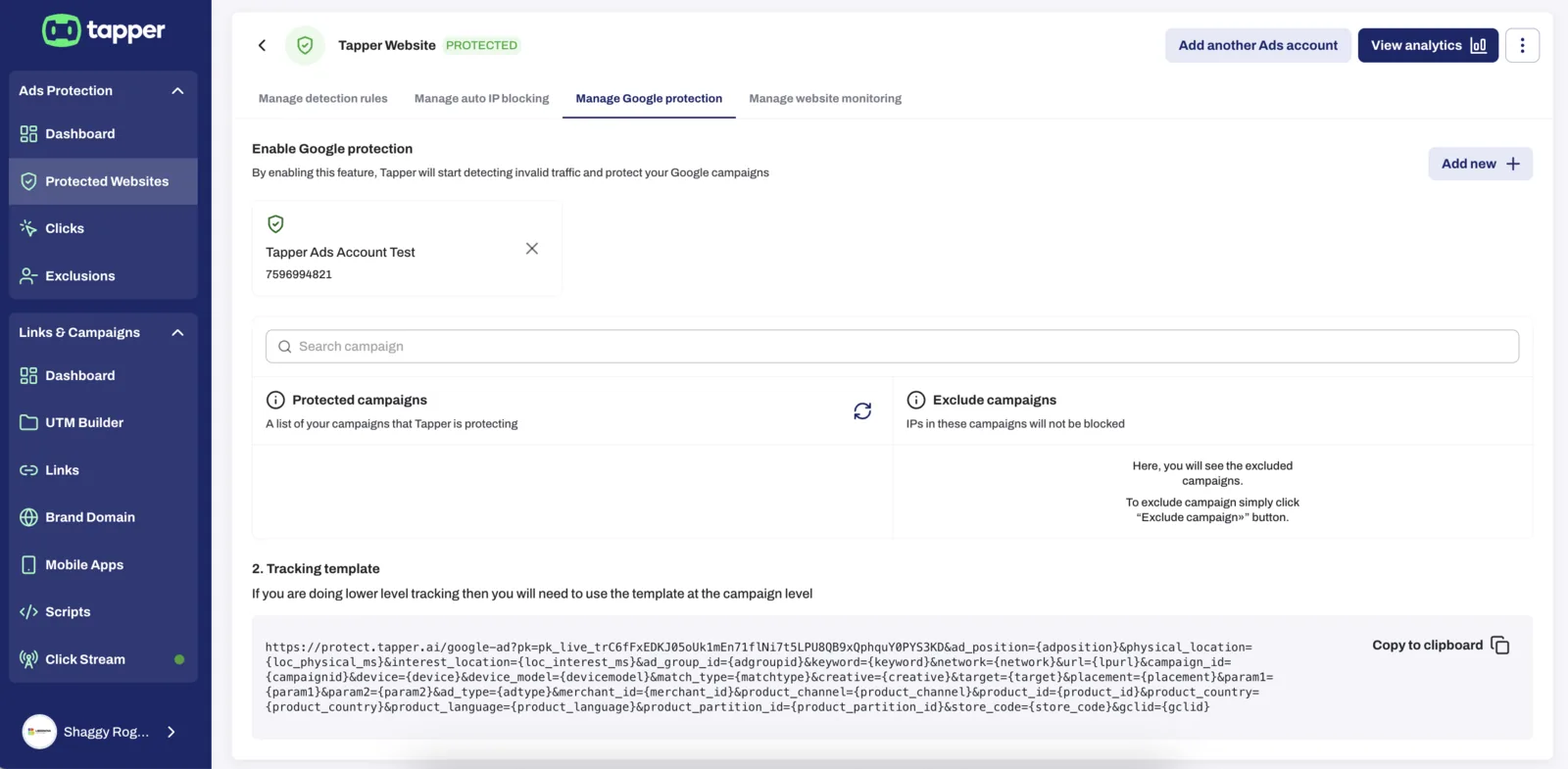
Where to find your Google Ads tracking template & tracking code?

Both Tracking Template and Tracking Code can be found in your dashboard under Protected Websites - Manage Google protection:
Was this helpful?

Related articles

  • Everything you need to know about Facebook ads learning phase
  • Tracking Template
  • Intro to Meta (Facebook) ads:
  • Working with HubSpot

Still need help?

Chat with our team and mention this article.

Still stuck?

Support homeDocstapper.aiPrivacy policyTerms of service

© 2026 Tapper