

What Tapper does: Block, Lift, Vantage and Screen
Tapper is the intelligence layer that scores customer value potential and turns it into smarter campaign optimization across Google, Meta and TikTok. Its products are Block, Lift, Vantage and Screen. Setting up a new workspace? Start with Start here: set up Block + Lift in five steps or, if you choose Lift only, Get started with Lift.
The products at a glance
| Product | What it does | Where you find it |
|---|---|---|
| Tapper Block | Invalid traffic removal: screens every click and blocks bots, click farms and repeat offenders in real time on Google, Meta and TikTok. | The Protection section of the sidebar, the Dashboard tabs, Reports and the entity page tabs |
| Tapper Lift | Account optimization: checks your Google Ads, Meta Ads and TikTok Ads accounts every day for leaks and, where it can, prices each one per day. Where a recommendation offers a fix, Tapper makes the change for you. | The Lift row in the sidebar and the Lift band on the dashboard |
| Tapper Vantage | Predictive customer acquisition: predicts each customer's lifetime value and sends it to the ad platforms as a signal they can bid on. | The CRM tab on the entity page and the Tapper goals section on the Google protection tab |
| Tapper Screen | Stop fake leads before they reach your CRM. Screen checks every form submission for bots, fake emails and junk entries. | Set up with Tapper's team |
Block, which the app also calls Protection
In the app, Block's pages sit in the sidebar section labeled Protection, and the product choice reads Block + Lift.
Block deals with invalid traffic: competitor clicks, bot traffic, click farms, VPN and proxy abuse and fake installs. Tapper's monitoring script watches each visit to your website, your detection rules decide what counts as invalid, and, once blocking is on, Tapper writes exclusions into your ad accounts so the same visitors stop seeing your ads. You set the rules per protected entity on the Web detection rules tab: an Invalid click threshold, switches such as VPN blocking, Block IPs by country, Behavior analysis and Device blocking, and a Suggest rules button that adds the presets for an industry you pick. Every setting is explained in Web detection rules: every setting on the tab.
Block connects to Google Ads, Meta Ads, TikTok Ads and Microsoft Ads, and to mobile apps through your MMP. How Tapper Block works explains what Tapper writes to each platform.
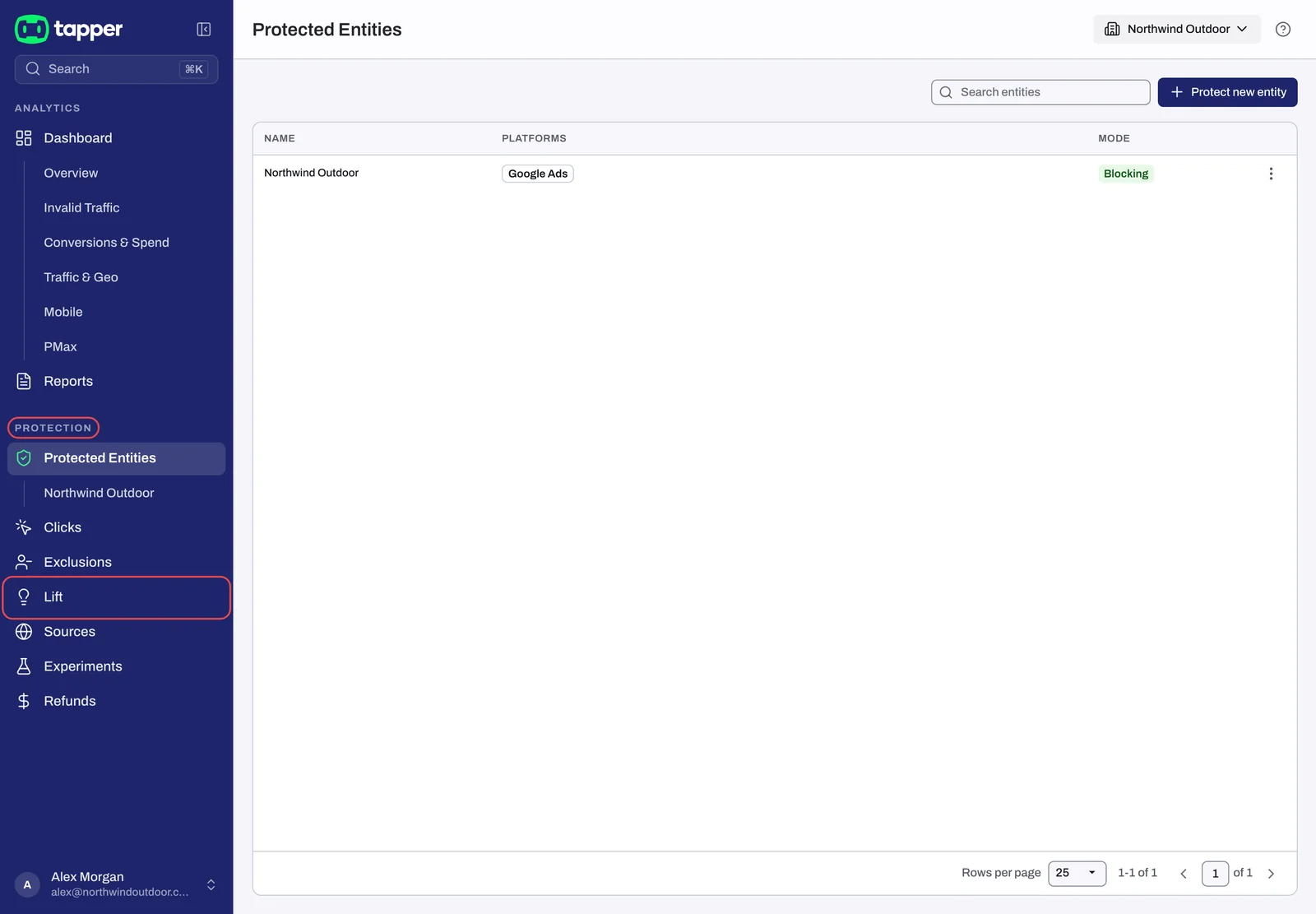
The Protection section holds Protected Entities, Clicks, Exclusions (labeled Invalid Traffic while a workspace is in monitoring-only mode), Lift, Sources, Experiments and Refunds. Your dashboards and monthly reports sit above it under Analytics.
Lift
Lift is a daily to-do list for your ad accounts. Every day it checks your Google Ads, Meta Ads and TikTok Ads accounts and lists the specific changes worth making, keywords and ads first and, within each kind, the biggest money first. Where Lift can price a recommendation, it shows the money per day, in the account's own currency. Where a card offers a fix, its button is named for the change, such as Pause campaign or Add negative keywords, and Tapper makes that change in Google Ads for you.
Lift lives in the Lift row of the sidebar, with the tabs Lift, Why, Settings and Activity, plus Products when the entity has a Google Ads account whose business type is an online store. It needs a connected Google Ads, Meta Ads or TikTok Ads account, and it starts once Tapper has set your workspace up. See Lift: what it does and where to find it.
Vantage
Vantage gives each new lead or customer a value score that Google Ads can bid on. It lives in two places on the entity page: the CRM tab, where you connect a Salesforce org read-only, and the Tapper goals section on the Google protection tab, where a goal of type Predicted conversion value creates a conversion action and a custom goal in Google Ads.
Tapper enables Vantage for your workspace, alongside either product choice in the wizard. Tapper Vantage: what it is and how it works has the details.
Screen
Screen checks the contact details of each form submission as it is sent and writes a verdict, a score and the reasons onto the lead in your CRM. You decide what happens next: hold a submission before it reaches your team, or let it land flagged and route it by score. Nothing is deleted.
Screen is set up with Tapper's team. To ask about it, press Get a demo on <https://tapper.ai/screen>. See Tapper Screen: stop fake leads before they reach your CRM.
Block + Lift or Lift only
The first wizard step, Choose your products, offers two packages:
| Choice | What it includes |
|---|---|
| Block + Lift | "Lift's recommendations, plus Tapper's tag on your website, detection rules and invalid traffic blocking in your ad accounts." |
| Lift only | "Lift's recommendations for your Google Ads and Meta Ads campaigns. No tracking code on your website, and no audiences or tracking templates in your ad accounts." |
Block + Lift is Block and Lift together. Lift only is Lift on its own: no monitoring script, no detection rules, no exclusions written to your ad accounts, and no Clicks, Exclusions, Sources, Experiments or Refunds rows. Tapper adds Vantage on top of either choice.
Choose your products: Lift only or Block + Lift has the steps, and Lift only: what your workspace includes and leaves out lists everything a Lift-only workspace does and does not see.
Questions? Write to support@tapper.ai; How to get help from Tapper lists every way to reach us.
Related
Was this helpful?
Related articles
Still need help?
Chat with our team and mention this article.