

How Tapper Block works
Tapper Block, which the app calls Protection, checks the ad clicks that reach your website and keeps the sources of invalid clicks (bots, click farms, competitor clicks and repeat offenders) away from your ads. It works in three steps: Tapper sees each click, the rule set that covers the click decides whether it is invalid, and Tapper writes an exclusion to the ad platform the click came from.
How it works
Tapper sees each click
Two inputs describe every ad click:
- The monitoring script on your website records the visit: the browser, the device and what the visitor does on the page. You copy it from the entity's Website monitoring tab. See The monitoring script: what it does and where to find it.
- The ad platform's click details. On Google Ads, Tapper sets its tracking template on the account when you connect it, so each click arrives with its campaign, ad group, keyword, device and location. You only paste the template yourself where a campaign, ad group or ad sets its own. See The Google Ads tracking template: what Tapper sets and why. On Meta and TikTok, the click ID the platform adds to your landing page and the URL parameters in your ads play the same role.
The rule set decides
Each protected entity has one or more rule sets on its Web detection rules tab. A rule set holds:
- Invalid click threshold rules, which count ad clicks per IP over a time window ("Block an IP if they click on an ad more than 3 times within 10 minutes."), and Aborted ad clicks rules.
- Detection features: JavaScript-disabled browsers, VPN blocking, a country rule, behavior analysis, suspicious ad clicks and a minimum time on site.
- Blocking features: Device blocking, Cross-platform blocking, Pixel Guard and Monitoring-only mode.
The Default rule set applies wherever no other set is linked; a custom set can apply to chosen platforms, ad accounts or campaigns. Tapper combines your rules with what it knows about the visitor's IP address (a data center, VPN, proxy or Tor network, for example) and reaches a verdict on the click. How Tapper decides a click is invalid goes through every check.
Tapper writes an exclusion
When blocking is on, each invalid click becomes an exclusion on the platform it came from:
| Platform | What Tapper writes |
|---|---|
| Google Ads | An IP exclusion on your Search, Display, Shopping and Demand Gen campaigns, pushed per flagged click. The visitor also joins the audiences Tapper created when you connected the account, which are excluded on your protected campaigns. Placement exclusions are written at account level. Performance Max campaigns take no IP exclusions. |
| Meta Ads | The visitor joins the "Tapper - Invalid Traffic Audience" custom audience, excluded on every ad set whose Protection switch is on. Meta has no IP exclusions. |
| TikTok Ads | The visitor joins the "Tapper - Invalid traffic" custom audience, excluded on every ad group whose Protection switch is on. TikTok has no IP exclusions. |
| Microsoft Ads | Connecting syncs your campaigns and spend. |
Two switches in the Blocking section widen what one detection does. Device blocking detects IPs that the same device used to click your ads repeatedly, so a clicker who changes IP is still caught. Cross-platform blocking checks for invalid clicks and blocks them across Google, Meta and TikTok. For what each Google campaign type receives, see Which exclusions Tapper applies to each Google Ads campaign type.
How fast it happens
Tapper acts on each verdict automatically; nobody has to approve an exclusion. It is not instant, and Tapper does not promise a number of seconds:
- On Google Ads, the IP exclusion is pushed per flagged click, once Tapper has reached its verdict.
- Audience exclusions take effect as each platform processes its audience lists.
- Campaigns are synced every 6 hours and whenever you use Refresh campaigns. New campaigns a sync finds get Tapper's IP exclusions and audience exclusion queued.
- When a Google campaign reaches Google's limit of 500 IP exclusions, Tapper rotates lower-priority IPs out to make room. See The 500 IP exclusions per campaign limit in Google Ads.
- The dashboard's figures update every 4 hours.
Automatic and manual exclusions
- What your rules decide shows on the Exclusions page in the sidebar: one row per excluded visitor with its Block reason, and on Google Ads the excluded placements. See The Exclusions page and the proof drawer.
- The entity tab named Auto IP blocking is, despite its name, the list you type by hand under Manually exclude IPs. Tapper pushes those addresses and ranges to your Google Search, Display and Shopping campaigns, and they stay until you remove them. See Manually exclude IP addresses and ranges.
When Block only watches
Every new rule set starts with Monitoring-only mode on: Tapper detects and records invalid clicks but writes no exclusions from its detections. During the free trial and on the Free plan the switch cannot be turned off, because blocking is a paid plan feature. In this mode the Exclusions page is named Invalid Traffic and lists what Tapper would have excluded. The hand-entered list on Auto IP blocking is the one exception: it is pushed to Google even in monitoring-only mode. See Monitoring-only mode: why nothing is blocked yet and what changes when blocking starts.
A workspace that chose Lift only has no Block: no monitoring script, no detection rules and no exclusions. Blocking needs Block + Lift.
What you see in Tapper
Everything Block does for one entity is on the entity's page, grouped in its left rail. The results for the whole workspace are on the Clicks, Exclusions and Dashboard rows of the sidebar.
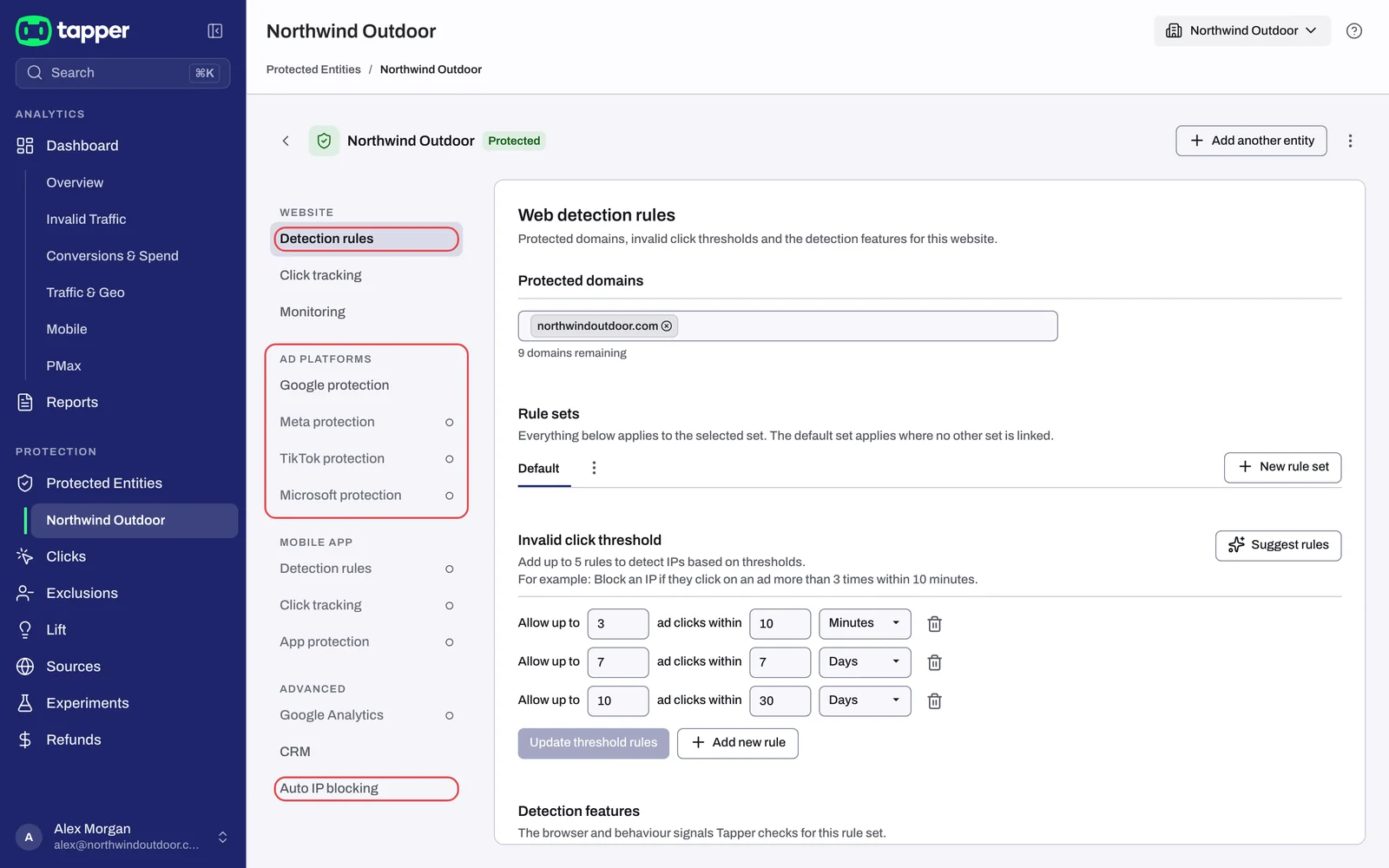
| Where | What it is for |
|---|---|
| Web detection rules tab (rail: Detection rules) | Rule sets, thresholds, detection features and the Monitoring-only mode switch |
| Google protection, Meta protection, TikTok protection, Microsoft protection tabs | Connected accounts, and the Protection switch per campaign, ad set or ad group |
| Auto IP blocking tab | The IP addresses and ranges you exclude by hand |
| Clicks page | Every tracked ad click, with its block reason |
| Exclusions page | Every excluded visitor and, on Google Ads, every excluded placement |
| Dashboard, Invalid Traffic tab | Totals, block reasons and IP exclusions per campaign |
Related
Was this helpful?
Related articles
Still need help?
Chat with our team and mention this article.