

Which exclusions Tapper applies to each Google Ads campaign type
Google Ads accepts different kinds of exclusion on different campaign types, so what Tapper Block writes into a campaign depends on its type.
How it works
Tapper only uses exclusion methods that Google offers through the Google Ads API. There are four:
- IP exclusions: the IP address of a visitor Tapper flagged is added to the campaign's IP exclusions, so Google stops showing that campaign's ads to it. Google allows at most 500 per campaign.
- Audience exclusion: Tapper keeps the visitors it flagged in two lists in your account, "Tapper - Invalid Traffic List" and "Tapper - Ad Click Limit Exceeded Traffic List", and excludes them from the campaign. Google stops showing the ads to those visitors, and the exclusion does not depend on their IP address.
- Conversion value rule: a rule that multiplies by 0.5 the conversion value of visitors on Tapper's lists, so Google's bidding values them less.
- Placement exclusions: websites and apps Tapper scored as poor placements, added to the account's placement exclusion list.
Tapper applies these on its own only while blocking is on for the entity, and the campaign-level ones only to campaigns whose Protection switch is on.
What each campaign type gets
| Campaign type | IP exclusions | Audience exclusion | Value rule | Protection switch |
|---|---|---|---|---|
| Search | Yes | Yes, on the campaign | Yes | Yes |
| Display | Yes | Yes, on the campaign | Yes | Yes |
| Shopping | Yes | Yes, on the campaign | Yes | Yes |
| Demand Gen | Yes, as each click is flagged | Yes, on each ad group | No | Yes |
| Performance Max | No | Yes, on the campaign | No | Yes |
| Video | No | No | No | No |
| Hotel and every other type | No | No | No | No |
Placement exclusions are not in the table because they apply to the whole account, not to one campaign (see below).
Search, Display and Shopping
These get every method. They are also the only types that receive the IP addresses and ranges you exclude by hand on the entity's Auto IP blocking tab. On Search and Shopping rows, the ⋮ menu also offers Create shadow campaign, an optional extra you set up yourself.
Demand Gen
Tapper excludes its audience on the campaign's ad groups rather than on the campaign, and sends IP exclusions one at a time as individual clicks are flagged. The IPs you exclude by hand are not sent to Demand Gen campaigns.
Performance Max
Google does not accept campaign-level IP exclusions on Performance Max, so you will not find Tapper's IP addresses in a Performance Max campaign's settings. That is expected. These campaigns are protected by the audience exclusion and by the account-level placement exclusions. Tapper does not add a value rule to Performance Max campaigns today; you can add one yourself in Google Ads if you want that extra layer. A Performance Max campaign may still carry a value rule Tapper added in the past, in which case its row shows the Value Rule Exclusion chip.
Video, Hotel and other types
Tapper writes no campaign-level exclusions to these campaigns, and their rows on Manage campaigns have no Protection switch. To keep flagged visitors away from a Video campaign, exclude Tapper's list yourself in Google Ads, as described in The Invalid Traffic Audience and its retention window.
Placement exclusions apply to the whole account
Tapper writes placement exclusions to the account-level exclusion list in Google Ads, so they cover every campaign in the account that can serve on those websites and apps, such as Display and Performance Max. Tapper keeps the list within 65,000 entries; when it is full, the lowest-scored placements make room for new ones. There is no setting for placement exclusions on the entity page. See Placement exclusions on Display and Performance Max.
What you see in Tapper
Open the entity's Google protection tab and go to Manage campaigns. In the Campaigns view, the Protection column shows the switch for the five types that take exclusions, with chips for what Tapper applied:
| Chip | Meaning |
|---|---|
| Audience Exclusion | Tapper's lists are excluded on the campaign. |
| Value Rule Exclusion | Tapper's value rule is attached to the campaign. |
| Audience Segment Exclusion | Tapper's lists are excluded on the ad group, through Tapper's audience. Shown in the Ad groups view, which is where Demand Gen protection appears. |
| Tapper goal | A Tapper goal is attached. This is not an exclusion. When the account has more than one Tapper goal, the chip names the goal, for example "Tapper goal: Predicted conversion value". |
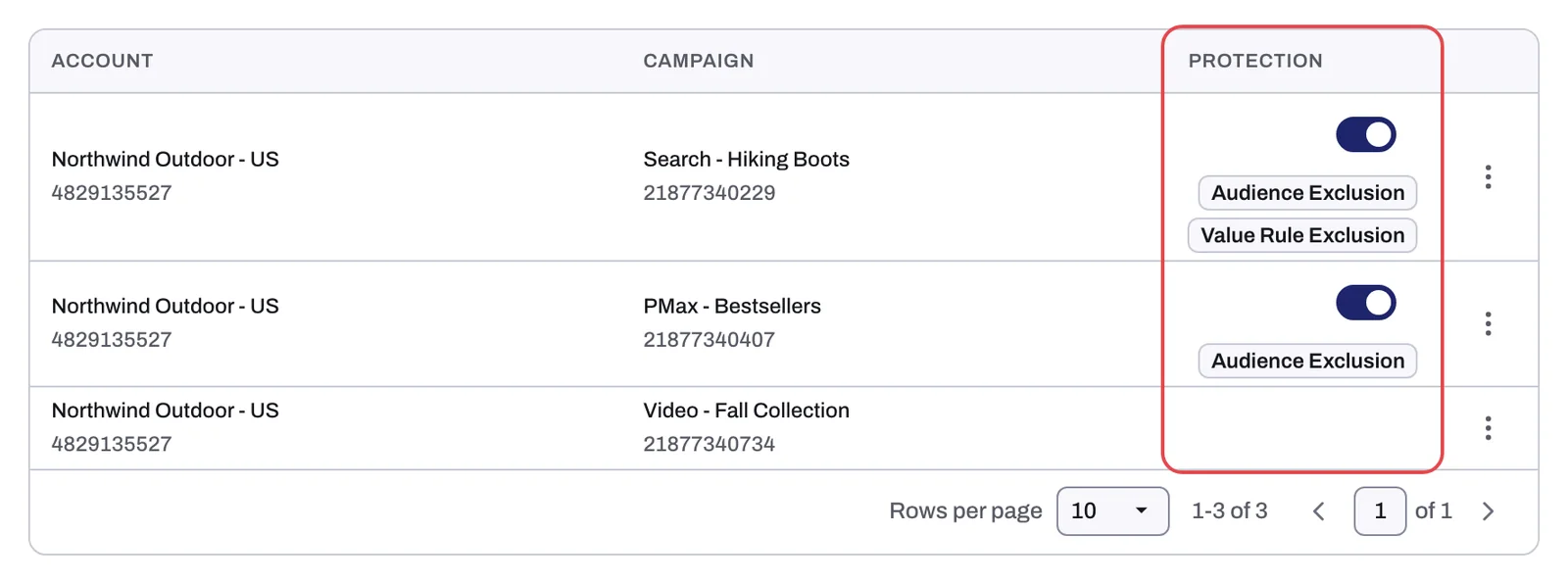
To see the visitors and placements Tapper excluded, open the Exclusions page. The dashboard's Invalid Traffic tab shows how full each campaign's IP exclusion list is in the IP Exclusions per Campaign card.
When Tapper writes nothing
- Monitoring-only mode: every new rule set starts in it, and it stays on during the free trial. Tapper detects invalid traffic but writes no automatic exclusions; only the IPs you add by hand on Auto IP blocking are sent. See Monitoring-only mode: why nothing is blocked yet and what changes when blocking starts.
- Protection switched off on a campaign: Tapper removes its audience exclusion and value rule from that campaign, and new IP exclusions skip it. See Choose which campaigns Tapper protects.
- Lift only workspaces: Tapper writes no automatic exclusions. The only exclusions it adds there come from a Lift fix you press, such as Exclude placements.
Meta, TikTok and Microsoft Ads
Only Google Ads takes IP exclusions. On Meta and TikTok, Tapper excludes a 90-day custom audience of flagged visitors from each ad set or ad group you protect. See How Block protects Meta ads and How Block protects TikTok ads.
Related
Was this helpful?
Related articles
Still need help?
Chat with our team and mention this article.