

How Block protects TikTok ads
Tapper Block protects TikTok ads the same way it protects Meta ads: with an audience, not with IP addresses. When Tapper finds that a visitor from one of your TikTok ads is invalid, that person joins an audience in your TikTok ad account, and every ad group you protect excludes it.
How it works
- Someone clicks one of your TikTok ads and lands on your website.
- The monitoring script on the page checks the visit against your entity's detection rules.
- If the visit is invalid, Tapper signals it through your TikTok Pixel, and the person joins the custom audience Tapper - Invalid traffic. Tapper creates this audience in your TikTok ad account when you connect it.
- Every ad group you protect excludes that audience, so TikTok stops showing those ad groups to the people in it. People stay in the audience for 90 days.
What follows from this:
- Nothing is protected until you switch ad groups on. You choose the ad groups, one at a time or all at once, under Manage ad groups. See Protect TikTok ad groups: Protect all or one at a time.
- There is no IP blocking on TikTok. Tapper writes no IP exclusions to TikTok, and the manual list on the Auto IP blocking tab applies to Google Ads only.
- The 90 days are not shown in Tapper. Unlike the Meta tab, the TikTok tab has no audience card, so there is no retention field to change.
What your account needs
- A Block + Lift workspace. On a Lift only workspace the TikTok tab is connect-only: Tapper reads your spend, creates no audience, needs no pixel and shows no Protection column, and Lift checks each connected account daily.
- A TikTok Pixel. Without one, the account does not connect.
- The monitoring script on your landing pages.
- The
ad_idparameter on your ads, described next.
The sign-in itself is in Connect TikTok Ads.
Add the ad_id parameter to your TikTok ads
TikTok does not put the ad's ID in your destination URL by default, and Tapper needs it to tie each click to the exact ad. TikTok Ads Manager has no separate URL parameter builder, so you add the parameter to the destination URL:
- In TikTok Ads Manager, open the Ad tab, hover over the ad and click Edit.
- Scroll to the ad's URL field.
- Add
?ad_id=__CID__to the end of the URL, or&ad_id=__CID__if the URL already contains parameters. Type the macro exactly: uppercaseCIDbetween double underscores. TikTok replaces it with the ad's ID every time the ad is served. - Publish the changes.
For example: https://www.example.com/landing?ad_id=__CID__. The text is the same for every ad, so you can add it to ads you create later and use TikTok's bulk editing for many ads at once. Tapper's public guide has the same steps: TikTok Ads: URL Parameters.
How Tapper stays in sync with TikTok
- The connection. Tapper keeps the TikTok sign-in fresh automatically, so you do not need to sign in again. If TikTok signs Tapper out anyway, the account card shows Needs reconnect, the line "TikTok signed Tapper out of this account" and "Reconnect TikTok to resume protection." Click Reconnect on the card. Tapper skips an account's syncs while it is in this state and does not email you about it, so check the card if TikTok numbers stop moving.
- Campaigns and ad groups. Tapper reads them when you connect and then every 6 hours. Refresh ad groups on the Manage ad groups sub-tab reads them again now.
- Spend and metrics. These arrive on a schedule, so the dashboard can trail TikTok Ads Manager by several hours. See When your data shows up after connecting.
What you see in Tapper
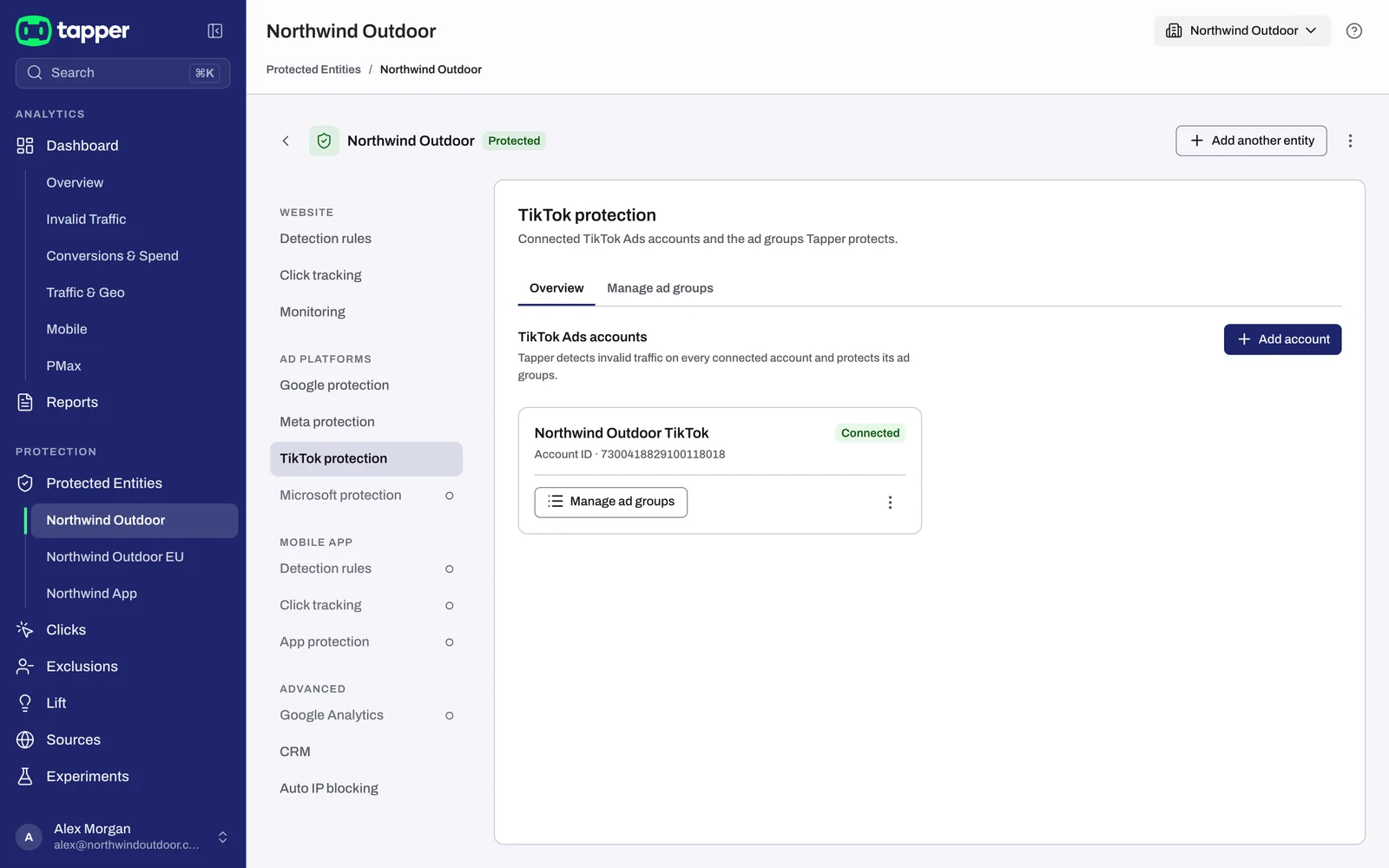
Open Protected Entities, open the entity and, under Ad platforms in the left rail, click TikTok protection. The Overview sub-tab lists TikTok Ads accounts, with a card per account (status, Account ID, Manage ad groups). The Manage ad groups sub-tab holds the Protection switch for each ad group, with Protect all or Disable protection and Refresh ad groups. There is no Export on this tab.
On the dashboard, pick TikTok on the platform toggle to see TikTok alone.
Related
Was this helpful?
Related articles
Still need help?
Chat with our team and mention this article.