

Click IDs: GCLID, WBRAID and GBRAID, and where Tapper shows them
A click ID is the identifier an ad platform attaches to the URL of every click it sends to your site. For Google Ads that is the GCLID, or on some devices a WBRAID or GBRAID. Tapper stores it with the click and uses it in three places: the Clicks page, the Google refund report and the Salesforce match on the CRM tab.
What the Google click identifiers are
The Google Click ID (GCLID) is a unique identifier that Google Ads assigns to each click on your ads and appends to your landing page URL as gclid=. It looks like a random string, but Google can read from it:
- The campaign it came from
- The exact time of the click
- The network, for example Search or Display
- The ad group and the ad that was clicked
WBRAID and GBRAID are Google's other click identifiers: clicks from iOS devices often carry a wbraid or gbraid parameter instead of a GCLID. Tapper treats all three as the identity of the click.
Meta and TikTok attach their own identifiers (fbclid and ttclid); Tapper uses those to spot traffic from accounts you have not connected on The Sources page.
How the click ID reaches Tapper
When you connect a Google Ads account on a workspace with Block, Tapper sets a tracking template on the account automatically. That template routes every click through protect.tapper.ai and carries the click ID in its gclid={gclid} parameter, next to the campaign, ad group, ad, device, location, network and keyword values. You only paste it by hand where a campaign, ad group or ad has its own template, which overrides the account one; the dashboard flags that with the banner Some ads skip Tapper's tracking and the button Fix tracking. See Fix campaigns, ad groups or ads that override Tapper's tracking.
Where Tapper shows the click ID
The Clicks page
Open Clicks in the sidebar and choose Google Ads. Each ad click Tapper tracked is one row, and the Click id column shows the identifier with its kind underneath: GCLID, WBRAID or GBRAID. Hover a row and choose View details to open the visitor drawer; its Click ID field has a Copy to clipboard button. On the Google Ads view, the Visitor ID filter narrows the list to one visitor. The Clicks page is not shown on Lift only workspaces.
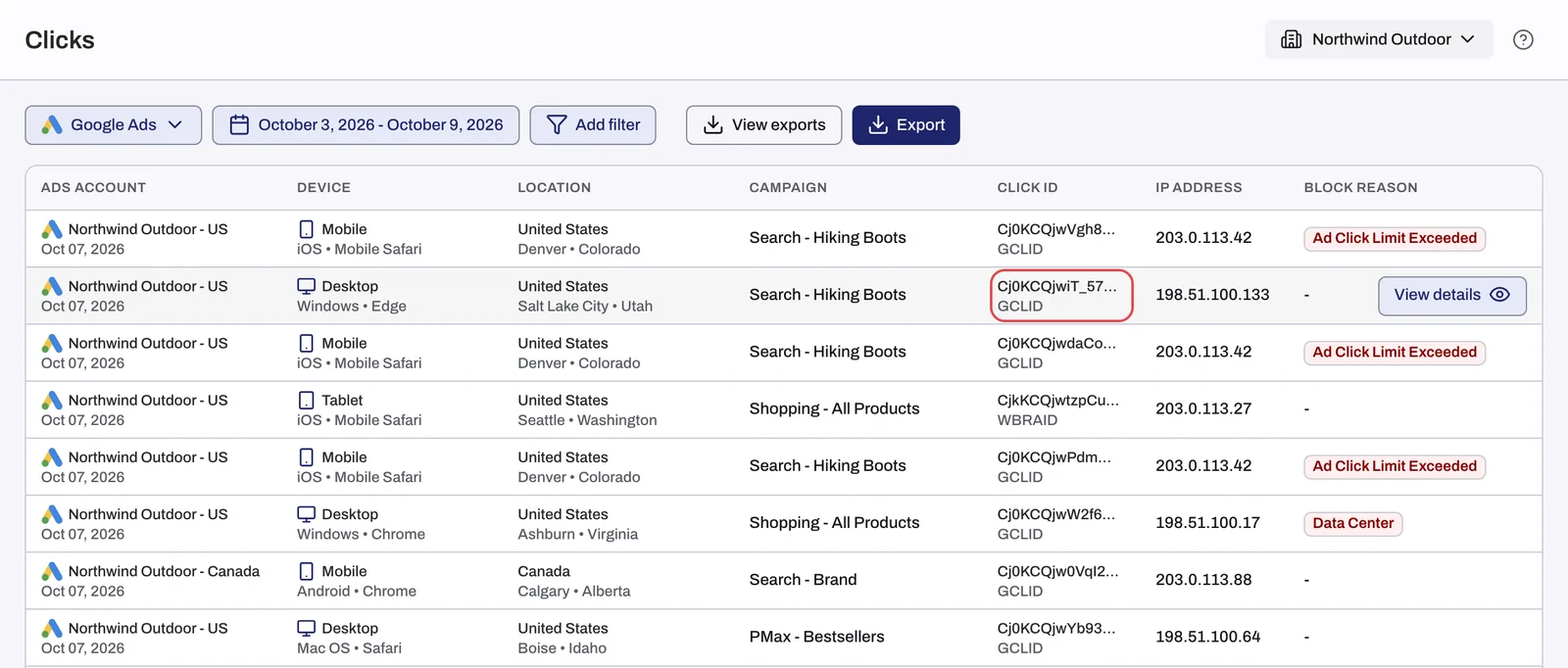
The visitor drawer on the Exclusions page shows the same fields, plus Google Analytics engagement evidence for the click when Google Analytics and its BigQuery export are connected; see The Exclusions page and the proof drawer.
The Google refund report
The Refunds page builds a CSV of evidence for an invalid-click claim with Google Ads: Google Ads clicks only, one row per unique GCLID, with gclid as the first column, followed by the IP address, your customer ID, the campaign, the time of the click, the landing page URL, the user agent, the referrer, the block reasons and details about the IP's network. Tapper sends nothing to Google on your behalf. You submit the file through Google's form yourself, and Google only investigates clicks up to 60 days old. See Request a refund from Google Ads for invalid clicks.
Salesforce and Tapper Vantage
Tapper Vantage, which Tapper enables for your account, reads each lead's real outcome from Salesforce and matches it back to the ad click that produced it. That match uses the click ID, so your Salesforce leads should have a field that stores the GCLID. On the entity's CRM tab, Click ID field shows which field Tapper reads, and Match rate splits your leads into Salesforce click ID, Tapper click data and Unmatched. See Connect Salesforce (read-only) on the CRM tab.
What a repeated click ID means
Google assigns one ID per click, so when the same GCLID appears more than once in Tapper, the same Google click reached your site again: the visitor reloaded the page, used the back button or reopened the link. Google counts that as one click.
Tapper does not know whether Google charged you for a click. Billing is Google's decision, and Google also removes some clicks as invalid on its own side. The Clicks page shows what reached your site; Google Ads shows what you paid. See Dashboard numbers differ from Google Ads.
Related
Was this helpful?
Related articles
Still need help?
Chat with our team and mention this article.