

How Block protects Meta ads
Tapper Block protects your Meta ads with an audience, not with IP addresses. When Tapper finds that a visitor from one of your Meta ads is invalid, that person joins an invalid traffic audience in your ad account, and every ad set you protect excludes that audience.
How it works
- Someone clicks one of your Meta ads and lands on your website.
- The monitoring script on the page checks the visit against your entity's detection rules: click thresholds, detection features and country rules.
- If the visit is invalid, Tapper signals it through your Meta pixel, and Meta adds the person to the custom audience Tapper - Invalid Traffic Audience. Tapper creates this audience in each Meta ad account when you connect it.
- Every ad set you protect carries that audience as an exclusion, so Meta stops delivering those ad sets to the people in it.
Three things follow from this:
- Nothing is protected until you switch ad sets on. Connecting a Meta account does not attach the audience to any ad set. You choose the ad sets under Manage ad sets; see Protect Meta ad sets: Protect all or one at a time.
- There is no IP blocking on Meta. Tapper writes no IP exclusions to Meta, and the manual list on the Auto IP blocking tab applies to Google Ads only.
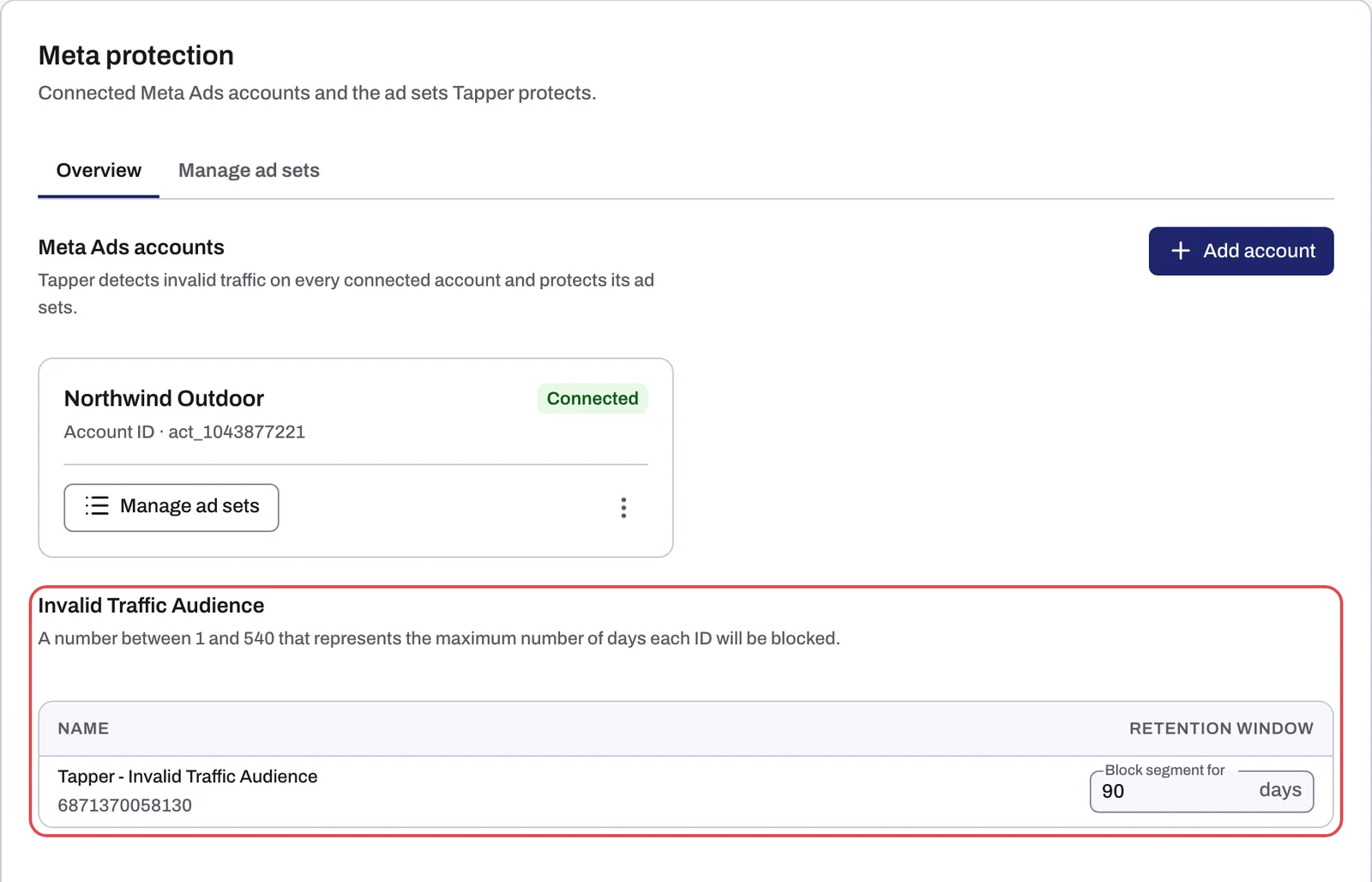
- The audience updates itself. People join as Tapper flags them and stay for 90 days by default. Your ad sets keep the same exclusion, so new detections do not edit them again.
What your ad account needs
- A Block + Lift workspace. On a Lift only workspace the Meta tab is connect-only: Tapper reads spend and conversions, creates no audience, needs no pixel and shows no Protection column, and Lift checks each connected account daily.
- A Facebook profile with Advertiser or Admin access to the ad account, and ads management allowed when Meta asks during sign-in.
- A Meta pixel on the ad account. Without one, Tapper cannot create the audience and the account does not connect.
- Meta's Custom Audience terms accepted for each ad account. When you tick an account while connecting, Tapper shows the link Accept the terms on Meta.
- The monitoring script on your landing pages.
- The
ad_idURL parameter on your ads, so Tapper can tie each click to the exact ad. See Add the ad_id parameter to your Meta ads.
The details, and the messages you see when something is missing, are in Before you connect Meta: permissions, the pixel and the Custom Audience terms.
Which ads Block can cover
Tapper judges a visitor on your website, so it needs ads that send people to your site. Ads that keep people inside Meta, such as video view campaigns, lead form ads and awareness or impression campaigns, give Tapper no visit to check, and an ad account that runs only these cannot be protected. In a mixed account, Tapper learns from the ads that reach your site, and you can still switch protection on for any ad set, including ones whose ads stay on Meta.
What changes in your Meta ad account
When you switch an ad set on, Tapper adds Tapper - Invalid Traffic Audience to that ad set as an exclusion. In Ads Manager, edit the ad set and you see it listed under Audience controls. Switching the ad set off removes it. Tapper uses its Meta access to list your ad accounts, read spend, create the audience and attach or remove it per ad set.
Adding an exclusion changes the ad set's targeting, so Meta may send its ads for review. Meta says most ads are reviewed within 24 hours (see Meta's About ads in review). Some ad sets may also re-enter the learning phase; see Meta ads and the learning phase after you turn protection on.
What it changes for your results
Meta usually charges per 1,000 impressions rather than per click, so invalid traffic costs you through the people your ads keep reaching. Once the people Tapper flags are excluded, your protected ad sets stop spending impressions on visitors who already behaved like bots, click farms or other invalid sources, and repeat bots stop draining your daily budget. Competitor clicks matter less than on Google, because you mostly pay for impressions.
Pixel Guard adds a second effect. This switch in the Blocking section of the Web detection rules tab controls when tracking pixels are allowed to fire, so sessions Tapper classifies as invalid do not feed the signals ad platforms optimize on. It starts off; the app marks it Recommended: On. See Pixel Guard: keep invalid sessions out of your ad platform signals.
How much this lifts your return on ad spend depends on how much invalid traffic your Meta ads attract, so measure it rather than assume it. On the dashboard, pick Meta on the platform toggle:
- ROAS is revenue divided by spend for your connected accounts.
What you see in Tapper
Open Protected Entities, open the entity and, under Ad platforms in the left rail, click Meta protection. The tab has two sub-tabs:
| Sub-tab | What it shows |
|---|---|
| Overview | A card per connected account (status, Account ID, Manage ad sets), then the Invalid Traffic Audience card with columns Name and Retention window. Change how long people stay in the audience in Block segment for, from 1 to 540 days. |
| Manage ad sets | The Protection switch for each ad set, plus Protect all or Disable protection, Export and Refresh ad sets |
Related
Was this helpful?
Related articles
Still need help?
Chat with our team and mention this article.