

Value rules and shadow campaigns: optional extras for Performance Max, Search and Shopping
Tapper Block protects your Google Ads campaigns on its own. Two optional extras sit on top: a conversion value rule that tells Google's bidding to value flagged visitors less, and a shadow campaign that moves high-risk traffic into a separate campaign with a bid you cap. Neither is required. Every protected campaign already gets Tapper's audience exclusion, and Search, Display and Shopping campaigns already get a value rule from Tapper.
What Tapper already does
| Campaign type | Value rule from Tapper | Chip on Manage campaigns |
|---|---|---|
| Search, Display, Shopping | Yes: conversions from visitors on Tapper's two lists, "Tapper - Invalid Traffic List" and "Tapper - Ad Click Limit Exceeded Traffic List", are multiplied by 0.5 | Value Rule Exclusion |
| Performance Max | No, not today | none for value rules |
| Demand Gen, Video and other types | No | none |
There is no value rule setting in Tapper: the Value Rule Exclusion chip on the Manage campaigns sub-tab of Google protection is the only place it shows. Switching a campaign's Protection switch off removes Tapper's value rule from it, and switching it back on adds it again. See Choose which campaigns Tapper protects.
Add a value rule to a Performance Max campaign (optional)
Performance Max campaigns are already protected by Tapper's audience exclusion. If you also want Google's bidding to value flagged visitors less there, add a value rule yourself in Google Ads. Tapper created the segment when you connected the account; there is nothing to upload.
- In Google Ads, open the Performance Max campaign and go to its Settings.
- In Value rules, click to create a new value rule.
- For the audience segment, click Browse, choose How they have interacted with your business and select "Tapper - Invalid Traffic List". Tapper's own rules also include "Tapper - Ad Click Limit Exceeded Traffic List"; add it too if you want the same coverage.
- Under Value adjustment, choose Multiply and enter
0.5, the same factor Tapper uses on the rules it creates. - Click Save.
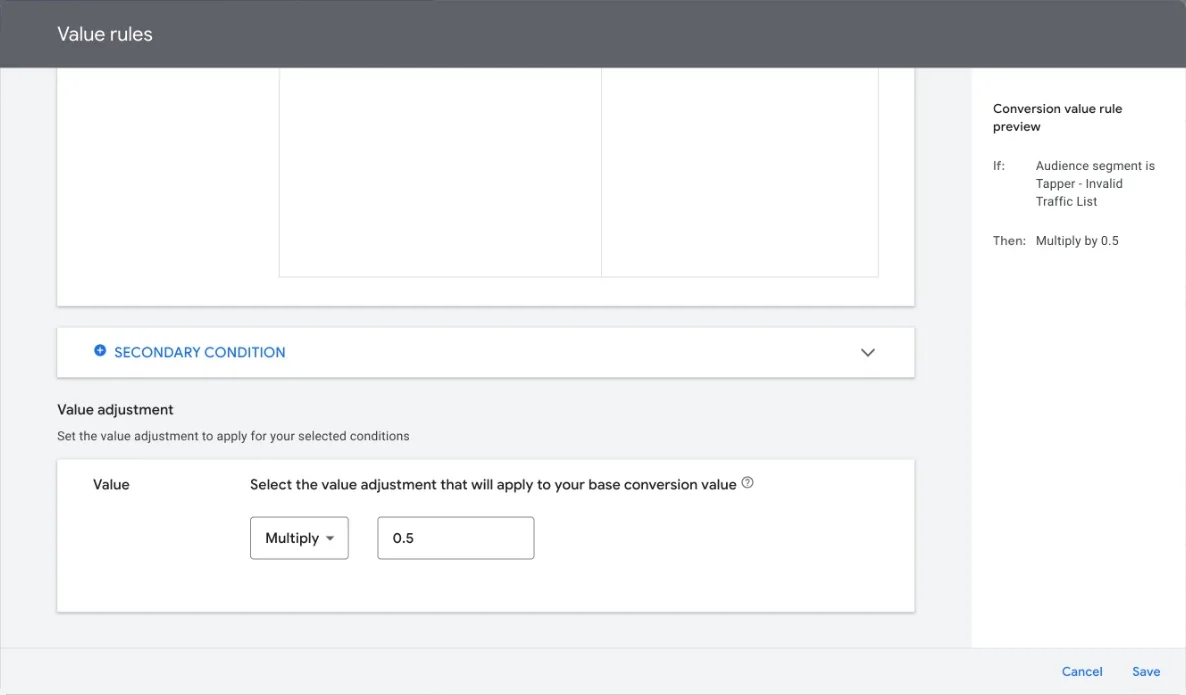
A value rule does not stop flagged visitors from seeing your ads. It halves the value Google's bidding gives their conversions, so the campaign bids less for them. How long a visitor stays in the segment is the retention window on the Invalid Traffic Audience card; see The Invalid Traffic Audience and its retention window.
If "Tapper - Invalid Traffic List" does not appear, check in Tools > Shared library > Audience manager > Your data segments that its membership status is Open. Tapper creates the list open and reopens it when Google refuses a closed one, so this is rarely the cause. If your conversion tracking is managed by another Google Ads account, Tapper creates the list in that account and its name ends with " - " and your ad account's ID.
Create a shadow campaign (Search and Shopping)
A shadow campaign isolates high-risk traffic in a separate Manual CPC campaign. Your original campaign keeps competing for genuine visitors with all of Tapper's exclusions in place. The shadow campaign still excludes Tapper's invalid traffic list, but not visitors who only went over your ad click limit, so those visitors can reach you there at no more than the CPC you set.
You need the Owner or Admin role.
- Go to Protected Entities, open the entity, choose Google protection and click Manage campaigns.
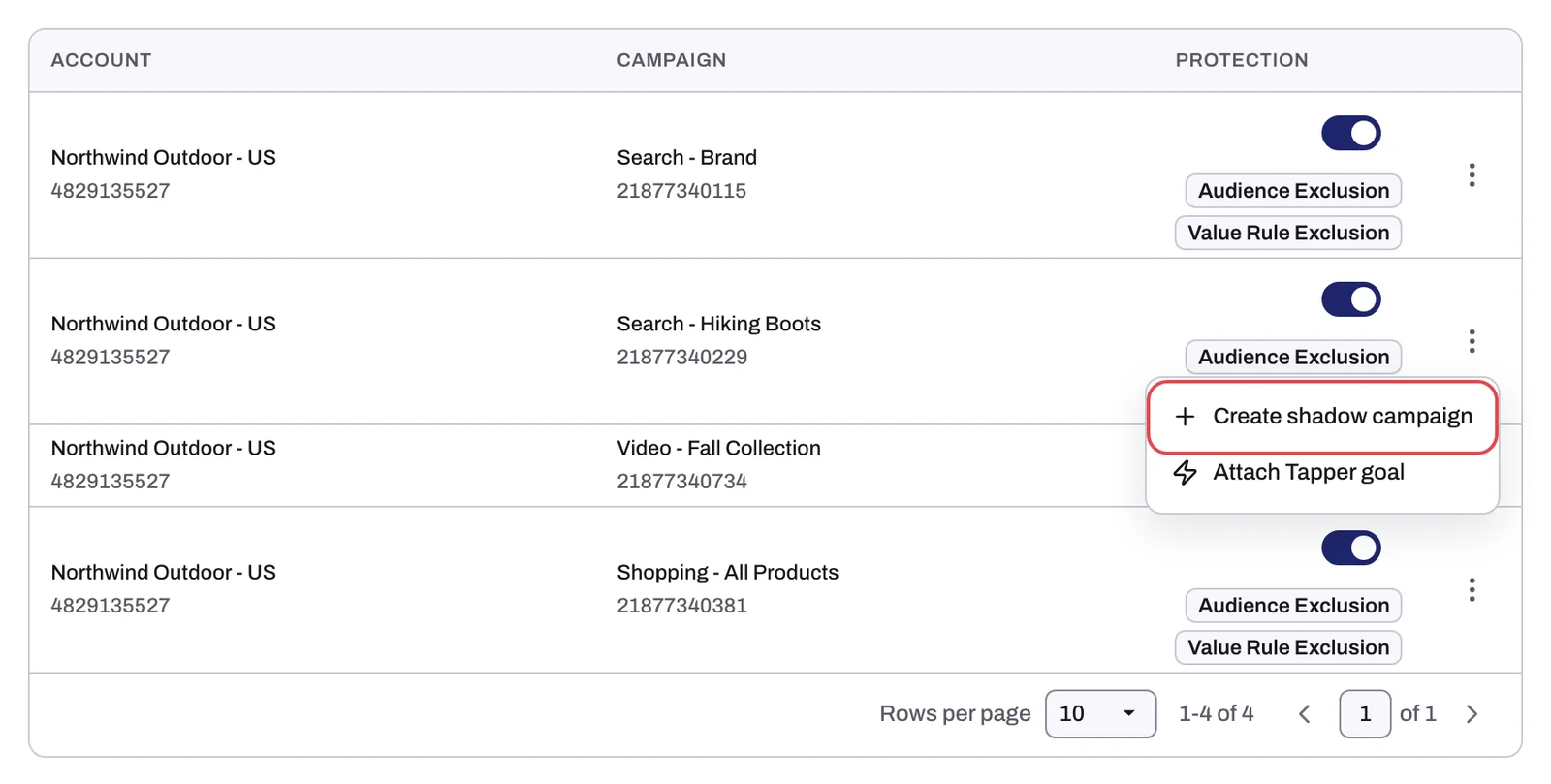
- On a Search or Shopping campaign row, open the ⋮ menu and click Create shadow campaign. The item only shows on campaigns that do not have a shadow campaign yet.
- In the Enter CPC for shadow campaign dialog, type your maximum bid in the field marked Shadow campaign CPC.
- Confirm.
What happens next
- Tapper copies the campaign in your Google Ads account with its own budget, set to Manual CPC at your bid, and names it after the original followed by " - Shadow - " and the creation date and time.
- The copy is created paused. Review it in Google Ads and enable it when you are ready; until then it serves nothing.
- On Manage campaigns, the original row gets a line that says it has a shadow campaign. Expand it to see the shadow campaign with its own Protection switch.
Related
Was this helpful?
Related articles
Still need help?
Chat with our team and mention this article.