

Connect or reconnect Google Ads for Lift
On this page
Lift checks each connected Google Ads account once a day and lists the changes worth making in Recommendations.
Before you start
- You need the Owner or Admin role. Managers can use Lift but not connect; Viewers can do neither.
- Use a Google login that can open the account, directly or through a manager account, with a level that can make changes, such as Standard or Admin. Lift's fixes go through that login.
- Check Settings > General > Products: Lift only or Vantage + Lift + Block decides what connecting writes into Google Ads, and the first connected ad account locks it (Choose your products).
Where to connect
With several entities, pick one in the switcher under the workspace name first. Each of these opens Add an account:
- Recommendations: Connect an ad account, or the dashed Google Ads tab when Meta Ads or TikTok Ads is already connected.
- Business details in Lift: pick Google Ads, then Connect Google Ads.
- Setup > Ad accounts > Google Ads: Add account (Connect Google Ads while it has none).
A new workspace's wizard has the same rows on Connect an ad account.
Steps
With Block these pages say "protect": see Connect Google Ads.
- On the Google Ads row, press Continue with Google. Allow access to your email address and Google Ads, with the Google Ads box ticked.
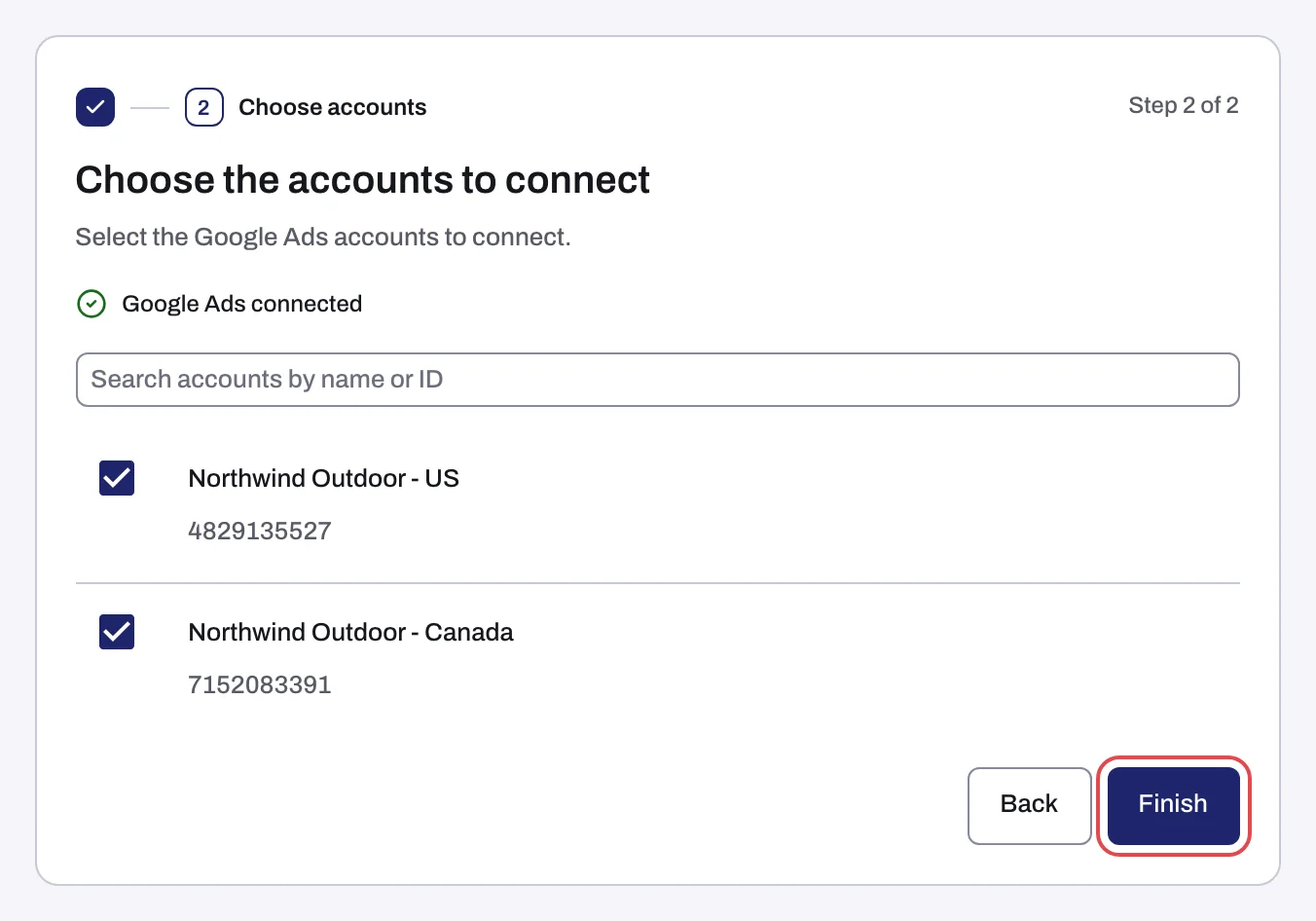
- Choose the accounts to connect lists every account the login reaches; a manager account shows as its client accounts. Tick each account. Accounts marked "Cancelled in Google Ads", "Suspended in Google Ads" or "Closed in Google Ads" are grayed out and cannot connect.
- Press Finish. The Google Ads connected line above the list only means the sign-in worked.
- Press Done: to the Google Ads page from Add an account, or to Recommendations from the wizard.
What connecting changes in Google Ads
| Workspace | What connecting writes into Google Ads |
|---|---|
| Lift only | Nothing: no tracking template, conversion actions, user lists or audiences. Tapper only reads the account. |
| With Block | Tapper Block replaces the account-level tracking template with its own (yours is put back when you disconnect) and creates four conversion actions, two user lists and two audiences. See What Tapper creates in your Google Ads account. |
After that, Lift changes the account only through:
- A fix you press, for example Pause campaign, then confirm (Fix, mark as done, dismiss and revert).
- An automation band, off unless an Owner or Admin sets one in Setup > Google Ads. Within it, Tapper tightens a target CPA or raises a target ROAS on its own, once a person's own fix of that kind has stuck on that account (Automatic fixes and the Activity tab).
When the first check runs
- Lift only: about 45 minutes after you connect, once the figures load. If they are not ready, the next daily check.
- With Block: the next daily check.
A change you make in Google Ads yourself shows after the next daily check. Lift starts once Tapper has set your workspace up.
If something goes wrong
- Sign-in messages, including "Your Tapper session ended." and an unticked Google Ads box: Connection failed, Sign-in cancelled or Connection status unknown.
- An empty list, an account already connected or in another workspace, or Google Ads limiting requests: No Google Ads accounts found, or the list did not load.
- No access, signed out, or not active: Google Ads says your sign-in has no access to the account.
- "2 accounts connected, 1 did not": press Retry the failed accounts, or Done with the connected accounts and retry later from Setup > Ad accounts.
- A new workspace stays on No open recommendations: contact your Tapper contact (No Lift recommendations yet).
- A fix button is grayed out with "Write access has not been verified for this ad account yet, so fixes cannot be applied.": contact your Tapper contact.
If you cannot tell which workspace holds an account, write to support@tapper.ai with the account ID.
Reconnect or disconnect
Lift skips an account showing Needs reconnecting or Not active until it is reconnected: no daily check, its open cards stay as they were, it is left out of the weekly summary, and no fix can be applied or reverted. See Reconnect an ad account that stopped working.
Disconnect is in the ⋮ menu on the row. Tapper stops reading the account and its open cards close with none of their money counted as saved. Lift fixes stay. See Disconnect an ad account.
Was this helpful?
Related articles
Still need help?
Chat with our team and mention this article.