

Split payments and free delivery labels on your frames
On this page
The Split payments and Free delivery frames show a label such as "4 payments of AED 312.50" or free delivery on the products that offer it. Lift cannot see which products your payment partner splits or which ship free, so you tell it with one file. The rest of the frame works as in Frames: put sale badges, labels and prices on your Meta catalogue ads.
The file
One row for each product, with these columns:
| Column | What goes in it |
|---|---|
id | The product id in your shop, the same id as in your catalogue. |
payments | The number of payments the product splits into: 2, 3, 4 or 6. |
free_delivery | 1 when the product delivers free. 0, or empty, when it does not. |
Add the labels
- In the Frames tab, select Download a sample file at the top of Product fields. It has the three columns and three rows with example values to replace with your own.
- Select Add fields, upload your file and select Save fields. Lift tells you how many rows matched your products.
- Select New template, then Split payments or Free delivery under Labels in the Starting point list. For split payments, choose 4 to start, or 2, 3 or 6.

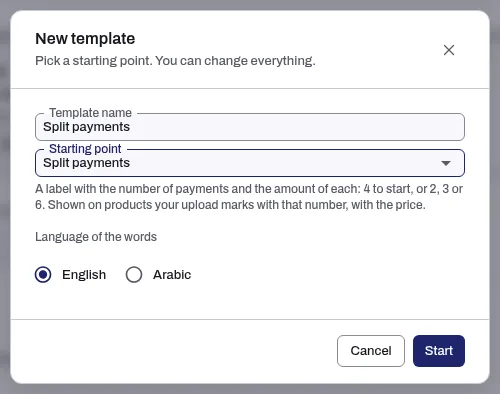
Split payments shows on a product only when its payments is the number the label says, and works out each payment for you: what the shopper pays now, divided by that number. Free delivery shows on the products with a 1. Then approve the template and put it on your catalogue as usual.
Related
Was this helpful?
Still need help?
Chat with our team and mention this article.