

Tapper Lift for car makers and dealers
On this page
A car account buys the same searches as every other account, and wastes money on a few that only a car account has. A brand campaign that pays for a rival make's buyers. A sales campaign that pays for people who want an oil change. An ad that still says Ramadan in July. A lead campaign that cannot tell a test drive from a form filled in by mistake.
Tapper Lift checks for these, every day, on your Google Ads accounts. Each finding is a card in Recommendations, with the campaign, the money a day it touches, what to do and the proof. And Model demand shows how often people search for each of your models, beside what you spend on those searches.
Which accounts get it
Car makers and dealers. Lift knows an account is a car account from the make it advertises, read from the account's own brand terms, website address and account name. Nothing to switch on: when the make is known, the car checks run on every connected Google Ads account of that make.
When your workspace industry is Automotive (set when you name your workspace), Names in Business details opens on your Model names, described below.
The car checks run on Google Ads accounts. Lift also reads Meta Ads, TikTok Ads, Microsoft Ads, LinkedIn Ads, Snapchat Ads and Apple Ads accounts, with the checks listed in The checks Lift runs.
Tell Lift your model names
Under Setup > Business details > Names > Model names, Lift lists the models it knows you sell, in English and in Arabic. English names show with capitals, as your make writes them: Atlas, X-Trek, Rover Z. Lift never pauses or excludes a search that carries one of these names, and the car checks use them to tell your own cars from a rival's.
The line above the names says how many models they make, for example "Lift never pauses or excludes a search for these 5 models." Lift counts each English name once, whatever its spelling: X-Trek, Xtrek and X Trek are one model. Arabic names are spellings of those models and are not counted again. An account with only Arabic names sees the count in names: "these 4 names".
To change the list, type in Add or remove model names, separate names with a comma, and press Save. The field writes the English names with capitals too, and a name you leave as it is is saved exactly as it was. Add each model in English and in Arabic, and each spelling you use, as its own name. The field holds every name on the list, the ones Tapper added for you included, so a name you take out of it is removed when you save. Cards update at the next daily check.
When your workspace industry is not Automotive, the same list is Protected terms under Business details > Names.
The car checks
| Check (its name in the Check filter) | What it finds | What to do |
|---|---|---|
| Spend on searches for other car makes | A brand or model campaign paying for searches that name another make. | Exclude the rival names in that campaign only, or move them to a competitor campaign. |
| Service searches in sales campaigns, and the reverse | A sales campaign paying for servicing and parts searches, or a service campaign paying for new car searches. | Exclude those words in that campaign only. |
| Sales leads and service bookings under one goal | A campaign counting sales leads and service bookings as one goal. | Give sales and service their own conversion goal. |
| Live ads still mention an offer or season that has ended | Live ads that mention an offer, season or year that has passed. | Pause the lines or update the wording. |
| Google can't tell which leads become buyers | Lead campaigns that tell Google only about forms and calls. | Send your CRM's lead stages to Google. |
| Page views and downloads counted as leads | Lead campaigns bidding on page views, brochure downloads and other early steps as if they were leads. | Set those actions to secondary. |
Each card has the same shape as every Lift card: a headline, Found, Do and the proof. How to read one is in Read a Lift card.
Rival car makes
The finding. A brand campaign or a model campaign is there to buy searches for your name and your cars. Google also lets it buy searches for other makes, mostly through broad match on your keywords. They often cost more per lead. Lift puts the two side by side.
Lift looks at your Search and Performance Max campaigns that are brand or model campaigns. It leaves out competitor campaigns, because buying a rival's searches is their job, and campaigns that have not spent in the last 7 days or have fewer than 14 days of spend in their current run. A search that also names your own make counts as yours, so a comparison of your car with a rival's is never in the figures. A sister brand of your own make is not a rival either.
Here is a card on a brand campaign, with example figures.
- Headline: $40 a day on searches for other car makes.
- Found: They cost $60 per lead, against $30 on searches for your own name.
- Do: Exclude the rival names here only, or move them to a competitor campaign.
- Why: Campaign "Brand - Search" is a brand campaign and not a competitor campaign, yet 120 searches naming other car makes reached it in 30 days, the costliest "rival motors suv", "northwind cars price" and "crestline auto offers". The card then says which way they came in: Performance Max, your own keywords, broad match on your keywords, AI Max, or no keyword of yours.
The proof lines hold the choice:
- Never exclude them across the account. A competitor campaign for them is funded from this campaign's budget, so the total stays the same.
- Buying a rival's searches can pay, so this is spend affected, not money lost.
Lift never suggests spending more. You decide whether the rival searches stay.
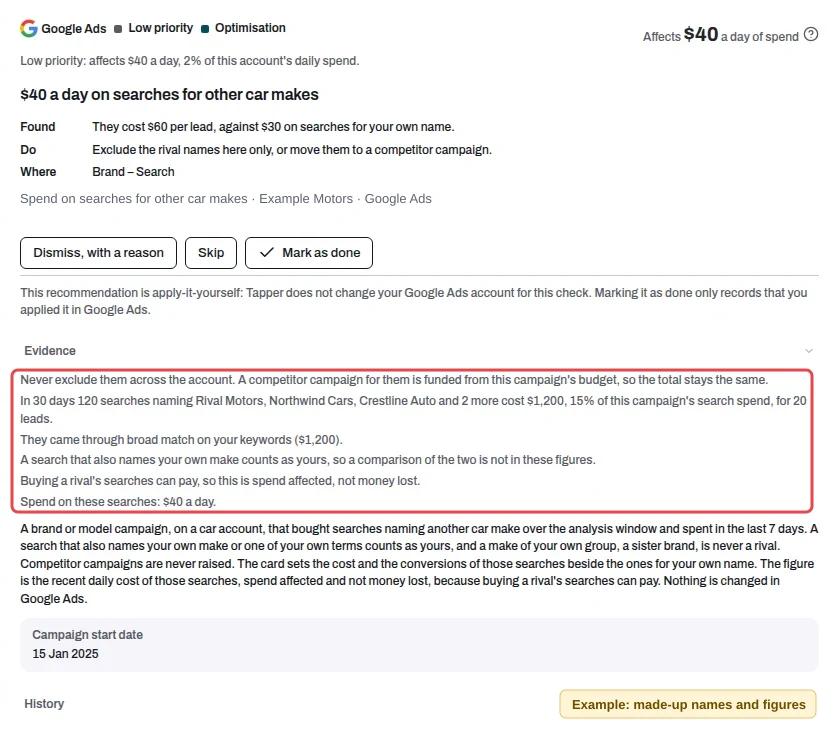 Example card: made-up names and figures. The box marks the proof lines.
Service and sales
Service searches in a sales campaign. Searches such as "service centre" or "spare parts" in a campaign that counts sales leads. Lift reads each campaign's counted conversions to tell a sales campaign from a service campaign, and a campaign whose name says service is a service campaign whatever it counts. The card names the searches, what they cost in the window and the leads they brought, and its proof gives their spend a day in the last 7 days.
- Headline: $10 a day on searches for servicing and parts.
- Found: In 30 days they cost $300, 20% of this campaign's search spend, for 3 leads.
- Do: Exclude these service words in this campaign only.
New car searches in a service campaign. The reverse: a service campaign paying for searches that name your make with a price, an offer or a buying word, or that ask for a test drive. A search that carries one of your Model names is never on this card.
- Headline: $5 a day on searches for new cars.
- Do: Exclude these new-car searches in this campaign only.
Both fixes are for that campaign only, never across the account. When the account runs a service campaign, the card says that campaign keeps the service searches (and, on the reverse card, that your sales campaigns keep the new car searches). When we find none, the card says so instead: "We found no service campaign on this account, so excluding these leaves them without an ad from you. Decide if you want to keep them."
A campaign and its Tapper test copy are one card. Their searches, spend and leads are added up, and Where names the campaign once, without its tracking code or test tag, followed by "and its test copy".
These two cards read Search and Performance Max campaigns. As for rival makes, they leave out campaigns that have not spent in the last 7 days or have fewer than 14 days of spend in their current run.
One goal for sales and service. A campaign that counts a sales lead and a service booking under one goal makes Google bid for both as if they were worth the same. Lift checks this on every campaign type, with the same 7 and 14 day rule. The card names the campaign and the two sets of actions, and shows the spend it affects a day in the last 7 days. No saving is claimed.
- Headline: $50 a day under one goal for sales and service.
- Found: Google bids for sales leads and service bookings as if they were worth the same.
- Do: Give sales and service their own conversion goal.
Out-of-date ads
The finding. An ad that names an offer or season that has ended, or a past year, reads as old. Lift reads the headlines and descriptions of your responsive search ads and flags four things:
- A season used outside its season. Ramadan, رمضان, Eid or عيد, when it is not the season. Lift uses the Umm al-Qura calendar, the official calendar of Saudi Arabia, and allows 30 days before the season and 7 days after it.
- An end date that has passed. For example "Offer ends 31 August 2026", read only when the date carries its year.
- A year two or more years behind. For example "Brochure 2024".
- A model year one behind, only when the same account also advertises that model with this year or a newer one. "Model X 2025" is flagged only when you also run "Model X 2026", and a line that names both years is never flagged. Lift knows your models from Model names.
Only live ads count: the line is turned on, in an ad and a campaign that are turned on, and the campaign spent in the last 7 days. One card covers one campaign. It shows up to three of its lines, each with how many live ads carry it, and how many lines are out of date in all.
- Headline: 11 live ads still mention an offer or season that has ended.
- Found: An ad that names an offer or season that has ended, or a past year, reads as old.
- Do: Pause these lines or update the wording.
Each listed line reads like one of these:
- 3 live ads say "Offer ends 31 August 2026", and that date passed 62 days ago.
- 6 live ads still say "Eid Drive Event", 5 months after Eid ended.
- 2 live ads still say "Model X Brochure 2024", from 2024.
- 2 live ads still name the 2025 Model X, while you also advertise the 2026 Model X. The line says "Model X 2025 offers".
The card also gives the day each offer or season ended, and the spend of those ads a day: "These ads spent $60 a day, no saving claimed." The card has no money figure to rank by, so it sits below the cards with money.
Lead quality
The finding. A car dealer's lead campaigns bid on what Google counts. When all Google counts is a form or a call, it counts every form the same, whether or not the person ever reaches a showroom. The stages that tell a good lead from a bad one, qualified lead, test drive and sale, live in your CRM and never reach Google.
Lift checks your lead campaigns that bid on conversions, counted only forms and calls in the last 30 days, and spent in the last 7 days. A campaign that already counts a CRM stage is not on this card. One card covers the whole account and lists its campaigns.
- Headline: 2 campaigns: Google can't tell which leads become buyers. With one campaign it reads "1 campaign: Google can't tell which leads become buyers".
- Found: Google counts every form the same, whether or not the person ever reaches a showroom.
- Do: Send your CRM's qualified lead, test drive and sale stages to Google.
The card says what the campaigns counted. When they counted calls as well as forms, Found reads "every form and call", and the proof says the campaigns bid on "form fills and calls" only. When they counted forms alone, it says forms.
When your Salesforce stages are already set as goals in Google Ads and none has arrived in the days Lift can see, the card says so. Found reads: Your Salesforce stages are set as goals in Google Ads, but none has arrived in 45 days. Do reads: Check the Salesforce link so its stages reach Google. When stages do arrive but are not counted, the proof says which, so you can count them.
The card names the campaigns and the form and call actions they counted. Its proof gives their spend a day, "These campaigns spend $100 a day, no saving claimed.", and their total for the last 30 days on a line of its own. It also cites a case: Google reports that Volkswagen Middle East cut its cost per qualified lead by 28% and per test drive by 18% after sending CRM stages to Google and bidding on their value. You set the import up in Google Ads: Lift does not change it.
Early steps counted as leads
The finding. A lead campaign that bids on conversions learns from what it counts. When a page view, a brochure download, a configurator visit, an app install or a WhatsApp click counts as a primary conversion, Google learns to buy browsing instead of leads.
Lift reads every campaign on a car account that bids on conversions or conversion value. It looks at the conversion actions that are turned on, primary and included in Conversions, and at what Google counted on the campaign in the last 30 days. A campaign gets a card when these early steps are 30% or more of what it counted, and at least 10 conversions.
Enquiry forms, quotes, test drives, bookings, call backs and calls are leads, never early steps. Most car accounts already bid on those, so this check often shows nothing: no card here means your bidding goals are leads.
- Headline: 40% of conversions bid on are early steps, not leads.
- Found: Google learns to buy page views and brochure downloads, not leads.
- Do: Set these actions to secondary so Google bids for leads.
The card names up to three of the actions and gives the campaign's spend a day: spend affected, no saving claimed. Your enquiry forms stay as they are. You change the actions in Google Ads: Lift does not. In the Check filter of Recommendations, this check is Page views and downloads counted as leads.
Model demand
What it shows. How often people search Google for each of your models in a month, in Arabic and in English, beside what you spend a day on searches that name the model. Find it under Dashboard > Lift > Model demand, headed "What people search for each of your models".
Each country has its own table, one row per model, the most searched first. Five show at first, and Show all lists the rest.
- Arabic and English: searches a month for the model's Arabic spellings and for its English spellings.
- Demand: one bar for both, Arabic solid and English lighter, scaled to the country's most searched model.
- Your spend a day: what your search campaigns spent a day, over the last 30 days, on searches naming the model, in the account's own currency.
- Signal: where to put your money next, described below.
- Top-of-page bid: Google's range of bids for the top of the page, low to high, in the account's own currency.
- Year on year: up, down or flat against the same months a year earlier, with a line of the last four years. A dash when Google has too few months to compare.
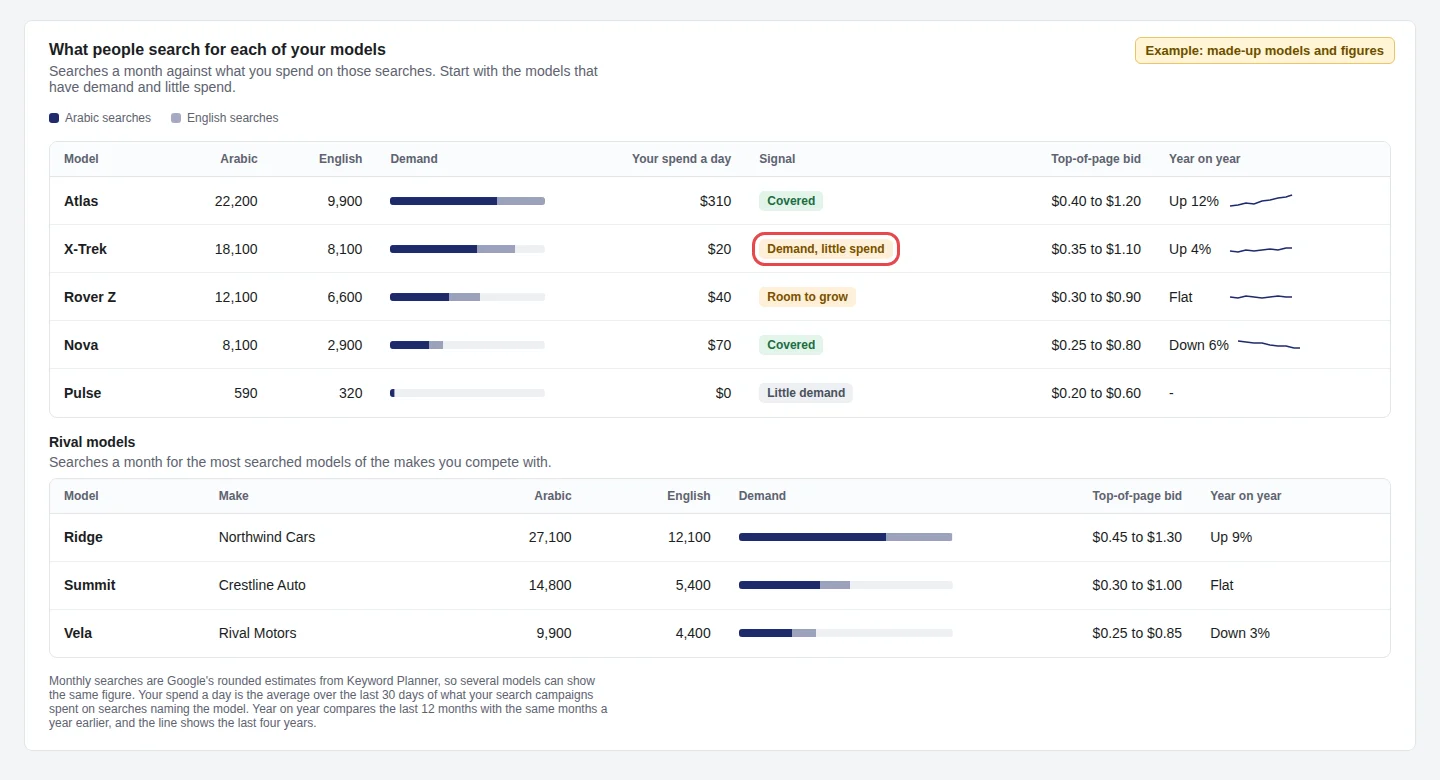 Example: drawn with made-up models and figures. The box marks a model with demand and little spend.
The signals. Lift sets each model's share of the searches against its share of your spend on those searches:
- Demand, little spend: people search for it, and you spend under a quarter of its share, or nothing. Start here.
- Room to grow: you spend between a quarter and three quarters of its share.
- Covered: you spend three quarters of its share or more.
- Little demand: under 2% of the searches, and not covered. Nothing to act on.
Below your models, Rival models lists the most searched models of the makes you compete with: their searches, demand, top-of-page bid and year on year.
It reads your model names. The panel measures the names in your Model names list, so a model missing from the list is missing from the panel. Keep the list complete, in English and in Arabic, as described in Tell Lift your model names. Model demand appears in the Lift menu once Lift has Google's figures for your model names.
Google's estimates. Monthly searches are Google's rounded estimates from Keyword Planner, so several models can show the same figure. Each spelling is counted once, in the language it is written in.
Questions
Why does my account have no car cards? Lift needs to know your make. Check that your brand terms, website address or account name carry it, and that Model names lists your models. A check shows a card only when the account has the spend and the data for it.
Will Lift exclude the rival names for me? No. These cards recommend. You exclude the names in Google Ads, or build the competitor campaign yourself.
Does the money on a card mean I lose that much? No. It is the spend the card touches, a day, in the account's own currency. Rival searches, for example, can pay.
Where do I see all of them? In Recommendations, in the Lift section of the sidebar. A card's label tells you the check.
Related
Was this helpful?
Still need help?
Chat with our team and mention this article.