

Sandbox: try a Lift recommendation before you make it
On this page
Lift's Sandbox shows what a recommendation is likely to do before you make it. It judges the change on the goal of the campaigns it touches, gives a range rather than a promise, and says how it worked the figure out. Once the change is made, Sandbox reads every day whether it is doing better, against campaigns left as they are, and says "Not clear yet" until it can tell.
Where to find it
- Sandbox is a row of the Lift section in the sidebar, after Results (
https://app.tapper.ai/lift/sandbox). It lists every change tried in Sandbox or saved there. - Try in Sandbox sits on every open Google Ads card in Recommendations, outlined, with a test tube icon, with the card's other buttons. It shows to the workspace's Owners, Admins and Managers. The other buttons are explained in Fix, mark as done, dismiss and revert.
- Sandbox works on Google Ads recommendations, in the Tapper app. The white-label partner app has no Sandbox page.
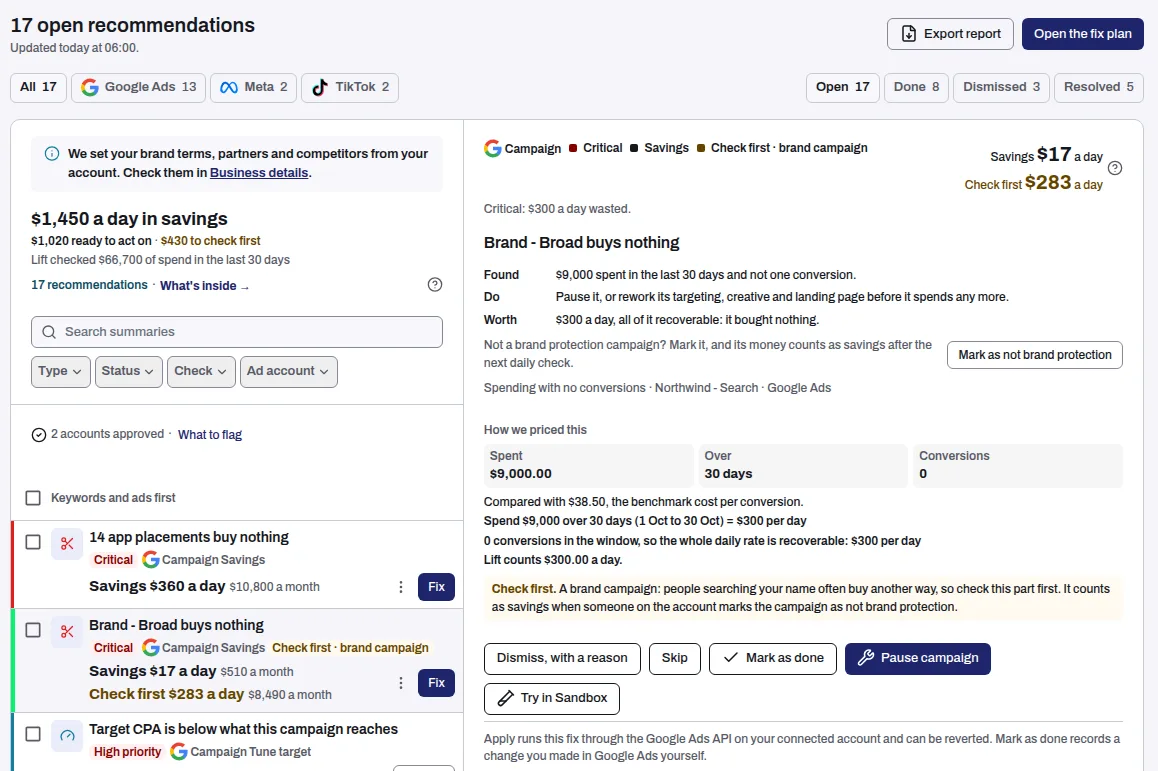
Try a recommendation in Sandbox
- In Recommendations, open a Google Ads card. How to read it: Read a Lift card: money, priority and evidence.
- Press Try in Sandbox. Sandbox makes a run for the card and opens its page. Nothing changes in your account.
- Read what the change is expected to do, what it is judged on and how Sandbox worked it out.
- Under How do you want to try it?, pick a way and press Choose this way. To decide later, press Save for later: the run stays on the Sandbox page. Not now takes you back to the card.
The run page: what the change would do
The page opens with the change in words. The line under it reads "Simulated on the last {N} days · nothing has changed in your account": the past days Sandbox learned from.
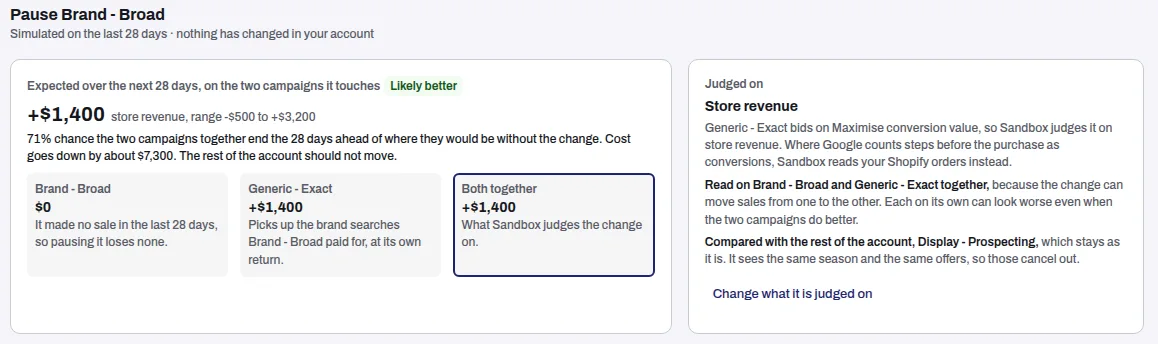
Expected over the next 28 days
The first card is labelled "Expected over the next 28 days, on the campaign it touches", or "on the two campaigns it touches" when the change can move more than one.
- The figure is the likely change in what the change is judged on, with its range beside it. With fewer than 30 counted conversions in the days Sandbox learned from, it gives the range only, with no likely figure.
- The tag reads Likely better when the likely figure is above zero and the chance of doing better is at least 60%, Likely worse when the figure is below zero and that chance is 40% or less, and Could go either way otherwise. With a range only, there is no tag.
- The line under it gives the chance that the campaigns end the 28 days ahead of where they would be without the change, how much the cost goes up or down, and, when there are campaigns to compare with, "The rest of the account should not move."
- One tile per campaign shows its part of the change and, where there is one, a sentence on what it means. When the change touches several campaigns, Both together or All together shows the figure Sandbox judges the change on.
Judged on
Judged on names the metric and why. Sandbox reads it from the campaign's bidding, and says so, for example "{campaign} bids on Maximise conversion value, so Sandbox judges it on conversion value."
| The campaign bids on | Sandbox judges it on | Read beside it |
|---|---|---|
| Maximise conversion value, or a target return on ad spend | Conversion value | Return on ad spend |
| Maximise conversions, or a target cost per action | Conversions | Cost per conversion |
| Maximise clicks, or manual cost per click | Clicks | Cost per click |
| A target impression share | Impression share | Impressions |
Conversions are the conversion actions Lift counts. Steps before a purchase, such as add to cart, are left out, so a change that only moves carts does not read as a sale.
When the change can move sales from one campaign to another, the card says it reads them together: "Read on {campaigns} together, because the change can move sales from one to the other. Each on its own can look worse even when the two campaigns do better."
The card also says what the change is compared with:
| The card says | What it means |
|---|---|
| "Compared with {campaigns}, which stay as they are." | A twin: for each changed campaign, a campaign of the same type and goal whose name differs only by its language or market. They see the same season and the same offers, so those cancel out. |
| "Compared with the rest of the account, {campaigns}, which stays as it is." | Every other campaign on the ad account that can be compared with. |
| "Compared with {campaigns}, which you chose and which stay as they are." | Campaigns picked by hand, left as they are. |
| "Read against its own estimate only" | Nothing in the account is left to compare with. That is the weaker read. |
A campaign is never used to compare with when it shares a budget or a portfolio bid strategy with a changed campaign, is paused, removed or ended, has too little data, or reports in another currency.
Change what it is judged on opens What should Sandbox judge it on? with six choices: Conversion value and return on ad spend, Conversions and cost per conversion, Clicks and cost per click, Impression share and impressions, Store revenue and store orders, and Store orders and store revenue. Pick one and press Judge on this. The card then reads "You chose {metric} on {day}, so Sandbox judges it on that."
What the change adds, building up over 28 days
The chart shows the change day by day from the day it is made, on the campaigns it touches: with the change minus without it. The shaded band is the range and the dashed line is the likely figure. The first days are marked "First 7 days settle, not counted": they are noisy while traffic settles.
How Sandbox worked it out
Numbered sentences say how Sandbox got its figure, including what it leaves out. Sandbox works the change out from the part of the past it removes or adds, such as the spend and sales of the search terms or placements you exclude, then puts a range around it.
For a budget or target change, Sandbox starts from Google's own simulator. Google's simulation then sits beside Sandbox's figure, with the line "These are Google's own projections, not measurements Tapper made." The two are never blended.
The card ends with Low confidence, Medium confidence or High confidence, and the number of counted conversions on the campaigns over the days Sandbox learned from.
No estimate
Some changes have no part of the past to read, such as assets, audiences, ad strength or creative. Sandbox then says No estimate, with the reason, and draws no chart. The ways to try the change are still offered.
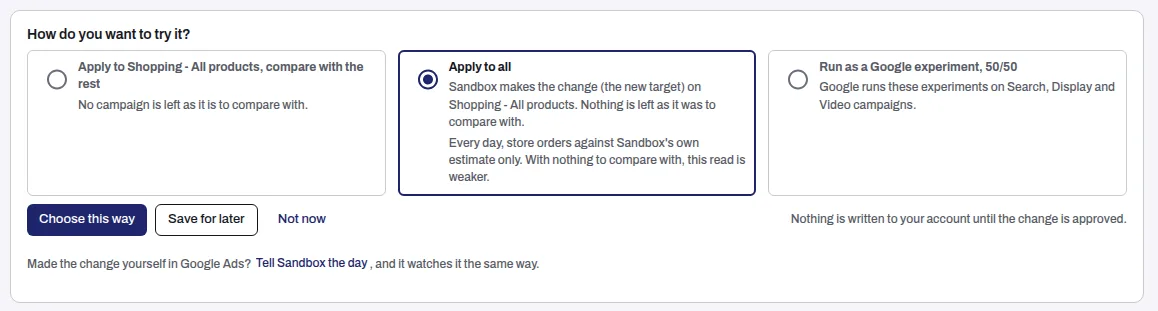
How do you want to try it?
The last card offers up to four ways. Each says what it changes and what Sandbox measures. The way Sandbox proposes is picked when the page opens; pick another to change it.
| Way | What changes | What Sandbox reads |
|---|---|---|
| Apply to {campaign}, compare with {campaigns} | Sandbox makes the change on the named campaign only. The campaigns it compares with stay as they are. | Every day, the metric on the changed campaign against the ones left as they are, over the same days. Sandbox proposes this way where it is offered. |
| Apply to all | Sandbox makes the change on every campaign it covers. Nothing is left as it was to compare with. | Every day, the metric against Sandbox's own estimate only. With nothing to compare with, this read is weaker. |
| Run as a Google experiment, 50/50 | Google makes a trial copy of the campaign with the change and splits its traffic 50/50 with the original, which stays as it is. | Google's own experiment statistics, shown as Google's. |
| Made the change yourself in Google Ads? | Nothing is changed from here. You make the change in Google Ads and tell Sandbox the day. | From that day, the same daily read: against the campaigns left as they are, or against Sandbox's own estimate where there are none. |
Choose a way
- Pick the way.
- Press Choose this way, or Choose the Google experiment for the experiment.
- The confirmation names the way, what it changes and how to undo it, and says "Nothing is written to your account until the change is approved." Confirm with the same button.
Sandbox saves the run with that way: "Saved with this way. The change is made once it is approved." A run keeps the first way you choose.
Made the change yourself
Under the ways, one line reads "Made the change yourself in Google Ads? Tell Sandbox the day, and it watches it the same way."
- Press Tell Sandbox the day.
- When did you make the change? lists the steps: open the campaign in Google Ads, make the change, leave the campaigns Sandbox compares with as they are (where there are any), and tell Sandbox the day.
- Pick the Day of the change, today or earlier, and press Watch it.
Sandbox reads from that day: "Sandbox watches it from that day."
When a way is not offered
A way Sandbox cannot run on this card keeps its name, cannot be picked, and says why:
| The way says | What to do |
|---|---|
| "No campaign is left as it is to compare with." | Use Apply to all, or make the change yourself. |
| "This recommendation names no campaign to change." | The card is about the account, not one campaign. |
| "This change is made in the ad platform itself." | Make the change in Google Ads, then tell Sandbox the day. |
| "Tapper has read-only access to this ad account.", "This ad account is disconnected.", "One-click fixes are turned off for this ad account." or "Tapper has not confirmed access to change this ad account." | The ad account cannot take a fix from Tapper. See A fix was refused or cannot be reverted, or make the change yourself. |
| "Google runs these experiments on Search, Display and Video campaigns." | The campaign's type has no Google experiment. Use another way. |
| "Google takes a Performance Max experiment only where it accepts a campaign mix on the account." | Use another way. |
Who can choose
Choosing a way is for a workspace Owner, Admin or Manager. Anyone else reads "Choosing a way is for a workspace manager, admin or owner." in place of the button, and the made-it-yourself line is not shown. What each role can do: Roles: what owners, admins, managers and viewers can do.
The Sandbox page
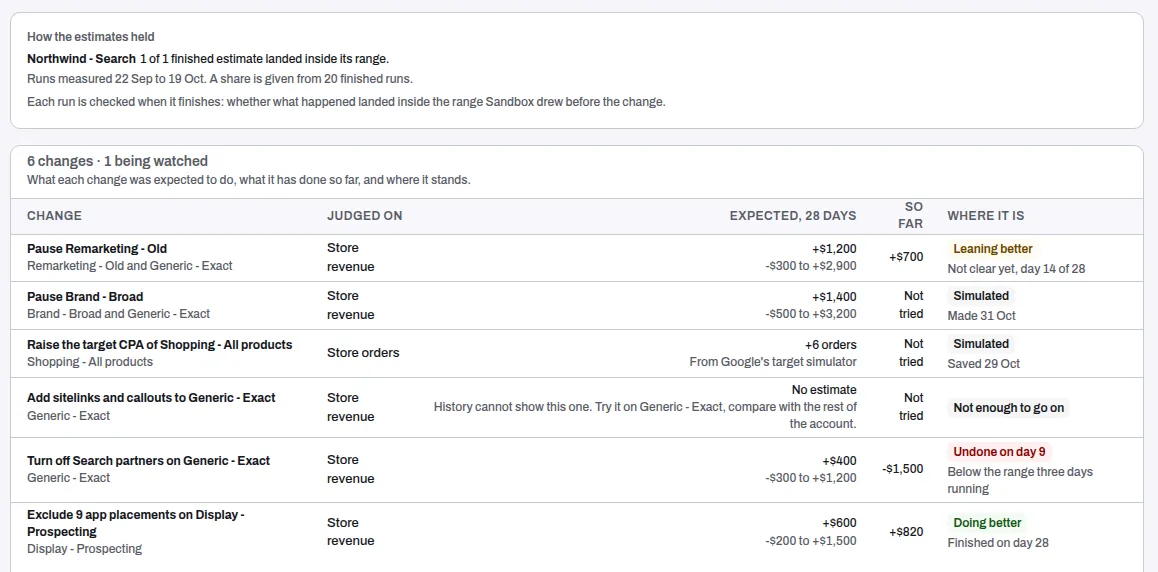
Sandbox lists every change tried or saved. Its title counts them, for example "5 changes · 1 being watched". Press a row to open its run. With more than 25 runs, the table has pages.
| Column | What it shows |
|---|---|
| Change | The change, with the campaigns it touches under it and, for a twin or campaigns you chose, what it is compared with. |
| Judged on | The metric, such as Conversion value. |
| Expected, 28 days | The likely change with its range under it, the range alone, or No estimate with the reason. "From Google's {simulator}" when the figure is Google's. |
| So far | What the change has added since it was made, or "Not tried". |
| Where it is | Where the run stands, below. |
Where it is reads:
- Simulated, with "Made {day}" or "Saved {day}": the change has not been made in the account.
- Not enough to go on: Sandbox has no estimate for this change.
- A verdict, with "Not clear yet, day {N} of 28" or "Day {N} of 28": Sandbox is watching the change. See Verdicts.
- A verdict, with "Finished on day {N}": the read is over.
- Undone on day {N}, with why: the change was undone.
With nothing tried, the page says No changes tried and "Open a recommendation and choose Try in Sandbox to see what it would do before you make it.", with Open recommendations.
How the estimates held
Once a run has finished, How the estimates held sits above the table: for each ad account, how many finished estimates landed inside their range, for example "4 of 5 finished estimates landed inside their range", and the days those runs were measured over. "Each run is checked when it finishes: whether what happened landed inside the range Sandbox drew before the change."
- Only finished runs count. A run never made, still being watched, or undone is left out.
- A share needs 20 finished runs. From 20, the line adds the share inside the range, such as "{N}% inside the range". Until then it says "A share is given from 20 finished runs."
- Each ad account stands alone. Nothing is added across accounts, and no money is shown. An account whose finished runs are in more than one currency says so, and none of them is counted.
Once the change is made: the watch page
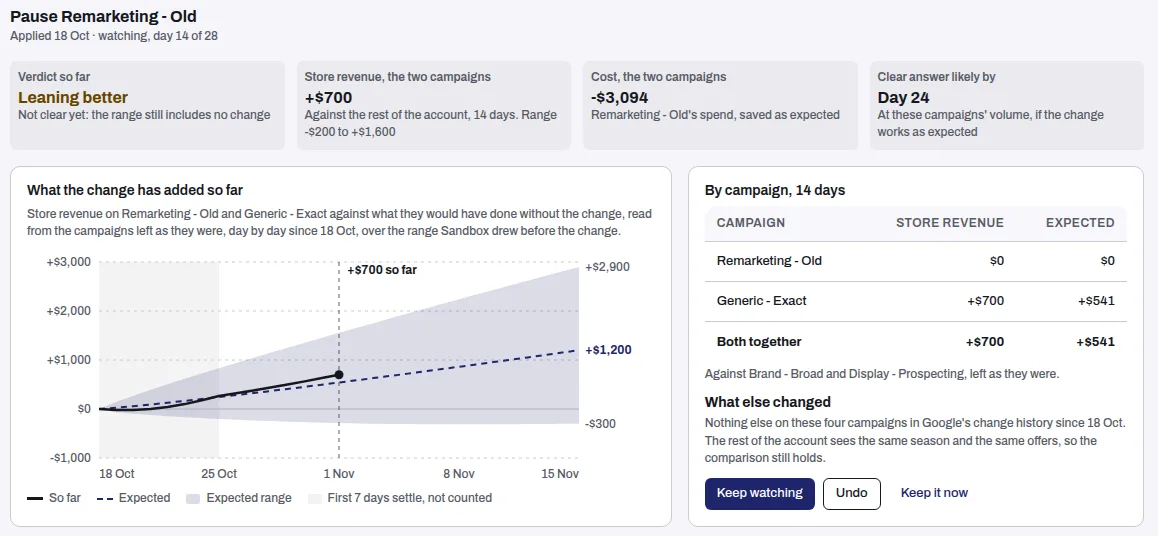
Once the change is made, its run opens on the watch page. The line under the change reads "Applied {day} · watching, day {N} of 28", then "finished on day {N}" or "undone on day {N}".
Four tiles sit at the top:
| Tile | What it shows |
|---|---|
| Verdict so far | The verdict, and the line under it. It reads Verdict once the run has ended. |
| {Metric}, {the campaigns} | What the change has added so far, against what it is compared with, with its range. |
| Cost, {the campaigns} | How the cost has moved so far. |
| Clear answer likely by | The day a clear answer is likely at these campaigns' volume, if the change works as expected, or Not in reach when none is in reach by day 28. |
What the change has added so far draws the change day by day since it was made, as a solid line (So far), over the line and band Sandbox drew before the change (Expected and Expected range). The first 7 days are marked: they settle and are not counted.
By campaign, {N} days lists each campaign with what it has added and what the estimate expected by now, then Both together or All together. The line under the table names what the campaigns are compared with.
What else changed lists any other change on these campaigns in Google's change history since the change was made, with its day, campaign, what changed and who: You, in Google Ads, Tapper or Google. With none, it says "Nothing else on these {N} campaigns in Google's change history since {day}." When one did, it says "Another change landed on these campaigns since {day}, so this read is muddied."
Verdicts
Sandbox does not call a result while the range still includes no change. Until it can, the line under the verdict reads "Not clear yet: the range still includes no change". In the first 7 days it reads "The first 7 days settle and are not counted. Day {N} of 28."
| Verdict | What it means |
|---|---|
| Doing better | The range sits wholly above no change. |
| Leaning better | It points to better, but the range still includes no change. |
| No clear change | It points neither way, and the range includes no change. |
| Leaning worse | It points to worse, but the range still includes no change. |
| Doing worse | The range sits wholly below no change. |
| Stopped | The campaigns spent nothing three days running, so there is nothing to read. |
| Undone | The change was undone. |
Keep watching, Undo, Keep it now
While Sandbox watches a change, three buttons sit under What else changed:
- Keep watching: "Sandbox keeps watching. You get an alert if it falls below the range."
- Undo asks Undo this change?: "Tapper puts back the setting that was there before, in Google Ads, and Sandbox stops watching." Confirm with Undo.
- Keep it now asks Keep the change now?: "The change stays as it is and Sandbox stops watching. The figures so far stay on the Sandbox page." Confirm with Keep it.
When the change falls below the low end of its range three days running, you get one alert with Open the change. It is an early warning, not the final result, and nothing is changed back: to put the old setting back, open the change and press Undo.
When Tapper makes the change from a Sandbox run, it is a fix like any other. The Activity tab lists it, and reverting it there also undoes the run. See Automatic fixes and the Activity tab.
If something goes wrong
- No Try in Sandbox on a card. It shows on open Google Ads cards, to Owners, Admins and Managers. A card that is no longer open, or a card from another ad platform, has none.
- "Sandbox could not open this one." The run could not be made. Try again from the card; if it keeps failing, contact Tapper support.
- "This Sandbox run could not be opened". Press Open the Sandbox page: every run is listed there.
- "The ways to try it could not be read. Reload the page to try again." Save for later still works.
- "The Sandbox runs could not be read. Reload the page to try again." Reload the page.
- A way cannot be picked. Its reason is on the way: see When a way is not offered.
Related
Was this helpful?
Related articles
Still need help?
Chat with our team and mention this article.