

The Competitors tab and your brand terms
On this page
The Competitors tab shows who else is advertising on Google in Europe: the competitors you named, and any advertiser that uses your brand name in its own. It reads Google's Ads Transparency Center once a week, so it costs you nothing to open and asks you to upload nothing. Two short lists in Business details decide what it looks for: your competitor names and your brand terms.
When the tab shows
Competitors sits in the Lift section of the sidebar for a workspace that advertises in a European Economic Area country. Google's Ads Transparency Center covers those markets, so for a workspace that does not advertise there the competitor figures do not appear. A workspace with affiliate figures still sees the tab, with its Affiliates section.
- The tab counts ads running, never spend or impressions. Google does not publish those.
- Google's figures arrive with a weekly read, every Monday, and a competitor name you save is usually looked for soon after you save it. The line under the title says which day it was read and for how many countries; its ? names them.
- The white-label partner app has no Competitors tab.
What the tab shows
| Part | What it tells you |
|---|---|
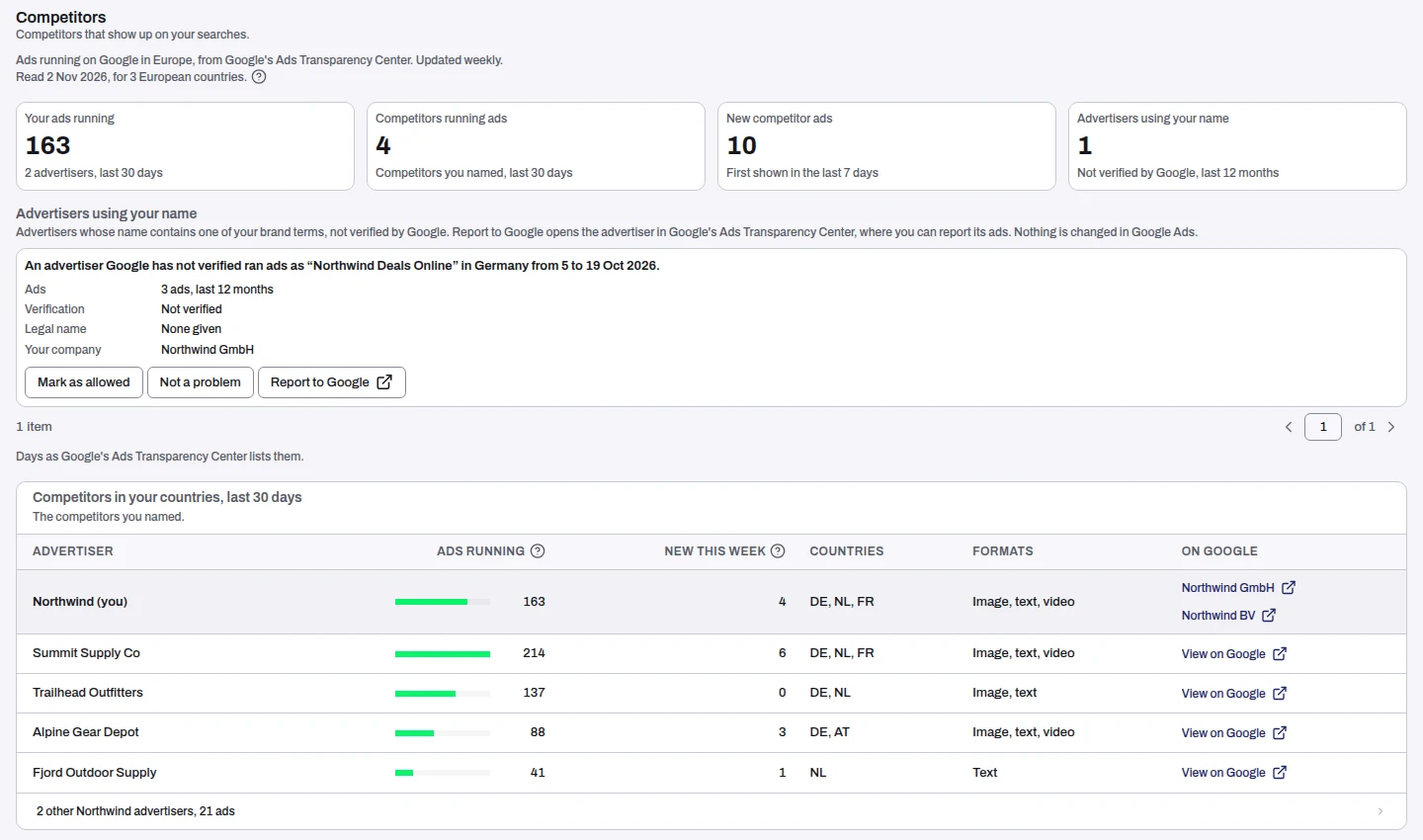
| Your ads running | Ads Google showed for your own advertisers in the last 30 days, with how many advertisers they run under. |
| Competitors running ads | How many of the competitors you named ran ads in your countries in the last 30 days. |
| New competitor ads | Competitor ads first shown in the last 7 days. |
| Advertisers using your name | Advertisers whose name contains one of your brand terms and that Google has not verified, over the last 12 months. |
A figure with nothing to say is left out, and when nobody else is advertising on your name the tab says so: "No one else is advertising on your name in these countries."
Advertisers using your name
Each advertiser is a card with what Lift found: how many ads, whether Google verified it, its legal name, and your own company's name on Google to compare. The card says in one sentence where and when it ran its ads.
- Report to Google opens the advertiser's page in Google's Ads Transparency Center, in a new tab.
- Mark as allowed is for an advertiser you accept, such as a reseller. You confirm it, and it applies to your whole workspace.
- Not a problem takes the card off the list at once, for the whole workspace.
Owners, Admins and Managers see Mark as allowed and Not a problem. Everyone who can open the tab sees the cards.
Competitors in your countries
One row per competitor you named: Ads running with a bar, New this week, Countries, Formats and a link On Google to its advertiser page. Your own row comes first, highlighted, so you can read yourself against them. A competitor with several advertisers on Google shows each one, named and linked.
Under the table, one row counts your brand's other advertisers in other markets, such as a sister company in another country. Press it to open the list.
Keep your competitor list
The table lists the competitors you named. You keep that list in Setup > Business details > Names > Competitor names. The tab links there when the list is empty: "Add competitor names in Business details".
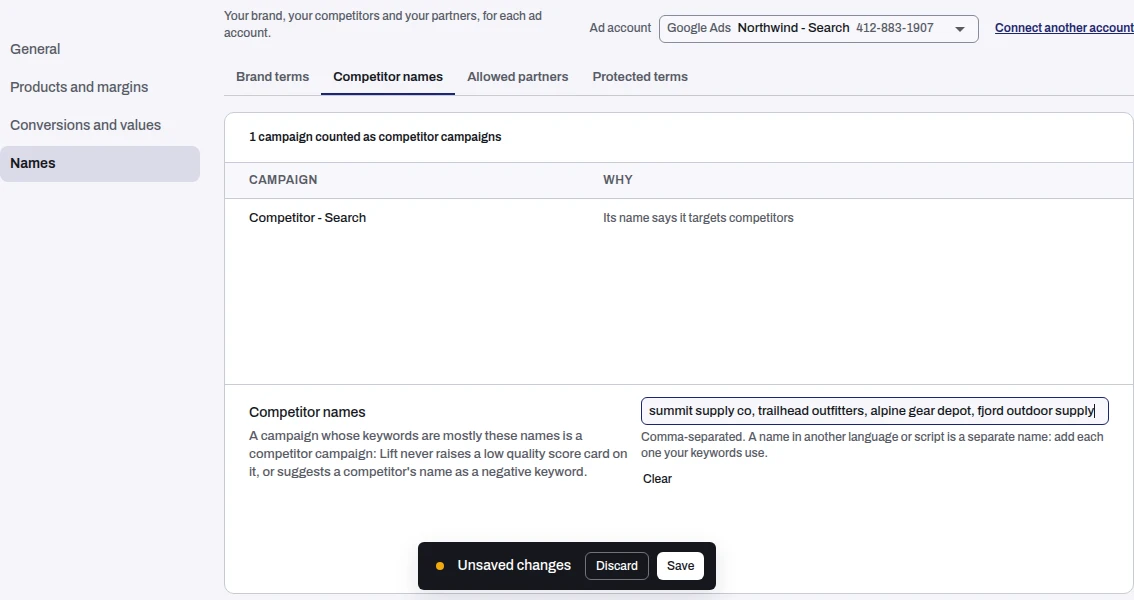
- Open Setup > Business details and choose Names.
- Pick the Ad account at the top, then the Competitor names tab.
- Type the names in the Competitor names field, separated by commas.
- Press Save in the bar that appears at the bottom. Clear empties the list.
Owners, Admins and Managers can change the list. A Viewer can read it.
- One list for the business. All your ad accounts read the same list while they hold the same names. A business that runs separate brands keeps a list for each brand, so pick the ad account of the brand you are editing.
- Every name your keywords use. A name in another language or script is a separate name: add each one.
- A new name is looked for when you save it. Lift usually looks soon after you save, and at the latest in the next weekly read. Until Lift has looked, the tab says the name is still to be looked for rather than showing an empty list.
- It also shapes your cards. A campaign whose keywords are mostly these names counts as a competitor campaign, and Lift never raises a low quality score card on it or suggests a competitor's name as a negative keyword. The list on the page shows each campaign counted and why.
Brand terms in every spelling searchers use
Your brand terms are how Lift knows which advertisers carry your name, and which of your own campaigns are brand campaigns. They live in the same place: Business details > Names > Brand terms.
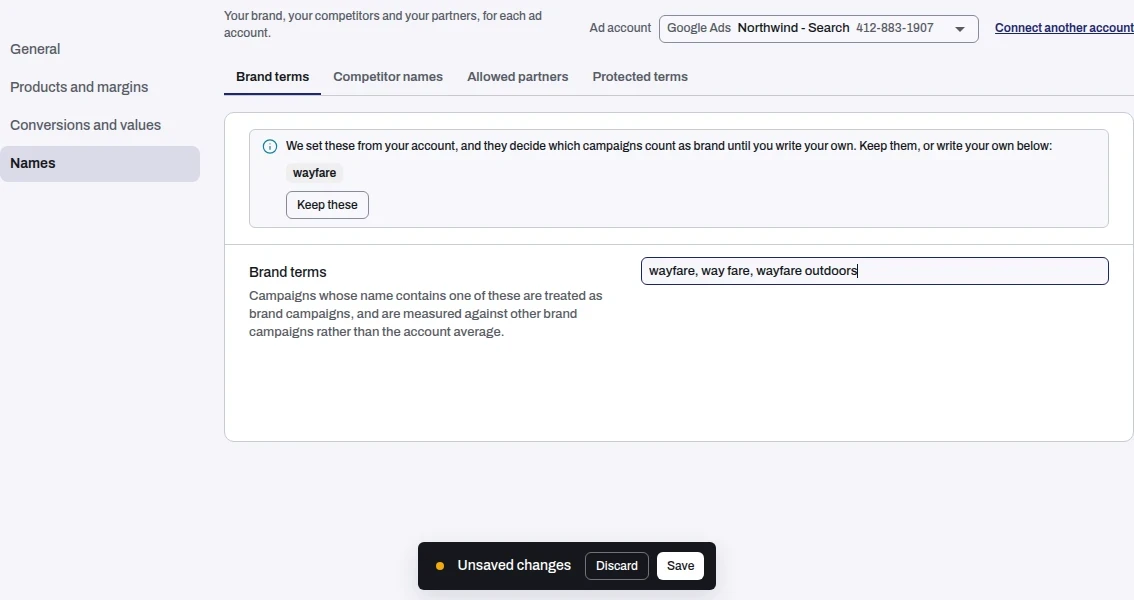
Searchers do not all type your name the same way. Write one term for each spelling in use, separated by commas: the name itself, the spaced or run-together form, a short form, and the name in another language or script.
- On the Competitors tab, an advertiser carries a term when its name holds the term as whole words, ignoring capitals. A name that holds "wayfare" as a word is found; one that merely contains it inside another word is not.
- In your campaigns, a campaign whose name contains one of the terms, ignoring capitals, counts as a brand campaign and is measured against your other brand campaigns. "wayfare" matches "Wayfarer Search" but not "Way Fare Search".
- Lift starts you off. With no terms of your own, Lift sets one from your account, shown with Keep these. Press it to keep them, or write your own. Your own terms replace them. Clear goes back to the ones Lift set.
- A word in every campaign name. A term that matches almost every campaign would put the whole account in the brand group. Lift says so when it cannot use a term for that reason, and reads your keywords instead where it can.
- A new term is looked for from the next weekly read on the Competitors tab, and your cards update at the next daily check.
Owners, Admins and Managers can change the terms. A Viewer can read them.
Frequently asked questions
Why is a competitor I named not in the table?
The table lists the competitors you named that ran ads in your countries in the last 30 days. When none did, it says "None of your competitors ran ads in your countries in the last 30 days." When Tapper has found no Google advertiser for a name, it says "No competitor advertisers matched." A name you just added is usually looked for soon after you save it, and at the latest in the next weekly read.
Why does an advertiser I know is mine show under "Advertisers using your name"?
It carries one of your brand terms and Google has not verified it. If it is yours or a partner you accept, press Mark as allowed. If it is harmless, press Not a problem.
Does the tab show spend?
No. Google's Ads Transparency Center lists ads, not what was spent on them, so the tab counts ads and never invents a spend.
Can I use the tab for affiliates?
The same page holds an Affiliates section for Owners, Admins and Managers when your store has affiliate orders. How to act on it: Report affiliates who buy Google ads on your brand.
Related
Was this helpful?
Still need help?
Chat with our team and mention this article.