

How Tapper decides a click is invalid
On this page
Tapper runs each ad click through the checks of the rule set that covers it, together with what it knows about the visitor's IP address. Every check you can change is a setting of a rule set (Setup > Rule sets).
The evidence
- What happened on your site. The monitoring script records whether JavaScript ran, whether the page loaded, how long the visitor stayed and how they behaved.
- Who clicked. How often the same IP clicked your ads in a time window, the device behind the click, the IP's country and its network (a data center, a VPN, a proxy or Tor, for example).
The rule set that covers the click (the Default set, or a custom set linked to that platform, ad account or campaign) holds your settings. When a check fires, the visitor gets a block reason, and Tapper excludes it unless the rule set is in Monitor-only. A visitor can carry more than one reason.
Click limits tab
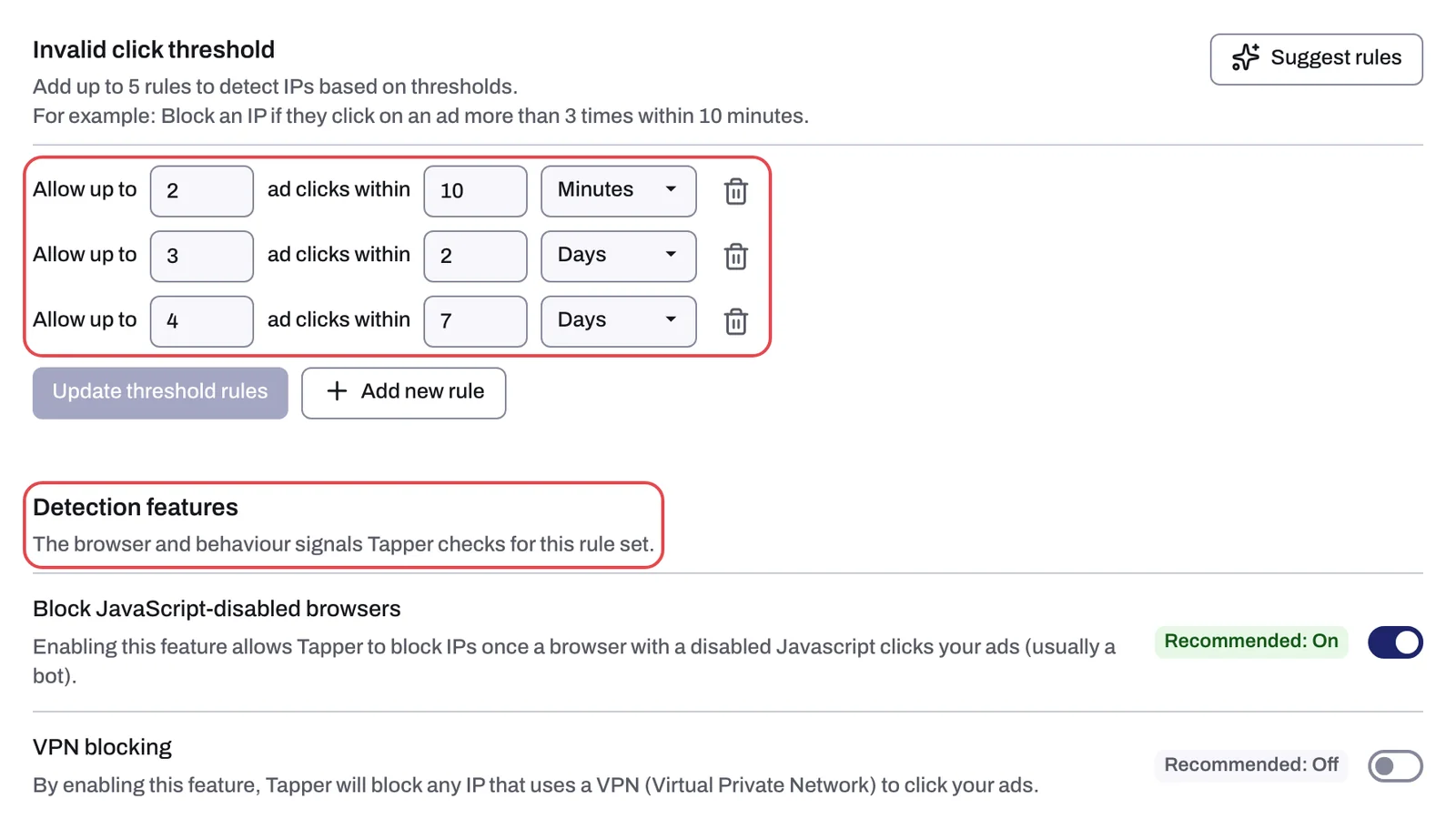
- Ad click limits. Each row reads "Block after [N] clicks within [M]" and a unit: Seconds, Minutes, Hours or Days. A rule set with no rows uses Tapper's own default limits. Suggest limits adds your industry's presets. Reason: Ad click limit exceeded. A genuine buyer may click several times before converting, so tune the rows to how your customers buy. See Set invalid click thresholds.
- Aborted ad click. A flag for an IP whose recent Google Ads clicks mostly registered but never loaded your page, with no events recorded. The check is the same for every account and has no setting of its own: the Aborted ad clicks list on this tab does not decide it. Reason: Aborted ad click. See Aborted ad clicks.
Detection features and Countries tabs
| Setting | What it checks | Chip | New rule set | Reason it leaves |
|---|---|---|---|---|
| Block JavaScript-disabled browsers | A browser with JavaScript disabled clicked your ad (usually a bot) | Recommended: On | On | JavaScript disabled |
| Block VPN traffic | The IP belongs to a VPN | Recommended: Off | Off | VPN |
| Block by country (Countries tab) | The IP's country is on your block list, or missing from your allow list | none | Off | Location mismatch |
| Block suspicious click behavior | The visit's movement, scrolling and click timing match bots and click farms, not real visitors | Recommended: On | On | Suspicious click behavior |
| Suspicious ad clicks | The IP clicked [N] times without any events on the page | none | 3 | Suspicious ad click |
| Minimum seconds on site | The IP spent less than [N] seconds on your site | none | 2 | Instant bounce |
See Detection features: what each switch does, Block or allow clicks by country and Suspicious ad clicks and minimum seconds on site.
Two more switches on the Detection features tab reach beyond a single click:
- Block repeat clicks from one device (on for a new rule set): "Detects IPs used by the same device ID to click your ads repeatedly." A clicker who changes IP is still matched to the same device. See Device blocking.
- Block across ad platforms (off for a new rule set): a block from another platform carries the reason Blocked on another platform. See Cross-platform blocking.
Two settings do not change what counts as invalid: Block tracking pixels for invalid traffic, the last row of the tab, controls when tracking pixels may fire, and Monitor-only, on its own tab, decides whether a detection is enforced.
Checks with no switch
These come from Tapper's own analysis, so you cannot turn them off one by one:
- IP intelligence: network data leads to reasons such as Data center, Proxy, Tor, Known attacker, Known abuser, Known threat and Suspicious network.
- Device and browser signals: automation and spoofing show up as Bot, Fake user agent, Suspicious screen resolution and Tampered device.
Block reasons explained: what each label means lists every label and what produces it.
Related
Was this helpful?
Still need help?
Chat with our team and mention this article.