

Fix campaigns, ad groups or ads that override Tapper's tracking
The dashboard banner Some ads skip Tapper's tracking, with Fix tracking, means clicks on some campaigns, ad groups or ads never reach Tapper until you fix them.

Why it happens
With Block, Tapper sets its tracking template at account level. Google uses the most specific template: ad over ad group, ad group over campaign, campaign over account. So a template on a campaign, ad group or ad replaces Tapper's. Common sources:
- A leftover from a tool you no longer use.
- A UTM template such as
{lpurl}?utm_source=google&utm_campaign={campaignid}. - A template managed by Search Ads 360.
Tapper finds overrides in the campaign sync (every 6 hours, or Refresh on the Google Ads page of Setup > Ad accounts), so a brand-new template may not be listed yet. Templates that already point to protect.tapper.ai are not listed.
Fix it
You need to be an Owner or Admin.
- Click Fix tracking on the banner. Fix ad-level tracking opens.
- Expand an account to see the items with their own template. Hover a row's warning icon to see it.
- Click a row's wrench button to fix one item, or Fix all.
- Rows Tapper can't rewrite safely stay listed with the reason. If a row offers a Corrected template (ready to paste), paste it yourself: in Search Ads 360 if it manages the account, otherwise in the item's URL options in Google Ads. If not, the dialog suggests adding Tapper's click hop by hand; support@tapper.ai can give you the exact string.
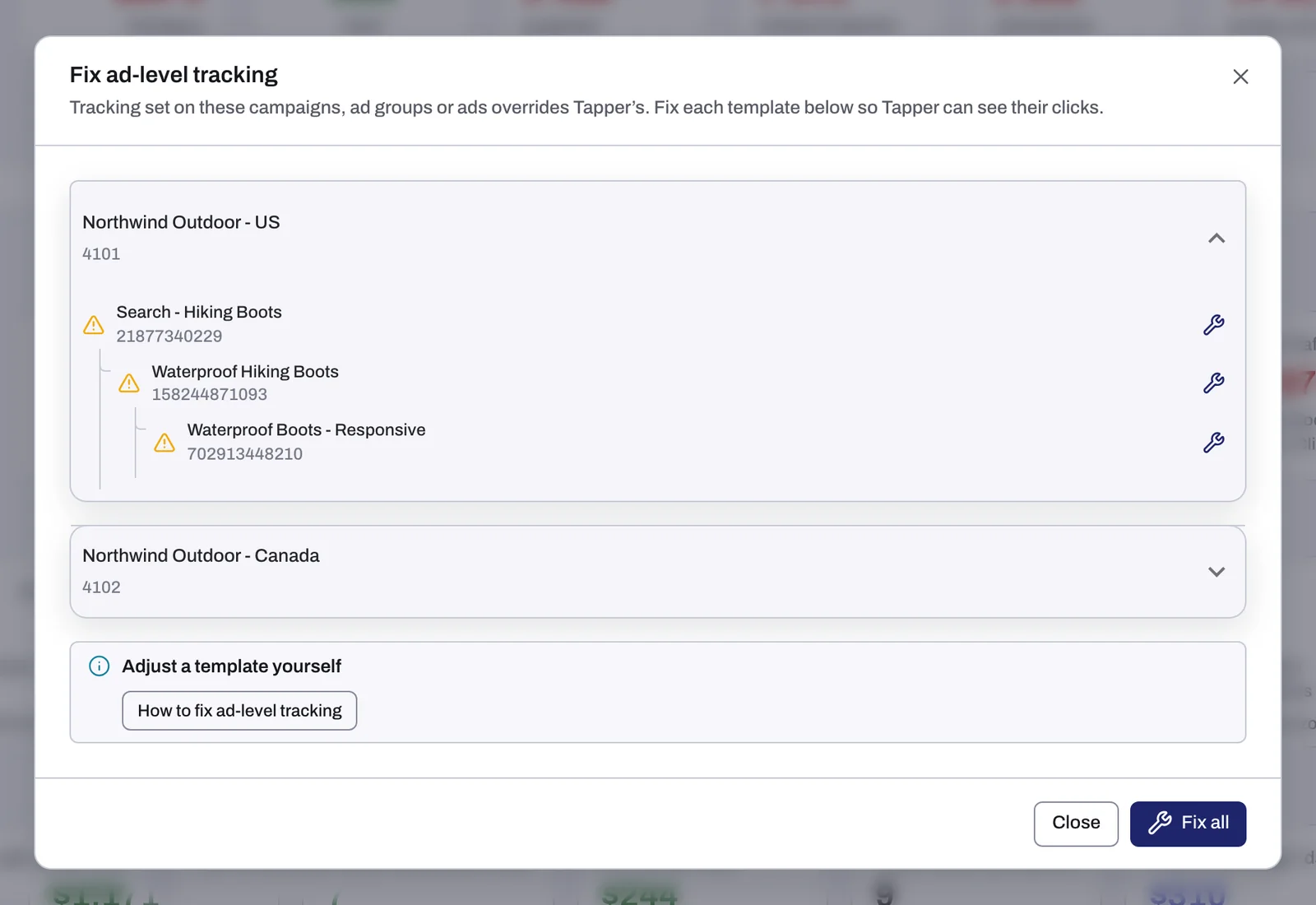
What a fix changes in Google Ads
- A template that starts with
{lpurl}?only adds parameters: Tapper moves them into the item's Final URL suffix, keeping what is there, and clears the template. Your UTM tags still reach your page. - Any other template: Tapper wraps it in its own, so the click passes through Tapper and then your template.
Accounts managed in Search Ads 360
Search Ads 360 rewrites its templates on every sync, so a Google Ads edit does not last. The dialog says: "Paste in SA360 (Settings → tracking template) - pasting in Google Ads will be reverted by SA360's next sync." Paste there.
Leftover templates you no longer need
- In Google Ads, open the campaign, then Settings > Additional settings > Campaign URL options (or the ad group's or ad's URL options).
- Empty Tracking template and click Save. Tapper's account-level template applies again.
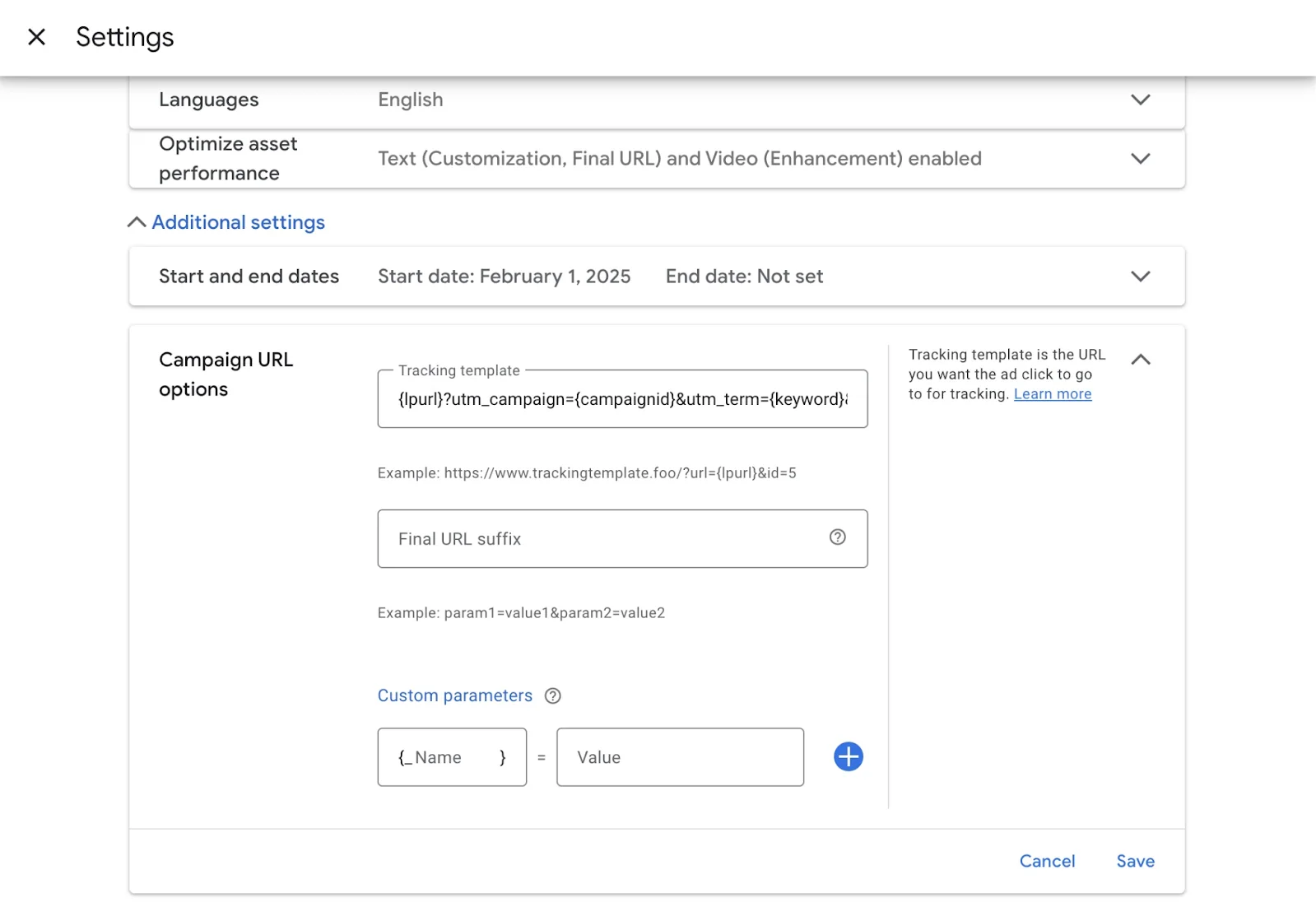
Changing a template by hand
The dialog's Adjust a template yourself notice has How to fix ad-level tracking, which opens Tapper's guide on docs.tapper.ai. In an item's URL options in Google Ads:
- For a template starting with
{lpurl}?, add everything after the?to Final URL suffix, empty Tracking template and save (what a fix does). - Otherwise, paste Tapper's template (copy it from the Tracking template tab of the Google Ads page of Setup > Ad accounts) into Tracking template. This replaces the item's own template; to keep it, use a fix, which wraps it.
Tapper has no Final URL suffix setting of its own. Never add parameters after redirection_url={lpurl}: they belong to Tapper's address, not your landing page. Stuck? Write to support@tapper.ai.
Microsoft Ads
The Microsoft Ads page of Setup > Ad accounts shows Some Microsoft Ads clicks skip Tapper's tracking with Fix tracking. Fix Microsoft Ads tracking templates has a fix button per row, Close and Fix all, and rewrites the template in Microsoft Ads. See Connect Microsoft Ads.
If it still happens
- The banner stays after a fix in Google Ads. Press Refresh on the Campaigns tab of the Google Ads page, or wait for the next sync.
- The same rows come back. Another tool, such as Search Ads 360, rewrites the template. Change it there.
- Still stuck? Write to support@tapper.ai with the customer ID as Google Ads shows it and the campaign names.
Related
Was this helpful?
Still need help?
Chat with our team and mention this article.